 Today's Deal
Amazon Deals
Today's Deal
Amazon Deals
 Today's Deal
Amazon Deals
Today's Deal
Amazon Deals
 popular
 5
5
Views Today
 1
1
Favorites Today






Business Name: CREALITY 3D HK TECHNOLOGY LIMITED

Business Address: Unit 1307, Beverley Commercial Centre, 87-105 Chatham Road S, Hong Kong, 999077, HK

Business Size: Small
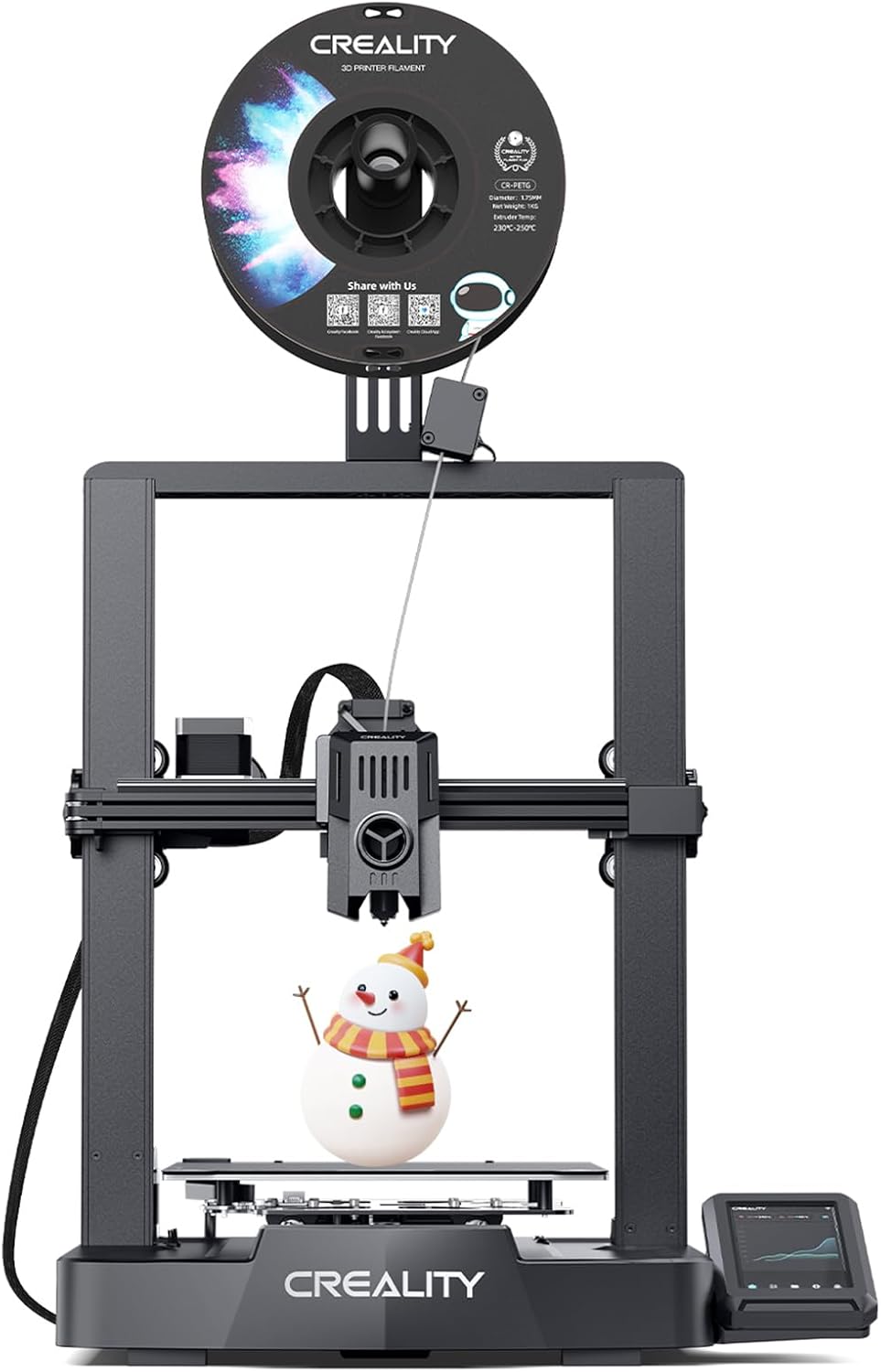
The Creality Ender 3 V3 KE 3D Printer is a top-notch high-speed 3D printer equipped with advanced features that elevate your 3D printing experience. With its auto-leveling capabilities, innovative dual cooling system, and user-friendly interface, it stands out in the realm of affordable 3D printers. This machine supports printing sizes up to 8.66x8.66x9.44 inches and offers a maximum printing temperature of 300℃, making it versatile for various types of filament. For a price point of $237.99, it promises remarkable value and performance.
The Creality Ender 3 V3 KE 3D Printer brings a multitude of benefits to its users. Firstly, its speed is unmatched, allowing you to complete projects in a fraction of the time compared to other printers. Users have praised its ability to produce clean, high-quality prints swiftly and quietly. With an auto-leveling feature, the setup becomes hassle-free, saving you valuable time and effort. Its dual cooling system ensures optimal temperature regulation, preventing warping and enhancing the finish quality. The printer's smart UI and wireless connectivity through Creality Cloud gives you the flexibility to manage tasks remotely, an excellent feature for continuous, 24/7 operation.
Absolutely. Priced at $237.99, the Creality Ender 3 V3 KE offers high-end features commonly found in more expensive models, making it one of the best options for those seeking affordability without compromising quality. The printer’s efficient performance translates to savings in time and material costs, especially for high-volume printing. Additionally, its durable build minimizes the need for frequent replacements or repairs, ensuring long-term value for your investment.
Choosing the Creality Ender 3 V3 KE 3D Printer means opting for a reliable, high-performance machine that adapts to your needs, whether you're a beginner or an advanced user. The printer’s robust community and extensive support network make it easier to find solutions and improve your 3D printing skills over time. Users appreciate its ease of setup and operation, coupled with its reliable print quality and efficiency. Furthermore, Creality's integration with their cloud service allows for seamless updates and remote control, giving you added convenience and control over your projects.
The Creality Ender 3 V3 KE 3D Printer is distinguished by several unique features. It offers dual Z-axis which ensures better stability and precision during printing. Its innovative dual cooling system not only maintains consistent print temperatures but also optimally cools the print area to reduce errors. The auto-leveling technology eliminates the tricky manual leveling process, ensuring accurate prints every time. Moreover, the textured bed improves material adhesion, lowering the chances of print failures, which is a common issue in other models.
The Creality Ender 3 V3 KE 3D Printer operates by following pre-programmed design files to extrude filament layer by layer, building up the final object. It employs an auto-leveling sensor to detect the surface height of the printing bed, ensuring a uniform starting point for every print. The dual cooling fans help maintain an optimal temperature, reducing the chances of overheating and ensuring smooth layering. Thanks to its dual Z-axis, the print head moves with increased stability and precision, yielding a finely detailed result.
This versatile 3D printer is suitable for a diverse range of projects, from creating intricate miniatures and prototypes to printing functional mechanical parts. It excels in producing high-quality prints in both PLA and PETG filaments, making it ideal for complex designs and larger projects such as hydroponic towers or mechanical assemblies. Whether you are an engineer looking to produce precise parts or a hobbyist creating custom items, the Creality Ender 3 V3 KE supports your creative endeavors effectively.
The Creality Ender 3 V3 KE can be used continuously thanks to its robust design and efficient cooling system. Many users run it for long hours without any issues, making it perfect for both short-term projects and large, time-intensive prints. The minimal maintenance requirements and automatic leveling feature mean that it is always ready to go when you need it, whether you’re working on a quick prototype or a long-running detailed project.
The Creality Ender 3 V3 KE 3D Printer is available through various online retailers, including Amazon, Creality's official website, and other popular electronics and 3D printing supply stores. Purchasing from reputable sellers ensures you get genuine products, alongside warranty options and reliable customer support. Checking user reviews and ratings on these platforms can also help you make an informed purchasing decision.
Currently, the Creality Ender 3 V3 KE 3D Printer is priced at $237.99. Considering its advanced features, this price point offers great value for both beginners and seasoned 3D printing enthusiasts. Additional accessories or replacement parts might slightly increase the overall cost, but the printer itself stands as a highly cost-effective option in the market.
The Creality Ender 3 V3 KE 3D Printer is designed for continuous, high-volume printing. With regular maintenance and proper handling, you can produce countless prints without significant drops in quality. Reviews suggest that even with near-constant use, the printer holds up well, delivering consistent, high-quality outputs for various project sizes and materials.
For optimal performance, the best filaments to use with the Creality Ender 3 V3 KE are PLA and PETG. PLA is excellent for general-purpose printing with a good balance of strength and ease of use, whereas PETG offers higher durability and is better suited for functional parts. The printer’s capability to reach a high temperature of 300℃ expands its usability to more advanced materials as well, providing flexibility for different project requirements.
When compared to other models in its price range, the Creality Ender 3 V3 KE stands out due to its high-speed printing, dual Z-axis, and innovative dual cooling system. While many other printers require manual leveling and frequent adjustments, the auto-leveling feature of the Ender 3 V3 KE saves time and reduces setup complexity. Additionally, its wireless connectivity and user-friendly interface provide a smoother and more versatile user experience compared to similarly priced alternatives.
A: Assembly can take about an hour or less, with some users reporting even faster setup times.
A: Relative to other models, it operates quietly, making it suitable for home and office environments.
A: Yes, it features wireless capabilities through Creality Cloud.
A: The printer supports high resolutions, producing clean and detailed prints.
A: While it supports temperatures up to 300℃, users commonly use PLA and PETG for best results.
The Creality Ender 3 V3 KE 3D Printer offers exceptional value for its price, making it a strong candidate for both beginners and seasoned 3D printing users. Its high-speed printing, automatically leveling feature, and reliability in producing quality prints earn high marks from users. By addressing potential setup quirks and ongoing support challenges, Creality ensures that you have capable resources to back your investment. Considering its advanced features and affordability, the Creality Ender 3 V3 KE is definitely worth considering for anyone looking to venture into or upgrade their 3D printing setup.
Investing in the Creality Ender 3 V3 KE is a smart decision for those seeking a dependable and efficient 3D printer. With its competitive pricing and impressive range of features, it provides both quality and versatility. Whether for personal use, learning, or professional applications, this printer is equipped to meet your needs and exceed your expectations.
Only In TestMarket
Average rating
 5
5
12
4
3
3
0
2
0
1
0


 Facebook
 Twitter
 Linkedin
 Reddit
 Pinterest




Emma Brooks
Oct 06, 2024
I am quite satisfied with the performance of the Ender 3 V3 KE. The printer assembled easily and started printing without much fuss. The speed is remarkable and ensures a clean, detailed output. I did encounter a few adhesion issues early on but those were manageable.
All in all, a great addition to my toolkit.
Shipping
Item Quality
Customer Service
Packaging
Henry Adams
Oct 04, 2024
Excellent value for an entry-level printer. The Ender 3 V3 KE has most features you’d want, including auto-leveling and dual cooling. Setup was intuitive except for a voltage switch. The print quality is quite good, especially considering the price.
Definitely worth considering for beginners.
Shipping
Item Quality
Customer Service
Packaging
William Green
Oct 03, 2024
The Creality Ender 3 V3 KE has been great for my small business needs. It runs almost non-stop and has decreased print times significantly. The wireless function and auto-leveling make it an efficient machine.
I had minor issues with filament retraction but following some online advice, it works perfectly.
Shipping
Item Quality
Customer Service
Packaging
David Jenkins
Oct 09, 2024
Ender 3 V3 KE offers excellent value for money. The setup was quick once I figured out the voltage switch. Prints are fast and detailed.
The Creality cloud feature adds a lot of convenience. However, making sure the bed is cleaned well before each print is essential to avoid issues.
Shipping
Item Quality
Customer Service
Packaging
David Jenkins
Oct 03, 2024
I’ve owned the Ender 3 V3 KE for a couple of months now. It quickly became a staple in my small workshop. The build quality is pretty great and the speed is good for the price. The auto-leveling feature ensures the bed is ready for each print.
Just make sure to closely follow the manual, especially the voltage setting.
Shipping
Item Quality
Customer Service
Packaging
Logan Lee
Oct 05, 2024
Purchased the Ender 3 V3 KE as my first 3D printer and overall, it's been a good experience. The setup took around an hour, and it’s been reliable for smaller prints. For larger projects, there were some adhesion issues which I managed to fix. The slicer software is easy to use.
Good for the price, but be prepared to tinker a bit.
Shipping
Item Quality
Customer Service
Packaging
David Jenkins
Oct 03, 2024
My experience with the Ender 3 V3 KE has been positive. It’s my go-to printer for various DIY projects. The speed is impressive, and the output quality is solid.
I appreciate how efficiently the auto-leveling feature works. I have had minor bed adhesion issues, but it’s manageable. A worthwhile investment.
Shipping
Item Quality
Customer Service
Packaging
Andrew Allen
Oct 07, 2024
I've used the Ender 3 V3 KE extensively and am mostly pleased. The setup was straightforward, and the automatic leveling is a lifesaver. I did face a small hiccup with voltage settings initially. The dual Z-axis helps in getting more stable prints.
The only downside could be its challenging support from Creality.
Shipping
Item Quality
Customer Service
Packaging
Logan Powell
Oct 08, 2024
Recommended
The Creality Ender 3 V3 KE is a gem within this price range. It’s a reliable and fast printer with auto-leveling that’s genuinely useful. I ran into a minor issue with the voltage switch, but this was quickly resolved. My prints come out clean and well-detailed.
A solid recommendation for anyone looking to start with 3D printing.
Shipping
Item Quality
Customer Service
Packaging
Mia Adams
Oct 05, 2024
After hours of research, I decided on the Creality Ender 3 V3 KE. The assembly took a bit more than the advertised one hour, but not much more. The auto-leveling is a huge time saver. The printer runs quietly and the dual cooling system is quite efficient.
Prints have been consistent and of good quality.
Shipping
Item Quality
Customer Service
Packaging
Elena Reed
Oct 04, 2024
Initially, I was quite happy with my first prints on the Ender 3 V3 KE, but after a few weeks, larger prints started having issues. The print head missed lines and adhesion failed, leading to messy prints. Support has been unhelpful.
The automatic spaghetti detection doesn’t work as advertised. I feel frustrated and out of options.
Shipping
Item Quality
Customer Service
Packaging
Chloe King
Oct 08, 2024
I’ve run this Creality Ender 3 V3 KE for nearly 24/7 over the past month, printing hydroponic towers effortlessly. The build quality is impressive and speed is outstanding. Wireless Creality cloud support is a bonus, making remote printing so much easier.
Just ensure you wipe the bed with 70% alcohol for good adhesion.
Shipping
Item Quality
Customer Service
Packaging
James Foster
Oct 06, 2024
The Ender 3 V3 KE is good but has a learning curve. I faced some issues with the voltage switch, but once sorted, it’s been smooth. The auto-leveling works great, and the print quality is impressive. However, I did run into some adhesion problems initially but nothing that couldn’t be resolved with some tweaks.
Overall, useful but requires some patience at the start.
Shipping
Item Quality
Customer Service
Packaging
Henry Adams
Oct 06, 2024
Recommended
This 3D printer has been fantastic for my hydroponic tower projects. I was able to print three towers, two in PLA and one in PETG, with exceptional speed. My older printer took 16 hours for a piece that this one handles in only 5.5 hours.
The assembly was quick, and I recommend using the Creality cloud for wireless controls. The prints have been flawless. A solid buy!
Shipping
Item Quality
Customer Service
Packaging
Grace Wright
Oct 04, 2024
The Creality Ender 3 V3 KE 3D Printer is truly a workhorse. After switching the voltage from 220V to 120V (be sure to check that before you start), the setup was easy, though the instructions didn’t mention this. It's quiet and the auto-leveling feature works wonderfully.
The prints come out clean and the adhesion is solid without needing extra glue. I’m very satisfied with its performance.
Shipping
Item Quality
Customer Service
Packaging