 Today's Deal
Amazon Deals
Today's Deal
Amazon Deals
 Today's Deal
Amazon Deals
Today's Deal
Amazon Deals
 popular
 3
3
Views Today
 1
1
Favorites Today






Business Name: CREALITY 3D HK TECHNOLOGY LIMITED

Business Address: Unit 1307, Beverley Commercial Centre, 87-105 Chatham Road S, Hong Kong, 999077, HK

Business Size: Small
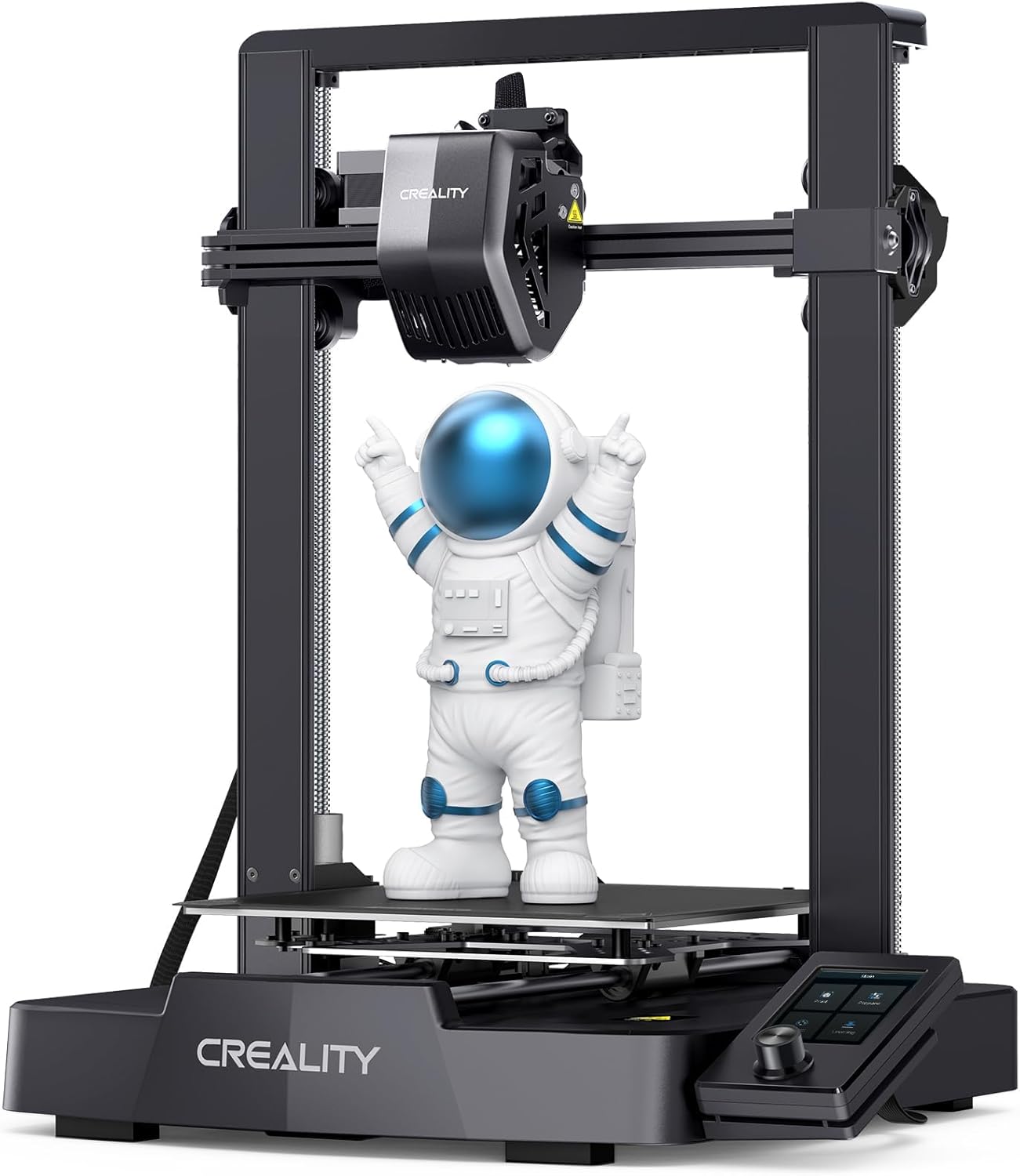
The Creality Ender 3 V3 SE 3D Printer is a device that has captured the interest of both newcomers and experienced hobbyists in the 3D printing community. Designed with innovative features like CR Touch auto leveling, Sprite Direct Extruder, and auto filament loading, this printer promises a faster printing speed of up to 250mm/s and professional-grade prints for a fraction of the price of higher-end models. But what truly sets the Creality Ender 3 V3 SE apart from its competitors? Let’s dive into the details.
The Creality Ender 3 V3 SE offers several benefits to its users. Firstly, its CR Touch Auto Leveling feature ensures that your prints start on a perfectly leveled bed, reducing the risk of print failures. The Sprite Direct Extruder provides consistent extrusion, allowing for clean and precise prints, even with complex models. Dual Z-Axis stabilizes the print head, improving the overall print quality. Additionally, automatic filament loading saves time and effort, making the printing process more straightforward.
Real buyer reviews highlight these benefits, emphasizing the print quality and ease of use. One user mentioned that, despite owning high-end printers, they were impressed with the output quality of the Creality Ender 3 V3 SE. Another user appreciated the robust online community support available for Creality printers, making troubleshooting and finding tips easier.
At a price of $175.20, the Creality Ender 3 V3 SE offers remarkable value for its cost. It’s tough to find another 3D printer that provides such a comprehensive list of features at this price point. Users often remark that the print quality and reliability are comparable to more expensive models, making it an excellent choice for those looking to get started in 3D printing without a significant investment.
One reviewer pointed out that the Creality Ender 3 V3 SE’s print quality is almost as good as their $3,000 MakerGear M2 printers. This sentiment is echoed by another satisfied buyer who, despite some initial setup challenges, found the printer’s performance well worth the effort and cost.
Why choose the Creality Ender 3 V3 SE over other models? Simply put, it offers features that are usually reserved for more expensive printers, such as auto leveling, dual Z-Axis stability, and smart filament loading. For beginners, it removes many of the barriers to entry, making 3D printing accessible and enjoyable. For more experienced users, it provides a reliable and versatile tool that can handle various projects with ease.
The Creality Ender 3 V3 SE is equipped with innovative features that enhance the overall user experience. Key features include the CR Touch auto-leveling sensor, Sprite Direct Extruder, dual Z-Axis for improved stability, and auto filament loading. These features work together to deliver high-quality prints, reduce print failures, and simplify the printing process.
Real buyers have noted that these features significantly enhance their printing experience. For example, the flexible magnetic bed makes removing prints hassle-free, while the ability to resume printing after a power failure prevents wasted time and filament.
Setting up the Creality Ender 3 V3 SE is relatively straightforward, even for those new to 3D printing. The printer arrives well-packaged, and assembly generally takes around 30 minutes to an hour. Users should pay close attention to the initial bed leveling process, as it may require multiple adjustments to get it perfectly flat.
Once assembled, the printer can be used with SD card compatibility to transfer GCODE files. It is advisable to watch a few tutorial videos for tips on setting up and using the printer effectively. Experienced users recommend bundling the wires neatly and making minor adjustments to ensure smooth operation.
The Creality Ender 3 V3 SE is compatible with a wide range of 3D printing materials, including PLA, ABS, PETG, and TPU. The direct extruder allows for better control over flexible filaments like TPU. However, users should be cautious when using materials that require higher temperatures and different bed adhesion techniques.
There isn’t necessarily a “best time†to purchase the Creality Ender 3 V3 SE, as it is already priced very competitively. However, keeping an eye out for periodic sales or discounts around major holidays and shopping events, like Black Friday or Cyber Monday, might offer the chance to save even more.
The Creality Ender 3 V3 SE can be purchased from various online retailers such as Amazon, eBay, and the official Creality website. It’s essential to buy from reputable sources to ensure you receive a genuine product and can access customer support if needed. Checking out user reviews and ratings can also help in choosing the best retailer.
Regular maintenance is vital to keep the Creality Ender 3 V3 SE running smoothly. This includes cleaning the build plate, regularly checking the belts and extruder, and occasionally re-calibrating the bed. Following the manufacturer’s guidelines for maintenance will help ensure longevity and consistent print quality.
There are numerous upgrades available for the Creality Ender 3 V3 SE, ranging from hardware improvements like better cooling fans and upgraded hotends to software tweaks for enhanced performance. The large community around Creality printers means that there’s no shortage of upgrade guides and kits available.
To get the most out of your Creality Ender 3 V3 SE, it’s recommended to follow best practices such as ensuring the bed is leveled before each print, regularly cleaning the build surface, and keeping the extruder and filament in good condition. Regular firmware updates can also help improve performance and fix bugs.
Reviews for the Creality Ender 3 V3 SE are generally positive, with many users highlighting its impressive print quality and ease of use. Some users have faced issues with auto-leveling and extrusion but often found solutions within the supportive community. Overall, the consensus is that this printer offers excellent value for its price.
**Q:** Is the Creality Ender 3 V3 SE suitable for beginners? **A:** Yes, it’s designed to be user-friendly for both beginners and experienced users. The auto-leveling feature and community support make it an excellent starter printer.
**Q:** What materials can I print with the Creality Ender 3 V3 SE? **A:** It supports PLA, ABS, PETG, and TPU, with the direct extruder providing better control over flexible filaments.
**Q:** How do I handle power failures during a print? **A:** The printer has a resume print function that allows it to continue where it left off after a power failure.
The Creality Ender 3 V3 SE offers an impressive array of features that rival those of more expensive models. With its budget-friendly price and positive reviews, it is an excellent option for anyone looking to start or advance their 3D printing journey. While it may require some initial setup and occasional adjustments, the benefits far outweigh these minor inconveniences.
Overall, the Creality Ender 3 V3 SE stands out as a reliable, feature-rich, and budget-friendly 3D printer. Whether you’re new to 3D printing or an experienced hobbyist, this printer offers great performance, ease of use, and a robust community for support. Given its capabilities and price point, the Creality Ender 3 V3 SE is a worthy investment for anyone looking to explore the world of 3D printing.
Only In TestMarket
Average rating
 5
5
11
4
4
3
0
2
0
1
0


 Facebook
 Twitter
 Linkedin
 Reddit
 Pinterest




Mia Kelly
Oct 10, 2024
This is my third 3D printer, and the Creality Ender 3 V3 SE outperforms my previous models in terms of speed and print quality. The combination of dual Z-axis and Sprite Direct Extruder ensures stable and precise prints. The packaging was sturdy, and assembly straightforward. However, I have had mixed results with the CR Touch Auto Leveling, leading to some prints failing unless I manually level the bed before each print.
Overall, it’s a reliable printer with rich features at a reasonable price.
Shipping
Item Quality
Customer Service
Packaging
Lucas Stewart
Oct 07, 2024
I have been using the Creality Ender 3 V3 SE for a few weeks now, and it has generally been a positive experience. The end product prints are of high quality, detailed, and smooth. Auto filament loading is particularly convenient and saves time.
However, I’ve encountered some issues with the auto-leveling—it sometimes does an incomplete job, requiring manual leveling. Nevertheless, for a budget-friendly printer, it performs well. Setup and packaging were also satisfactory.
Shipping
Item Quality
Customer Service
Packaging
Christopher Scott
Oct 09, 2024
It’s been a mixed experience with the Creality Ender 3 V3 SE. While the printer offers high-speed printing at 250mm/s and has a direct extruder for better control, the auto-leveling does not consistently level the bed, leading to some failed prints. The magnetic bed makes print removal straightforward.
Packaging was good, ensuring no damage during shipping. For the price, it’s a decent option but requires some patience and manual adjustments to get the best results.
Shipping
Item Quality
Customer Service
Packaging
Emily Scott
Oct 09, 2024
The Creality Ender 3 V3 SE is a splendid choice for both beginners and seasoned hobbyists. Shipping was fast, and the unit was well-protected. Assembly was hassle-free and took about an hour. The quality of prints is on par with higher-end models, and the flexible magnetic bed is a great feature for easy print removal.
The dual Z-axis provides added stability, though I’ve had to occasionally manually level the bed despite its auto-leveling feature. Overall, it has been a rewarding experience.
Shipping
Item Quality
Customer Service
Packaging
Michael Rivera
Oct 08, 2024
The Creality Ender 3 V3 SE provides good quality prints but has its quirks. The auto filament loading and the magnetic bed are standout features, ensuring smooth and easy printing. One downside is the finicky auto-leveling, which sometimes necessitates manual intervention.
The machine is sturdy and well-built, and the packaging was top-notch, safeguarding all components effectively. Overall, it’s a decent 3D printer if you can manage occasional manual adjustments.
Shipping
Item Quality
Customer Service
Packaging
Charlotte Stewart
Oct 09, 2024
Happy with my purchase of the Creality Ender 3 V3 SE so far. The printer was well within my budget, and for the price, it offers a good set of features. The 250mm/s print speed is incredibly fast and helps in completing projects quickly. The dual Z-axis improves the stability, and the prints have been fairly clean.
My biggest issue is the included slicer software, which isn’t great, but a switch to another slicer resolved that. Overall, it’s a solid purchase for hobbyists.
Shipping
Item Quality
Customer Service
Packaging
Sofia Ross
Oct 07, 2024
As someone new to 3D printing, the Creality Ender 3 V3 SE was pretty easy to set up and get running. Instructions were detailed and assembly only took around 30 minutes. The innovative features like dual Z-axis and CR Touch Auto Leveling add to the printer’s stability and precision.
However, like others have mentioned, the auto-leveling isn’t always accurate, so manual tweaks were needed. The shipped package was sturdy enough, ensuring no parts were damaged.
Shipping
Item Quality
Customer Service
Packaging
Abigail Kelly
Oct 05, 2024
My experience with the Creality Ender 3 V3 SE has been mostly positive. The print bed heats up quickly, and the prints come out clean and precise. The auto filament loading is a neat feature, especially helpful for long print jobs where filament runs out mid-print.
However, the auto-leveling sometimes malfunctions, leading to uneven prints. Also, the included slicer software isn’t the best, so I switched to different software. Overall, satisfied with the purchase.
Shipping
Item Quality
Customer Service
Packaging
William Reed
Oct 06, 2024
The Creality Ender 3 V3 SE is a good value for the price. The auto-leveling feature does not always level the bed perfectly, requiring me to make manual adjustments before each use. Despite this, the print speed and quality are commendable. The flexible magnetic bed ensures easy print removal, and the prints have a smooth finish.
The Sprite Direct Extruder works well, producing consistent extrusion. If you’re on a budget but still want quality prints, this is a decent option.
Shipping
Item Quality
Customer Service
Packaging
Michael Powell
Oct 04, 2024
Bought the Creality Ender 3 V3 SE for my son, who is a 3D printing enthusiast. The printer produces fairly detailed and quality prints that I was not expecting from a budget model. The flexible magnetic bed is a fantastic feature for easily removing prints without damaging them.
There was a slight issue with the print head carriage being wobbly, but readjusting the eccentric nuts solved it. We are happy overall, despite needing minor manual adjustments occasionally.
Shipping
Item Quality
Customer Service
Packaging
Oliver Powell
Oct 10, 2024
A mixed bag of pros and cons with the Creality Ender 3 V3 SE. The assembly process was clear, and the packaging protected all components well. On the positive side, the dual Z-Axis ensures the printer’s stability and the auto filament loading is genuinely convenient. On the downside, the auto-leveling feature did not function as seamlessly as I hoped, resulting in some failed prints.
Overall, it’s a solid starting 3D printer, but expect a small learning curve.
Shipping
Item Quality
Customer Service
Packaging
Logan Powell
Oct 07, 2024
I bought this 3D printer to take my hobby to the next level, and it has not disappointed. The Ender 3 V3 SE's ability to print at 250mm/s is impressive, especially when I'm printing larger objects. The auto filament loading is a life-saver, making it much easier to manage filament changes. The dual Z-Axis helps in maintaining the stability of the prints, which was an issue with my previous printer.
The only downside is that the auto-leveling sometimes needs minor manual adjustments.
Shipping
Item Quality
Customer Service
Packaging
Lily Rivera
Oct 07, 2024
Overall, the Creality Ender 3 V3 SE is decent for its price point. My major issue, though, is with the auto-leveling system. Despite the ‘auto-level’, I’ve had to manually adjust the bed before every print. When it works, the Sprite Direct Extruder performs well and produces good quality prints.
If you’re okay with hands-on tweaking and adjustments, this unit is workable, but it might be frustrating for beginners or those looking for a more 'plug-and-play' experience.
Shipping
Item Quality
Customer Service
Packaging
Abigail Kelly
Oct 10, 2024
The Creality Ender 3 V3 SE has exceeded my expectations in most areas. First off, the shipping was faster than I anticipated and the printer was well-packaged. I spent a solid 40 minutes on setup, including getting familiar with the assembly process and the included instructions.
Once everything was in place, I did experience a bit of wobble on the X-Rail, but this was easily fixed by adjusting the eccentric nuts. Printing quality is good, but the filament loader needs carefully managing since it isn’t entirely reliable on its own.
Shipping
Item Quality
Customer Service
Packaging
Lucas Stewart
Oct 04, 2024
I am loving my new Creality Ender 3 V3 SE 3D Printer! I have an older 3D printer and the difference in print speed is significant. This one prints at 250mm/s, which makes a real difference when you're trying to get things done quickly. The CR Touch Auto Leveling feature is also fantastic—no more struggling to get the bed level manually.
The prints come out clean and fine. Setup was straightforward and the packaging was solid. If you're looking for a reliable 3D printer at a reasonable price, this is a great choice.
Shipping
Item Quality
Customer Service
Packaging