 Today's Deal
Amazon Deals
Today's Deal
Amazon Deals
 Today's Deal
Amazon Deals
Today's Deal
Amazon Deals
 popular
 3
3
Views Today






Business Name: Anker Technology (UK) Ltd

Business Address: Gnr8 49 Clarendon Road,, Watford, Hertfordshire, England, WD17 1HP, GB

Business Size: Enterprise
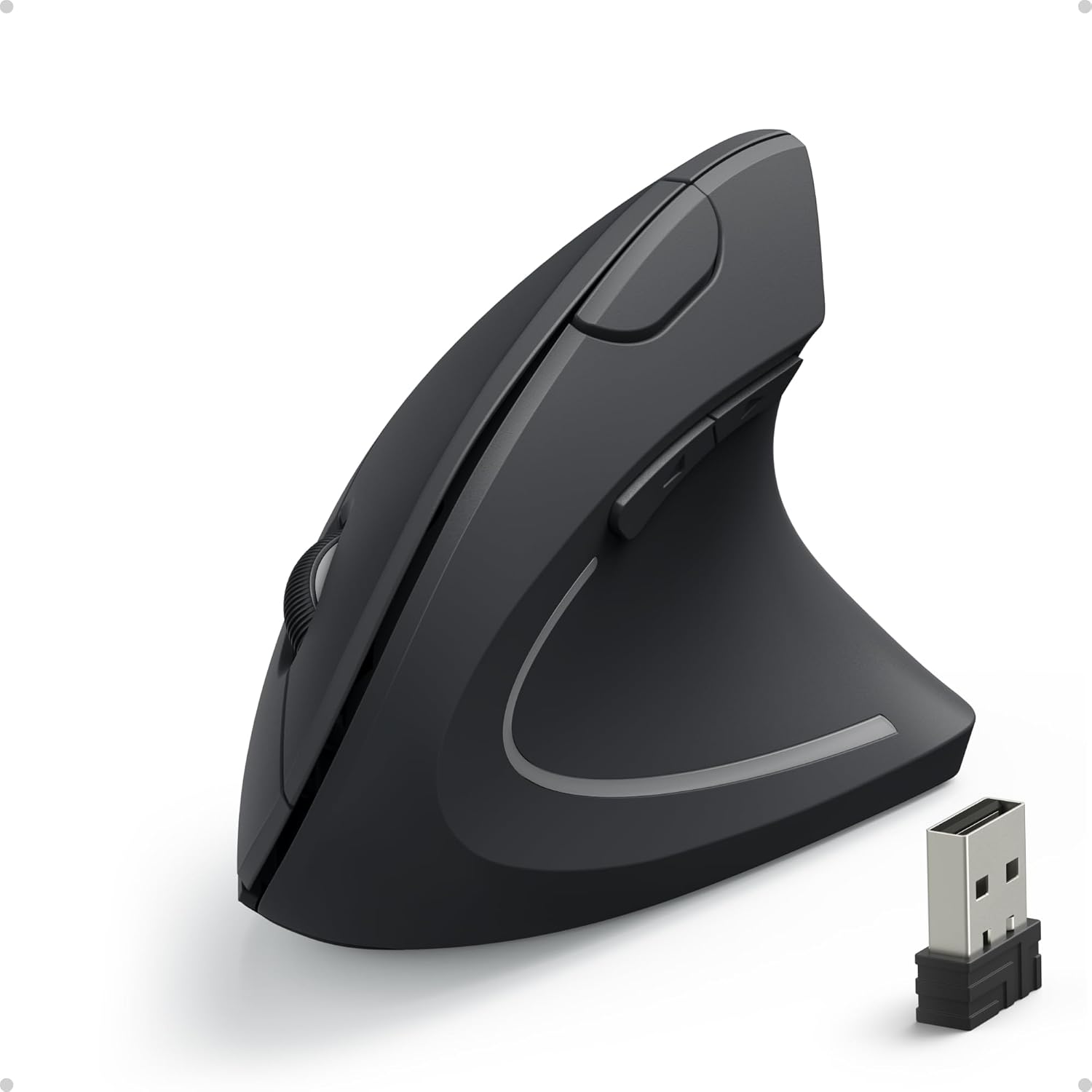
Are you looking for a reliable and comfortable mouse for your laptop or desktop? The Anker AK-UBA Mouse might be the perfect fit for your needs. This special ergonomic optical mouse offers a 2.4G wireless connection, adjustable DPI settings, and a host of other features that make it a popular choice among users. In this blog post, we'll delve into the various benefits and features of the Anker AK-UBA Mouse and why it’s a smart addition to your workspace.
The Anker AK-UBA Mouse comes with a multitude of benefits designed to enhance your computing experience. Thanks to its ergonomic design, this mouse helps prevent repetitive strain injuries (RSI) and carpal tunnel syndrome. By supporting a natural hand position, it reduces tension and allows for more comfortable use over extended periods. The mouse also features adjustable DPI settings (800/1200/1600), providing precise control for both everyday tasks and specialized activities like graphic design or gaming.
Additionally, it operates on a 2.4G wireless connection, ensuring a stable and uninterrupted experience. Users have noted that the mouse works seamlessly on various surfaces, including glass and fabric, making it incredibly versatile. Finally, it boasts five customizable buttons, enabling you to tailor its functionality to your specific needs, whether for productivity or entertainment.
For those wondering about price, the Anker AK-UBA Mouse is exceptionally budget-friendly, costing just $16.99. Despite its affordability, it doesn’t skimp on essential features. This is what makes it highly attractive for students, professionals, and casual users alike. You get the benefits of a high-end ergonomic mouse without breaking the bank.
Why is the Anker AK-UBA Mouse a better choice compared to other models? For one, the brand itself is known for its high-quality products and excellent customer service. Many reviews praise Anker for their quick and reliable support, ensuring any issues get resolved promptly. Furthermore, the ergonomic design of the mouse sets it apart. This is especially important if you spend long hours working on a computer and want to avoid the discomfort associated with traditional mouse designs.
What makes the Anker AK-UBA Mouse truly stand out is its innovative ergonomic design coupled with wireless functionality. Unlike traditional mice, it offers vertical alignment to keep your hand and wrist in a more natural position. The mouse also includes a nano receiver that can be conveniently stored within the mouse itself, making it easy to transport.
Wondering how to optimize the use of your Anker AK-UBA Mouse? Begin by setting the DPI to match your specific needs. Whether you’re working on intricate designs that require high precision or need smooth cursor movement for general use, this mouse adapts effortlessly. Place the nano receiver in the USB port of your laptop or PC, and you’re ready to go. Don’t forget to use the on/off switch to conserve battery life when not in use.
Which surfaces will your Anker AK-UBA Mouse work best on? According to user reviews, this mouse performs exceptionally well on various surfaces including glass tables, leather sofas, fabric, and even glossy magazines. This versatility makes it an excellent choice for anyone who frequently uses their laptop or PC in different environments.
Wondering when to grab this budget-friendly ergonomic mouse? If you are experiencing wrist discomfort or looking for a more comfortable wireless mouse, now is an excellent time to invest in the Anker AK-UBA Mouse. Additionally, if you catch it on sale, you can get an even better deal, but its current $16.99 price point is already a steal.
Looking for where to buy the Anker AK-UBA Mouse? This mouse is widely available online through retailers like Amazon, Best Buy, and the official Anker website. Purchasing through these platforms ensures you receive genuine products along with the added benefit of customer reviews to help make your decision easier.
How much will you have to pay for this ergonomic wonder? The Anker AK-UBA Mouse is priced at just $16.99, making it one of the most affordable ergonomic mice on the market.
Curious about the functionality offered by the Anker AK-UBA Mouse? This model comes with five buttons and a scroll wheel, providing you with multiple options for customization and enhanced productivity.
What is the standout feature of the Anker AK-UBA Mouse? While there are many, the ergonomic design is arguably its best feature. This design significantly reduces wrist strain, making it an ideal choice for anyone needing a comfortable mouse for long-term use.
Looking to understand how well this mouse performs based on user experiences? Reviews are generally positive, praising the ergonomic design, ease of use, and excellent customer service from Anker. Users appreciate its versatility on different surfaces and its quick setup process.
Have questions about this mouse? Here are some FAQs:
- **Is the Anker AK-UBA Mouse wireless?** Yes, it offers a 2.4G wireless connection. - **What DPI settings are available?** You can choose between 800, 1200, and 1600 DPI. - **Does it come with a warranty?** Yes, Anker provides a warranty for this product. Check specific retailer details for more information.
Is the Anker AK-UBA Mouse worth your investment? Absolutely! At just $16.99, it combines affordability with high functionality and ergonomic comfort, making it a standout choice among budget wireless mice.
Should you make the purchase? If you’re in the market for an ergonomic, budget-friendly, and reliable mouse, the Anker AK-UBA Mouse is a fantastic option that won’t disappoint.
Only In TestMarket

Average rating
 5
5
8
4
7
3
0
2
0
1
0


 Facebook
 Twitter
 Linkedin
 Reddit
 Pinterest




Henry Parker
Aug 26, 2024
The Anker AK-UBA mouse works well for my needs. It’s especially great for people who suffer from wrist pains due to its ergonomic design. I was also impressed with how responsive the buttons and scroll wheel are. The 2.4G wireless connection is stable, and I haven’t experienced any lag.
An all-around solid mouse for an affordable price.
Shipping
Item Quality
Customer Service
Packaging
Sophia Collins
Aug 26, 2024
I came across the Anker AK-UBA mouse while looking for a budget-friendly option that wouldn’t strain my wrist. This mouse fits the bill perfectly. The ergonomic design is comfortable, and the multiple DPI settings are a nice touch.
The setup was effortless, just plug in the dongle, and it was ready to go. Have been using it for a month now, and so far, no complaints.
Shipping
Item Quality
Customer Service
Packaging
Alexander Adams
Aug 27, 2024
The Anker AK-UBA is a pretty good mouse for the price. It’s lightweight, has an ergonomic design, and multiple DPI settings that allow for flexibility depending on the task. The wireless function works seamlessly, and I haven’t faced any connectivity issues.
I was really pleased with how easy it was to set up. Overall, good value for the money.
Shipping
Item Quality
Customer Service
Packaging
Isabelle Reed
Aug 26, 2024
The Anker AK-UBA Ergonomic Optical Mouse fits my needs perfectly. It’s lightweight, making it comfortable to use for extended periods. The build quality is decent for the price.
Setting it up was straightforward, and it works seamlessly with my desktop. I haven’t experienced any lag, which is vital for my work. If you’re on a budget but need a good mouse, this one is worth considering.
Shipping
Item Quality
Customer Service
Packaging
Charlotte Kelly
Aug 27, 2024
I love Anker products, and this AK-UBA Mouse is no exception. It has a lovely ergonomic design that truly helps reduce wrist strain. Packaging was straightforward and installation a breeze.
The mouse performs well on various surfaces without any issue. I appreciated the customer service when I had a question about compatibility—they responded quickly. An overall reliable and budget-friendly option.
Shipping
Item Quality
Customer Service
Packaging
Ellie Adams
Aug 27, 2024
I’ve been an Anker fan for a while, and this AK-UBA mouse lives up to the brand’s reputation. Initially, I was a bit hesitant about the ergonomic design, but it has proven to be very comfortable. It’s lightweight yet robust.
Kudos to Anker for including multiple DPI settings and ensuring the mouse works on diverse surfaces. It’s a very practical and affordable choice.
Shipping
Item Quality
Customer Service
Packaging
Lily Rivera
Aug 28, 2024
This mouse by Anker is quite impressive. For its price, it offers excellent functionality and comfort. The 2.4G wireless connection is stable, and I haven't encountered any lag issues.
The five buttons and scroll wheel are responsive, and I love that it works well on different surfaces. The on/off switch is a thoughtful touch, conserving battery life. It’s an all-around good mouse for its price.
Shipping
Item Quality
Customer Service
Packaging
Logan Powell
Aug 29, 2024
Il mouse è di buona fattura, di materiale gradevole al tatto, e risolve le fastidiose tensioni al polso. Il numero di tasti è adeguato. Ho scelto Anker per la recensione positiva sul servizio post vendita.
Il puntatore avanzava in modo irregolare, e l'assistenza clienti ha risolto il problema rapidamente sostituendo il mouse e suggerendo soluzioni. Una società seria e affidabile. Consigliato!
Shipping
Item Quality
Customer Service
Packaging
James Cooper
Aug 30, 2024
I looked at many different ergonomic mice before settling on the Anker AK-UBA Mouse. The packaging was simple, allowing me to see the product right away. Installing it was easy—just plug and play. I appreciate the different DPI settings which make it suitable for various tasks from browsing to detailed work.
So far, this mouse has met my expectations and hasn’t given me any major issues.
Shipping
Item Quality
Customer Service
Packaging
David Rivera
Aug 29, 2024
In my hunt for an affordable yet functional wireless mouse, I came across the Anker AK-UBA Mouse. This mouse doesn't disappoint. It offers three DPI settings, making it versatile for different use cases. The ergonomic design truly makes a difference in reducing wrist discomfort.
Despite its lightweight and compact design, it feels quite sturdy. No hiccups in installation or usage so far.
Shipping
Item Quality
Customer Service
Packaging
Carter Richardson
Aug 28, 2024
The Anker AK-UBA mouse is a solid choice for anyone needing a reliable and affordable mouse. I appreciate its lightweight and ergonomic design. It makes long sessions at the computer more bearable, reducing wrist strain noticeably. The setup process was a breeze; just plug in the dongle, and it’s ready to use.
The extra buttons are a nice touch, although I use them sparingly. Overall, a good value for the cost.
Shipping
Item Quality
Customer Service
Packaging
Oliver Brooks
Aug 27, 2024
Funciona bien, no es pesado ni muy alto, es cómodo de usar. El proceso de pedido fue sencillo y llegó en el tiempo adecuado. La calidad del material del mouse Anker es bastante buena por el precio. No he tenido problemas de compatibilidad, y su funcionalidad es perfecta para uso diario.
Definitivamente lo volvería a comprar.
Shipping
Item Quality
Customer Service
Packaging
Sarah Davis
Aug 26, 2024
I am really happy with the Anker AK-UBA Wireless Mouse. It was easy to set up—no extra steps needed, just plug the dongle in, and it works right away. The mouse is very comfortable to use, thanks to its ergonomic design. The on/off switch is a thoughtful addition, ensuring battery efficiency.
It works perfectly on multiple surfaces, even my glass desk, which is a big plus. I use it daily and have not faced any major issues so far.
Shipping
Item Quality
Customer Service
Packaging
Michael Rivera
Aug 25, 2024
This Anker mouse is quite functional. Its ergonomic design has genuinely helped me avoid wrist strain. The 5 buttons are well-placed, and the optical resolution choices (800/1200/1600 DPI) are handy as I switch between different tasks.
It fits snugly in my hand and works smoothly on various surfaces. I had a minor hiccup initially with the USB dongle, but Anker's customer service was responsive and guided me through the setup. Nice, budget-friendly option if you need a reliable mouse.
Shipping
Item Quality
Customer Service
Packaging
Abigail Kelly
Aug 25, 2024
I recently bought the Anker AK-UBA Mouse, and my first impression was how lightweight and easy to handle it is. It feels quite comfortable to use during my long office hours, and I appreciate its ergonomic design which eases the strain on my wrist. The packaging was minimalistic yet sufficient. The mouse came in a clear plastic box with an information card at the back, which was pretty detailed.
Overall, a good purchase for the price.
Shipping
Item Quality
Customer Service
Packaging