 Today's Deal
Amazon Deals
Today's Deal
Amazon Deals
 Today's Deal
Amazon Deals
Today's Deal
Amazon Deals
 popular
 3
3
Views Today






Business Name: KTC TECHNOLOGY (HONGKONG) CO., LIMITED

Business Address: WORKSHOP 2&3 25/F ORIENT INTL, TOWER NO.1018 TAI NAN WEST ST, CHEUNG SHA WAN, CHEUNG SHA WAN, 999077, HK

Business Size: Small
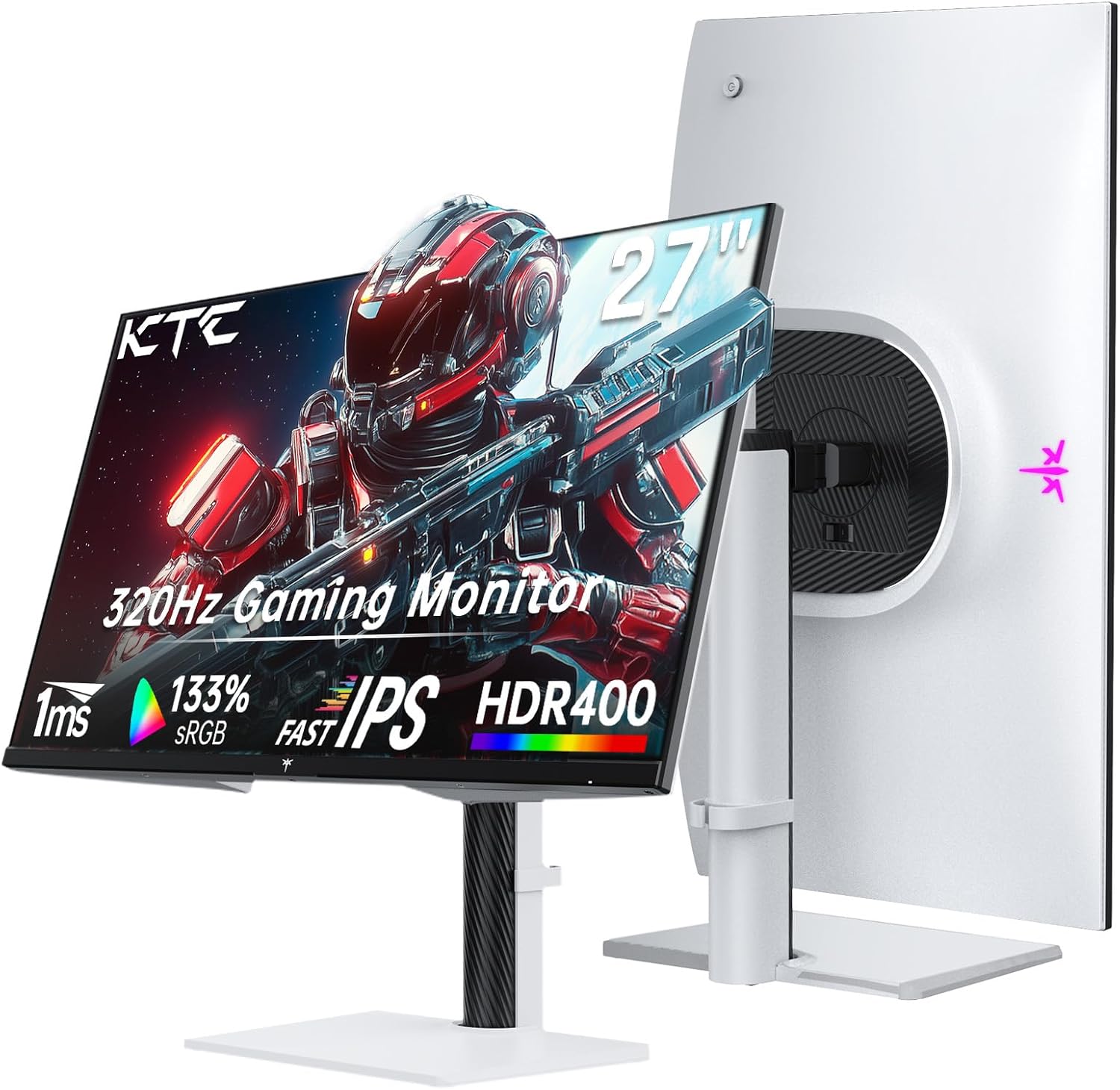
The KTC 1440P Gaming Monitor is not just another screen; it stands out for its high-quality visuals and stellar performance that cater specifically to gaming enthusiasts. With an impressive 27-inch QHD 2K display, this monitor is engineered to deliver an immersive viewing experience thanks to its fast 1ms Fast-IPS Panel and enhanced HDR400 technology. The robust build paired with cutting-edge features, such as Adaptive Sync and low blue light eye-protection, make it a smart choice for both gamers and professionals alike. Offering seamless connectivity with dual HDMI 2.1 ports, this monitor ensures you're equipped with everything necessary for exceptional gaming and detailed on-screen presentations.
The KTC 1440P Gaming Monitor offers several compelling benefits for gamers and digital creatives alike. Its 300Hz refresh rate, overclockable to 320Hz, guarantees smooth gameplay without any motion blur. The monitor's 144% sRGB provides vibrant and wide color accuracy, making every game or creative project not only vivid but also true to life. Additionally, the Adaptive Sync technology reduces screen tearing for smoother image rendering. One key feature is the Eye-Friendly Low Blue Light, which ensures you can game for extended periods with minimal eye strain. Finally, the HDR400 support bolsters the monitor's ability to deliver deep contrasts and stunning brightness levels, enhancing both gameplay and video content.
Priced at $186.99, the KTC 1440P Monitor proves to be an economical choice without compromising on features or performance. Compared to other monitors in the market offering similar specifications, this KTC monitor combines quality and affordability. It competently meets the needs of both casual and competitive gamers looking for a powerful yet cost-efficient display. Buyers have highlighted its unbeatable value, often stating that its performance rivals that of higher-priced monitors, making it an intelligent purchase for those on a budget.
The main reason to opt for the KTC 1440P Gaming Monitor is its elite combination of speed, picture quality, and price. This monitor excels in providing a seamless gaming experience, thanks to its impressive refresh rate and ultra-fast response time. It is designed to cater to diverse audiences, from hardcore gamers seeking performance to professionals who demand versatility in display capabilities. Beyond gaming, its advanced connectivity and intuitive setup also make it ideal for multitasking and work-related tasks.
Several features make the KTC 1440P Monitor stand out. Firstly, its innovative Fast-IPS panel technology ensures superior image clarity at every angle. The KTC monitor also boasts enhanced HDR400 technology for brilliant color and detail in every scene. Its Adaptive Sync capabilities ensure a smoother experience by syncing the monitor's refresh rate with frame output, minimizing lag and stutter. Moreover, the monitor includes practical features like a sturdy stand, easy navigation menu, and optimized connectivity options that offer flexibility whether it's used for gaming or other purposes.
Setting up the KTC 1440P Gaming Monitor is intuitive and straightforward. First, ensure you have a stable surface to place the 27-inch screen. Next, simply attach the monitor to its sturdy stand using the provided screws and screwdriver—make sure to check the packaging for these items. Connect your device via the 2 x HDMI 2.1 ports for advanced connectivity. Adjust the display settings on your device and the monitor to achieve the desired color balance and brightness. While the USB port is primarily for updates, it can power small peripherals if needed. Additionally, the menu system is user-friendly, allowing quick access to make any necessary adjustments.
To optimize the KTC 1440P Gaming Monitor for the best performance, adjust several key settings. Start with the display settings to ensure that HDR is correctly calibrated, or disable it if necessary, to achieve accurate color representation. Adjust the refresh rate settings to take full advantage of the overclockable 320Hz, which will ensure smooth graphics rendering. Tweak the monitor's brightness to suit your environment, avoiding overly bright or dim settings. Tailoring these settings will ensure optimal performance for both work and entertainment.
Choosing a 1440P monitor over a 1080P option depends on your needs and priorities. For gamers and content creators who value superior image clarity and detailed visuals, a 1440P monitor like the KTC offers a significant upgrade in pixel density and resolution, making it a suitable choice. It provides a sharper and more detailed picture, enhancing both gaming experiences and professional tasks. When paired with powerful graphics cards, 1440P monitors utilize the full potential of modern high-frame-rate gaming and detailed video editing.
To make the most of your KTC 1440P Gaming Monitor, place it in a comfortable and stable environment, ideally on a desk that can fully accommodate the 27-inch screen. Ensure the room has controlled lighting to avoid reflections or glares on the screen, optimizing your view. Place the monitor at eye-level at a comfortable viewing distance to minimize neck strain and maximize viewing comfort. A stable surface will prevent vibrations and maintain the monitor’s overall stability during intense gaming sessions or productive work tasks.
The Enhanced HDR400 technology in the KTC 1440P Monitor significantly improves gaming by offering richer and more vivid colors, making gameplay more immersive. It enhances contrast by making blacks deeper and whites brighter, providing finer details in shadows and highlights. This ensures that visuals are not only visually impressive but also more lifelike. It ultimately allows gamers to experience a more dynamic and engaging environment during gameplay, which enhances overall gaming pleasure and performance.
The KTC 1440P Gaming Monitor offers ample connectivity options with its two HDMI 2.1 ports and a DisplayPort. This advanced connectivity setup allows you to connect multiple devices simultaneously, including gaming consoles and PCs set at high resolutions for supreme performance. Such connectivity flexibility is advantageous for users who require seamless transitions between devices for different purposes, be it gaming, work, or media consumption.
Both gamers and professionals alike express high levels of satisfaction with the KTC 1440P Gaming Monitor. Gamers praise the monitor for its smooth gameplay capabilities and visually stunning performance, citing its refresh rate and color vibrancy as standout features. Professionals, on the other hand, appreciate its versatile connectivity, easy setup process, and reliable build quality, which support multitasking across various applications. Overall, its competitive pricing mixed with premium features results in positive reviews across different user demographics.
The best time to purchase a KTC 1440P Gaming Monitor is during major shopping events such as Black Friday, Cyber Monday, or holiday sales when retailers offer significant discounts. Additionally, keeping an eye on electronics stores for special promotions or clearances can also yield favorable prices. Purchasing during these periods can help you secure the monitor at a lower price, enhancing the overall value for money.
The KTC 1440P Gaming Monitor can be purchased from a variety of online and physical electronics retailers. Popular online marketplaces like Amazon offer this monitor with the convenience of shipping. Alternatively, tech-focused retail stores may provide in-store purchases allowing you to see the product firsthand. Ensure to buy from reputable sellers to guarantee the authenticity of the product and have access to return policies if needed.
Priced at $186.99, the KTC 1440P Gaming Monitor offers an exceptional range of features and performance at a cost-effective rate. Given the advanced technological specifications including a high refresh rate, fast response panel, and extensive color gamut, this monitor provides serious value to gamers and multimedia enthusiasts. The monitor’s affordability does not compromise its high-quality and user-friendly design, making it well-worth the investment for anyone looking to upgrade their gaming or workstation setup.
When creating a dual display setup, two KTC 1440P Gaming Monitors would provide a harmonious and highly functional arrangement. These monitors can be configured to enhance productivity by allowing plenty of screen real estate for multitasking. Each monitor can support vibrant color accuracy and fast refresh rates, proving equally advantageous for gaming or professional workflows. Given its competitive pricing, purchasing two may fit within budget constraints, offering powerful dual capabilities without breaking the bank.
To maintain your KTC 1440P Gaming Monitor, follow best practices such as regular cleaning with a microfiber cloth to prevent dust buildup, avoiding contact with harsh chemicals that could damage the screen. Ensure the monitor is placed away from sources of direct sunlight, which can degrade the display over time. Adjust brightness settings to a comfortable level to prolong screen life and avoid screen burn-ins. For longevity, utilize a surge protector to safeguard the monitor against electrical spikes.
On analysis, the KTC 1440P Gaming Monitor holds its own against competitors with similar specs. In its price range, it offers superior refresh rates and vibrant color performance, making it a strong contender among gaming monitors. While some high-end models may offer additional features like curved screens or higher peak brightness, the KTC provides a balanced mix of performance and affordability, winning favor for those who prioritize value-oriented yet highly competent displays.
Q: Does the KTC monitor support NVIDIA G-Sync? A: While not officially G-Sync certified, many users report smooth gameplay using NVIDIA graphics cards due to the Adaptive Sync feature.
Q: Can the monitor be wall-mounted? A: Yes, the monitor is VESA mount compatible, allowing for wall or alternative mounting options.
Q: Is the monitor suitable for office use? A: Absolutely, the monitor's clear visuals and versatile connectivity make it ideal for various tasks beyond gaming.
In conclusion, if you seek an engaging gaming experience and require a reliable display for professional tasks, the KTC 1440P Gaming Monitor is a solid choice. Its high refresh rate, robust IPS panel, and exceptional color accuracy coupled with budget-friendly pricing make it appealing across the board. The monitor offers easy setup and versatile application, ensuring viability whether you are a gamer, creative professional, or an everyday tech user. Its feature set provides stellar performance, ensuring it’s a worthy investment that satisfies diverse demands.
The KTC 1440P Gaming Monitor emerges as a top pick due to its blend of high-performance specifications, user-focused features, and accessible price point. It masterfully combines advanced technology with practical usability, which is appreciated by gamers and professionals alike. Its dedicated focus on eye protection and adaptive technology only enhances the user experience, making it a compelling option in the realm of modern monitors. Whether upgrading your current setup or starting fresh, the KTC monitor presents itself as a highly attractive choice.
Only In TestMarket
Average rating
 5
5
13
4
2
3
0
2
0
1
0


 Facebook
 Twitter
 Linkedin
 Reddit
 for Gaming, Innovative 27 Inch Monitor with 1ms Fast-IPS Panel, Professional Monitor with 144% sRGB, Enhanced HDR400 Technology, Smart Monitor with Adaptive Sync, Eye-Friendly Low Blue Light Feature, Advanced Connectivity with 2 x HDMI 2.1 & 1 x DP 1.4, Versatile Adjustable Stand, Exclusive H27E6 27 Inch IPS QHD 320Hz White Monitor&media=https://testmarket.io/storage/deal/amazon/2025-09-24/f62b8ae890810f1851de7abab6b07c0b.jpg) Pinterest
Pinterest




Harper Bennett
Sep 20, 2025
The Special KTC 1440P Gaming Monitor has been a fantastic addition to my home office. The impressive refresh rate makes transitions smooth when switching between tasks or gaming.
I had a minor challenge with the HDR settings at first, but some helpful online tips got it calibrated perfectly. The 27-inch size fits nicely on my desk, and its design is sleek and modern. While the speaker sound quality isn't top-notch, this is not a dealbreaker for me since the monitor delivers excellently on all other fronts, especially picture quality and connectivity options.
Shipping
Item Quality
Customer Service
Packaging
Henry Ward
Sep 18, 2025
I recently updated my workspace with the Special KTC 1440P Gaming Monitor, and the difference is night and day. The sharp picture quality from its 2K resolution is excellent for reviewing detailed documents and spreadsheets.
I appreciate the low blue light feature; my eyes feel less strained after a long day. The connectivity through HDMI 2.1 makes switching between my work PC and personal gaming setup hassle-free. The HDR adjustments took some effort, but once tuned, the monitor displays vivid colors and deep contrast well.
Shipping
Item Quality
Customer Service
Packaging
Emma Brooks
Sep 22, 2025
After weeks of research, I landed on the Special KTC 1440P Monitor, and it has exceeded my expectations. The clarity of the QHD display is remarkable, and the innovative 27-inch size provides ample viewing area without overwhelming my desk.
The setup was intuitive, with easy-to-follow instructions included. While I had to tweak the HDR settings for optimal visuals, everything now looks fantastic. The adaptive sync has significantly improved my gameplay with a seamless graphic experience.
I did have to enhance the sound through external speakers, but this monitor offers great value for the price!
Shipping
Item Quality
Customer Service
Packaging
Sophia Collins
Sep 17, 2025
I’ve been using the Special KTC 1440P Gaming Monitor for a few weeks now, and it’s impressive how its features cater to both my gaming and professional needs. The enhanced HDR400 technology required some initial setting tweaks, but the payoff in detail and color quality is worth it.
The screen real estate on this 27-inch monitor allows me to work more efficiently, and its 1ms response time ensures smooth transitions. I only wish the built-in speakers were better, but this can be easily fixed with separate desktop speakers.
Shipping
Item Quality
Customer Service
Packaging
David Jenkins
Sep 19, 2025
As an avid gamer and tech enthusiast, the Special KTC 1440P Gaming Monitor is everything I hoped for and more. The high-quality 2K resolution and 300Hz refresh rate offer an immersive experience that is hard to beat in this price range. Although speakers need an upgrade due to low sound quality, I primarily use headphones so it’s not a major issue. The monitor is very eye-friendly, reducing fatigue over time - a boon for long gaming sessions.
Connecting my gaming console and PC simultaneously has been effortless with the HDMI 2.1 ports.
Shipping
Item Quality
Customer Service
Packaging
Savannah Perry
Sep 18, 2025
I decided to upgrade to the Special KTC 1440P Gaming Monitor, and it’s been a worthy investment. The performance during gameplay is exceptional, thanks to the smooth 300Hz refresh rate.
While the HDR setup initially required some manual adjustment, once tuned, it showed stunning, rich visuals. The adaptive sync technology works beautifully with my PC, keeping the visuals crisp and tear-free. The monitor doesn't come with powerful built-in speakers, but its overall image quality is superb for the price.
Shipping
Item Quality
Customer Service
Packaging
Ellie Adams
Sep 21, 2025
The Special KTC Gaming Monitor has become a staple in my daily use, whether I am working or gaming. The display quality is fantastic, with deep blacks and bright colors that are essential for both office tasks and immersive gaming.
The adaptive sync eliminates screen tearing, which is a blessing for fast-paced games. Setup was fairly straightforward, although some adjustments to the color settings were necessary. The lack of quality built-in speakers was slightly disappointing, but the monitor's other features more than make up for it.
Shipping
Item Quality
Customer Service
Packaging
Jacob Thomas
Sep 17, 2025
I bought the Special KTC 1440P Gaming Monitor primarily for gaming, and it’s been a great addition. The visuals are sharp, and the 300Hz refresh rate delivers fast-paced action without any hitch. I found the low blue light feature particularly helpful during late-night gaming sessions, reducing eye strain significantly.
Out of the box, the colors were slightly off, but post adjustment, they are now vibrant and accurately represent game environments. The build quality seems robust, and I haven’t encountered any connectivity issues.
Shipping
Item Quality
Customer Service
Packaging
Grace Collins
Sep 22, 2025
As someone who spends a lot of time on video editing, the Special KTC 1440P Gaming Monitor is a fantastic tool. The color accuracy (144% sRGB) is excellent, which is vital for my work. Also, the high refresh rate ensures smooth previews, reducing any distractions during edits.
The setup was straightforward; however, I had to spend some time adjusting the HDR settings to suit my needs. Although I had to replace the speakers due to quality issues, the overall picture performance and connectivity features of this monitor make it a worthwhile investment.
Shipping
Item Quality
Customer Service
Packaging
Michael Parker
Sep 22, 2025
I’m thrilled with the purchase of the Special KTC 1440P Gaming Monitor. It combines excellent visuals and functionality, enhancing my Xbox gaming sessions.
The monitor’s 300Hz refresh rate and 1ms response time are game-changers, making gameplay incredibly smooth. I needed to adjust the settings to correct the HDR displays, but the effort was worthwhile as the picture quality is stunning. With its advanced connectivity options, switching between different consoles and my PC is seamless.
A great purchase for any gamer seeking high performance without breaking the bank.
Shipping
Item Quality
Customer Service
Packaging
James Cooper
Sep 17, 2025
This Special KTC 1440P Gaming Monitor is a steal for the price. The advanced connectivity options are ideal for my home office, and the 27-inch size is just right, not taking up too much desk space but offering enough screen real estate for multitasking.
The 1ms response time keeps things snappy, whether working or gaming. I did have to fine-tune the display settings, as the initial output was too bright, but now it’s perfect. The absence of high-quality speakers is a downside, but that’s a minor issue given the overall performance.
Shipping
Item Quality
Customer Service
Packaging
Emma Brooks
Sep 21, 2025
As a professional designer, I needed a monitor that could deliver high color accuracy, and the Special KTC 1440P did not disappoint. The 144% sRGB coverage ensures that my projects look incredible and consistent across different displays. While I had to adjust the HDR settings, once set up, the enhanced visuals were delightful to work with.
The packaging was robust, protecting the monitor during transit, and setting it up was a breeze. The multiple HDMI 2.1 ports are also a welcome feature, allowing me to connect various devices easily.
Shipping
Item Quality
Customer Service
Packaging
Lucas Stewart
Sep 19, 2025
Recommended
The Special KTC 1440P Gaming Monitor has significantly enhanced my gaming experience. The vividness of the 144% sRGB makes every color pop, and the 300Hz refresh rate ensures I’m never missing a beat during gameplay.
It is highly recommended for gamers who enjoy visually stunning environments. While the HDR400 was overly bright at first, a bit of tweaking resolved that issue. The monitor’s adaptive sync feature works seamlessly with my graphics card, minimizing screen tearing.
Although I miss having good quality built-in speakers, the overall performance of this monitor compensates for it.
Shipping
Item Quality
Customer Service
Packaging
Michael Rivera
Sep 17, 2025
I was looking for a monitor that would complement both my work and gaming needs, and the Special KTC 1440P Gaming Monitor seemed ideal. The 27-inch screen is perfect for multitasking, and the fast-IPS panel reduces any motion blur during gameplay.
Initially, I had to fiddle with the settings to get the colors right, but it was worth the effort. The monitor's low blue light feature really helps during extended use. However, I did experience some issues with the built-in speakers not producing sound, but connecting external speakers was a quick fix.
Overall, a useful addition to my setup.
Shipping
Item Quality
Customer Service
Packaging
Lucas Stewart
Sep 19, 2025
I recently purchased the Special KTC 1440P Gaming Monitor for my gaming setup, and it truly stands out. The crisp 2K resolution offers a significant upgrade over my previous monitor, making every detail in my games pop. Setting it up was straightforward, and I appreciated that the stand was quite sturdy, with all necessary tools included. The impressive refresh rate of 300Hz makes my gaming experience incredibly smooth, especially during fast-paced scenes.
While the HDR needed some adjustments, once calibrated, the colors were vivid and lifelike. The eye-friendly low blue light feature is a nice touch for long gaming sessions. Overall, it's an excellent monitor for the price.
Shipping
Item Quality
Customer Service
Packaging