 Today's Deal
Amazon Deals
Today's Deal
Amazon Deals
 Today's Deal
Amazon Deals
Today's Deal
Amazon Deals
 popular
 3
3
Views Today
 1
1
Favorites Today






Business Name: suzhouduomeishikejiyouxiangongsi

Business Address: 元和街道喜庆街99号, 3楼B区B-323室, 苏州市, 相城区, 江苏省, 215100, CN

Business Size: Micro
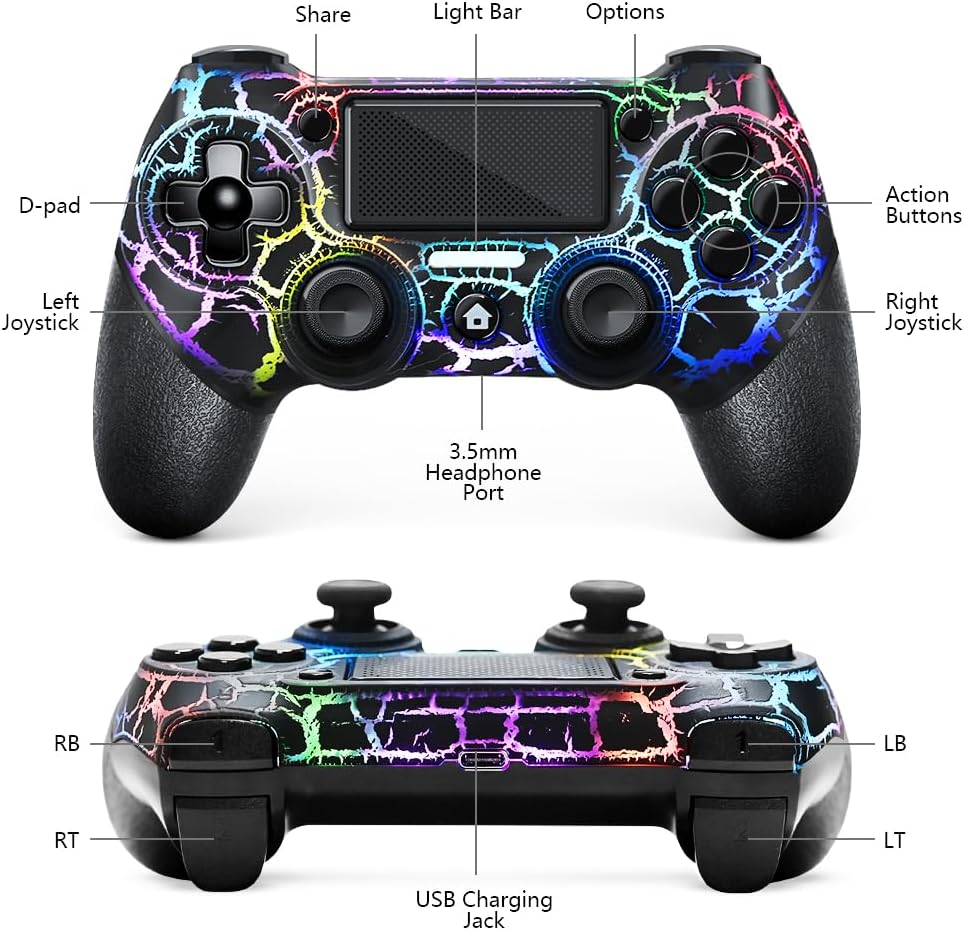
The AceGamer OLED Wireless Controller is a cutting-edge, special controller designed specifically for PS4 consoles. This custom-designed game controller features stunning RGB lighting effects, an innovative turbo function, a long-lasting 1000mah battery, and an integrated 3.5mm audio jack, making it an essential accessory for avid gamers. The controller is compatible with PS4, PS4 Slim, PS4 Pro, and Windows PC, offering versatility and convenience at an affordable price of $21.59.
Choosing the AceGamer OLED Wireless Controller comes with numerous benefits. The controller's customized design with enthralling RGB light effects not only enhances your gaming experience aesthetically but also provides practical functionalities like the turbo button for rapid fire actions. The 1000mah battery ensures extended playing time, reducing the need for frequent recharges. Additionally, the built-in 3.5mm audio jack allows seamless connectivity of headphones, providing an immersive and uninterrupted gaming experience. With easy connectivity and compatibility across multiple platforms, the AceGamer controller stands out in its category.
At a price point of $21.59, the AceGamer OLED Wireless Controller offers premium features typically found in more expensive models. The affordability does not compromise its quality or performance. The integrated RGB lighting, turbo function, and 1000mah battery provide excellent value for money. Gamers looking for an economical yet high-performance option will find this controller a perfect fit for enhancing their gaming sessions without breaking the bank.
The AceGamer OLED Wireless Controller has gained popularity among gamers due to its unique blend of style, functionality, and affordability. The mesmerizing RGB lights add an aesthetic appeal that enhances the gaming atmosphere, while the turbo function provides a competitive edge in fast-paced games. Its long-lasting battery and seamless compatibility with PS4 and PC make it a reliable choice for both casual and hardcore gamers, contributing to its widespread acclaim.
Several features make the AceGamer OLED Wireless Controller unique. Its custom design and integrated RGB lighting create a visually striking look that sets it apart from standard controllers. The turbo function allows for rapid fire, giving gamers a significant advantage in shooting games. Additionally, the 1000mah battery ensures prolonged gaming sessions without the need for frequent recharges. The inclusion of a 3.5mm audio jack further enhances the gaming experience by supporting direct headphone connections.
Using the AceGamer OLED Wireless Controller is straightforward. Begin by charging the controller using the provided USB cable. Once charged, turn on your PS4 or connect to your Windows PC. Press the power button on the controller and wait for the device to sync with your console or PC. For optimal performance, explore the settings to adjust the RGB light effects and customize the turbo function to fit your gaming style. Plug your headphones into the 3.5mm audio jack for an immersive experience and enjoy uninterrupted gaming.
The AceGamer OLED Wireless Controller is compatible with multiple platforms, ensuring versatility for gamers. It works seamlessly with PS4, PS4 Slim, and PS4 Pro consoles, as well as Windows PC. This wide compatibility makes it a versatile accessory for gamers who enjoy playing across different platforms. Whether you're a console gamer or a PC enthusiast, this controller has you covered.
If you're experiencing issues with your existing controller, such as unresponsive buttons, poor battery life, or lack of modern features, it's time to consider upgrading to the AceGamer OLED Wireless Controller. The advanced features, such as RGB lighting, turbo function, and superior battery life, make it a worthy replacement. Additionally, gamers looking for a more visually appealing and functional controller will find the AceGamer to be a significant upgrade.
The AceGamer OLED Wireless Controller can be easily purchased online from reputable retailers and e-commerce platforms. Ensure you buy from a trusted source to guarantee authenticity and take advantage of any available warranties or exchange policies. Popular websites like Amazon, eBay, and other specialized gaming accessory stores often stock this product at competitive prices.
The AceGamer OLED Wireless Controller is priced at an attractive $21.59. This cost-effective price point offers gamers access to premium features like RGB lighting, turbo function, a 1000mah battery, and more, without a hefty price tag. Its affordability makes it an excellent option for budget-conscious gamers seeking quality and performance.
The number of AceGamer OLED Wireless Controllers you need depends on your gaming setup and requirements. For solo players, one controller may suffice. However, if you enjoy multiplayer games with friends or family, it may be beneficial to invest in multiple controllers to enhance the overall gaming experience. Considering the affordable price, stocking up on a few extras is a practical approach.
The AceGamer OLED Wireless Controller boasts several outstanding features. The customizable RGB light effects provide a vibrant gaming atmosphere. The turbo function allows for rapid fire, giving gamers a competitive edge. Its 1000mah battery ensures extended playtime, and the 3.5mm audio jack supports direct headphone connectivity for an immersive experience. The combination of these features, along with its compatibility across platforms, positions it as a top choice for gamers.
When compared to other controllers, the AceGamer OLED Wireless Controller excels in both performance and value. Many controllers on the market with similar features are priced significantly higher, making the AceGamer a budget-friendly yet high-quality option. The RGB lighting and turbo function offer unique advantages that many standard controllers lack. Additionally, its superior battery life and wide compatibility further enhance its appeal, making it a competitive player in the gaming accessory market.
1.
Currently, the AceGamer OLED Wireless Controller is designed for PS4 and Windows PC. Compatibility with PS5 may be limited.
2.
Yes, the RGB lights can be customized to fit your preferences, enhancing your gaming environment.
3.
The 1000mah battery provides extended playtime, reducing the need for frequent recharges.
4.
Yes, connecting the AceGamer controller to a Windows PC is straightforward and hassle-free.
The AceGamer OLED Wireless Controller presents a compelling option for gamers seeking a high-performance, affordable, and visually appealing controller. With its customizable RGB lighting, turbo function, long battery life, and wide compatibility, it offers excellent value for its price. Whether you're a casual gamer or a dedicated enthusiast, this controller is designed to enhance your gaming experience and meet all your gaming needs.
If you're in the market for a new game controller that combines style, functionality, and affordability, the AceGamer OLED Wireless Controller is a smart choice. Its array of features and competitive pricing make it a standout option. Based on customer reviews and the product's specifications, investing in the AceGamer controller will undoubtedly elevate your gaming sessions.
Only In TestMarket
Average rating
 5
5
12
4
3
3
0
2
0
1
0


 Facebook
 Twitter
 Linkedin
 Reddit
&media=https://testmarket.io/storage/deal/amazon/2026-02-26/42342d81a228d62976e685e43a80563e.jpg) Pinterest
Pinterest




Henry Adams
Aug 30, 2024
The AceGamer OLED Wireless Controller is a great budget-friendly choice. It connected effortlessly to my PS4 and has been performing well. The lighting effects are a nice bonus and the addition of a Turbo button makes some games more manageable.
The build quality is decent, and the battery life is substantial, making it worth the $259 price tag.
Shipping
Item Quality
Customer Service
Packaging
Grace Collins
Aug 31, 2024
Decided to try the AceGamer OLED Wireless Controller for my PC gaming setup due to its tempting price and features. It fits well in my hands, and the RGB lights add a cool touch. The 1000mah battery is pretty durable, lasting through prolonged gaming sessions. For the cost, you really can’t go wrong with this purchase.
Shipping
Item Quality
Customer Service
Packaging
Layla Cox
Aug 31, 2024
I bought the AceGamer OLED Controller to have an extra for when friends come over. It was easy to set up, and the RGB lighting adds a fun element to our game nights. It’s not as solid as the original Sony controllers, but it’s a fraction of the price and still does the job. Great value for what you pay.
Shipping
Item Quality
Customer Service
Packaging
David Jenkins
Aug 29, 2024
The AceGamer OLED Wireless Controller is worth considering if you're looking for an affordable yet functional gaming controller. It pairs easily with my PS4 Pro and Windows PC. The lights are a fun touch, and the build quality feels alright for the price. I'd say it's a good secondary controller option.
Shipping
Item Quality
Customer Service
Packaging
Mila Campbell
Aug 30, 2024
Got this AceGamer OLED Wireless Controller as a gift, and I'm quite pleased. The lighting effects make it quite unique. The battery life is great – I can game for hours without recharging. I use it for both PS4 and PC gaming, and it works flawlessly on both.
No issues with connectivity or lag, which is impressive for a $259 controller.
Shipping
Item Quality
Customer Service
Packaging
David Jenkins
Aug 29, 2024
Was looking for a secondary controller and stumbled upon the AceGamer OLED Wireless Controller. The RGB lights look fantastic and provide a nice gaming ambiance. The build quality is decent, though not top-tier. I've had no issues with connectivity or lag while playing on my PS4.
Since it's affordable, it's worth every penny.
Shipping
Item Quality
Customer Service
Packaging
Oliver Jenkins
Aug 30, 2024
This AceGamer controller has exceeded my expectations. Setting it up was straightforward, and it synced with my PS4 without any hiccups. The 1000mah battery lasts a good amount of time, so I don't find myself constantly recharging it.
The 3.5mm audio jack is a useful feature too. Solid value for the money.
Shipping
Item Quality
Customer Service
Packaging
Olivia Young
Aug 27, 2024
Recommended
What drew me to the AceGamer OLED Wireless Controller was the promise of RGB lighting and a Turbo button. It's performed well on both my PS4 and PC. I was pleasantly surprised by how snugly it fits in my hands; it’s ergonomic enough for extended gaming periods. Highly recommend if you're on a budget.
Shipping
Item Quality
Customer Service
Packaging
James Cooper
Aug 27, 2024
For someone who games casually, the AceGamer OLED Wireless Controller is quite good. The RGB lights are a fun feature and add a nice vibe to my room. I mostly use it for my PC gaming, and it hasn’t given me any trouble so far. The battery life is pretty respectable too.
I don't know how it will hold up long-term, but I'm happy with it right now.
Shipping
Item Quality
Customer Service
Packaging
Jack Kelley
Aug 27, 2024
I was skeptical at first, but the AceGamer OLED Controller has won me over. It's not perfect; it could be a bit more sturdy, but at $259, it’s a great deal. The Turbo function is a neat addition, especially for arcade-style games.
Connecting it to my Windows PC was a snap, and it works flawlessly. Solid purchase overall.
Shipping
Item Quality
Customer Service
Packaging
Hannah Murphy
Aug 28, 2024
The AceGamer OLED Wireless Controller has been an excellent addition to my gaming setup. The RGB lighting makes it stand out from my old controllers, and it feels comfortable in my hands. While it's not as premium as some high-end controllers, it performs very well with no lag. I appreciate the inclusion of the 3.5mm audio jack, making it convenient to use my wired headset.
Thumbs up!
Shipping
Item Quality
Customer Service
Packaging
Julian Hayes
Aug 31, 2024
After reading some positive reviews, I decided to buy the AceGamer OLED Controller for my PS4 Slim. The unboxing experience was smooth, with the controller coming packed securely. The 1000mah battery really holds up well, which is important for long gaming sessions.
It's definitely not as premium as the DualShock 4, but it gets the job done especially for its price point.
Shipping
Item Quality
Customer Service
Packaging
Lucas Stewart
Sep 01, 2024
Picked up the AceGamer OLED Wireless Controller mainly because of the RGB lights, which indeed look fantastic in a dark room. Setup was a breeze—I had it working on my PS4 in no time. No lag or connectivity issues so far. If you’re looking for a cheap yet functional controller, this one checks all the boxes.
Shipping
Item Quality
Customer Service
Packaging
Ellie Adams
Sep 01, 2024
I was on the lookout for an affordable PS4 controller and came across the AceGamer OLED Wireless Controller. What caught my eye was the custom design and additional features like the 3.5mm audio jack and Turbo function. The controller is easy to set up and works seamlessly with my PS4 Pro. The only downside I've noticed so far is that it feels slightly less sturdy compared to the original DualShock 4, but for the price, it’s a minor gripe.
Shipping
Item Quality
Customer Service
Packaging
Landon James
Aug 29, 2024
The AceGamer OLED Wireless Controller really surprised me. For the price of $259, I wasn't expecting much, but it does perform well. The RGB lights are a cool touch and make my nighttime gaming sessions even more immersive. It's easy to connect to both my PS4 and Windows PC without any hassle.
Battery life is decent, lasting several hours on a full charge. Overall, it's a budget-friendly alternative to the original PS4 controller.
Shipping
Item Quality
Customer Service
Packaging