 Today's Deal
Amazon Deals
Today's Deal
Amazon Deals
 Today's Deal
Amazon Deals
Today's Deal
Amazon Deals
 popular
 5
5
Views Today
 1
1
Favorites Today






Business Name: DongGuanShiQiYueZhiNengZhuangBeiYouXianGongSi

Business Address: 南城街道白马先锋一路2号3栋405室, 东莞市, 南城片区, 广东省, 523012, CN

Business Size: Micro
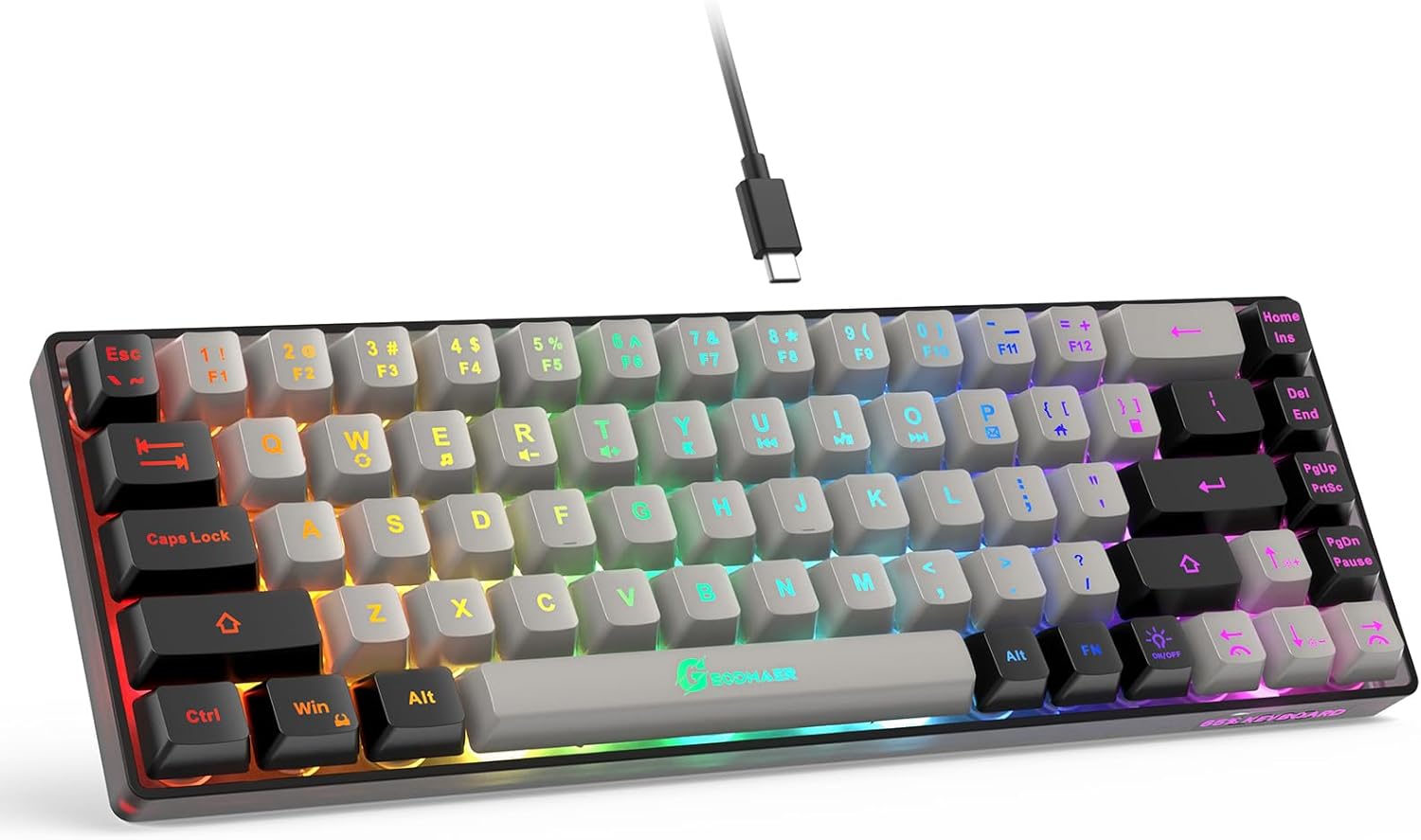
The gaming world is always in need of accessories that enhance the user experience, and the GEODMAER Special 65% Wired Backlit Mini Keyboard does just that. Designed specifically for PC, Laptop, and Mac gamers, this innovative ultra-compact gaming keyboard packs a punch with its 68 keys, anti-ghosting features, and budget-friendly price.
One pressing question among gamers is how a keyboard can truly enhance their gaming experience. The GEODMAER keyboard's ultra-compact design, with only 68 keys and backlit functionality, is tailored for the gaming community. Not only does it save space on your desk, but its anti-ghosting feature ensures that you never miss a key press, no matter how intense your gaming session gets. The backlit keys also allow for a more immersive experience, especially in low-light situations.
Price is always a significant factor when choosing gaming peripherals. The GEODMAER gaming keyboard, priced at just $12.97, offers an impressive range of features without breaking the bank. It provides a cost-effective solution for gamers who need reliable gear but are not ready to invest heavily. Even on a tight budget, gamers can enjoy enhanced functionality and performance, making it an attractive option.
Why might a gamer pick the GEODMAER keyboard over others? Its combination of affordability, compact design, and advanced features like anti-ghosting and backlit keys set it apart. Many users appreciate its design, which is not just for show but adds to the overall functionality. Whether you are gaming on a PC, laptop, or Mac, the GEODMAER keyboard aims to cater to a wide range of gamer preferences and needs.
The GEODMAER gaming keyboard boasts several noteworthy features: - **68 Keys**: Providing all essential functions while maintaining a compact size. - **Anti-Ghosting**: Ensures no missed keystrokes during intense gaming. - **Backlit Keys**: Enhances visibility in low-light conditions. - **Compatibility**: Works with PC, Laptop, and Mac. - **Design**: Grey-Black aesthetic adds a sleek look to your gaming setup.
Maximizing the potential of the GEODMAER gaming keyboard involves understanding its functions and features. Take advantage of the anti-ghosting capabilities to ensure smooth gameplay. Customize the backlit keys to match your gaming environment, creating an immersive experience. Make sure your keyboard is always connected correctly and update drivers regularly to ensure no issues arise.
While the GEODMAER keyboard can benefit a wide array of gamers, it is particularly suited for casual gamers and those who need an affordable yet efficient gaming accessory. If your gaming setup is compact, this keyboard fits seamlessly, offering all the required features without the bulk. Its versatility also makes it a practical choice for traveling gamers who need a reliable keyboard on the go.
Consider upgrading to the GEODMAER gaming keyboard when your current one no longer meets your gaming needs, or if you're entering the PC gaming world for the first time and need an affordable option. Whether it’s during a sale or when you need a reliable backup, this keyboard serves as an upgrade from standard, non-gaming-specific keyboards.
You can purchase the GEODMAER Special 65% Wired Backlit Mini Keyboard on popular e-commerce platforms such as Amazon, where reviews from other users can also be found to help you make an informed decision.
The GEODMAER gaming keyboard is priced attractively at just $12.97. This makes it one of the most budget-friendly options available, offering high functionality at a fraction of the cost of premium gaming keyboards.
The GEODMAER keyboard features 68 keys, providing all essential functions in a more compact layout. This is ideal for those who want to streamline their gaming setup without sacrificing necessary keys.
For gamers on a tight budget, the GEODMAER gaming keyboard could very well be the best option. It combines essential gaming features like anti-ghosting and backlit keys at an unbeatable price, making it highly competitive in the budget gaming accessories market.
Analyzing the GEODMAER keyboard, it's clear that while it offers great value, it does come with its set of drawbacks. Some customers reported issues with specific keys malfunctioning after a few weeks. However, this might be an isolated case, as others have found it quite satisfactory for its price range. The key's tactile response mimics that of more expensive keyboards, but the build quality seems to be average, as expected in this pricing tier.
-
- **A:** Yes, the GEODMAER gaming keyboard is compatible with PC, Laptop, and Mac.
-
- **A:** Yes, the keyboard has backlit keys with adjustable intensity.
-
- **A:** The exact length varies, but it is generally long enough for a standard desktop setup.
-
- **A:** The keys are relatively loud, similar to an old typewriter, which some users might find nostalgic.
In conclusion, the GEODMAER Special 65% Wired Backlit Mini Keyboard is a great option for budget-conscious gamers. While it has received mixed reviews, its low price point makes it a risk worth taking, especially for those who need an affordable gaming keyboard that gets the job done.
Given its price and feature set, the GEODMAER gaming keyboard offers substantial value. Despite some reported issues, its overall performance for casual gaming remains impressive. For those looking to invest in a budget-friendly gaming accessory, this keyboard is definitely worth considering.
Only In TestMarket
Average rating
 5
5
10
4
5
3
0
2
0
1
0


 Facebook
 Twitter
 Linkedin
 Reddit
 Pinterest




Ariana Sanders
Aug 18, 2024
My expectations were lower given the $12.97 price tag, but this gaming keyboard has held up nicely. The keys have a good responsive feel and the backlight is a cool feature. They are a bit loud, but it’s not a huge issue for me.
I use it for casual gaming and light office work. Decent performance all things considered.
Shipping
Item Quality
Customer Service
Packaging
Oliver Powell
Aug 19, 2024
I bought this as a gift for a friend who loves gaming. He appreciates the compact design and RGB lighting. The keyboard is somewhat rough around the edges, but performs well given its cost. Some keys can be noisy, but it's manageable.
Overall, it’s a good entry-level gaming keyboard and packs in some great features.
Shipping
Item Quality
Customer Service
Packaging
Lucas Cooper
Aug 20, 2024
Got this special 65% wired backlit mini keyboard for work-from-home use. It’s very compact and easy to type on. The build feels a bit rough, but it’s functioning well so far. The backlighting is nice and can be adjusted.
The keys are louder than anticipated, but not overly annoying. Overall, it’s a good, budget-friendly option.
Shipping
Item Quality
Customer Service
Packaging
Ava Campbell
Aug 21, 2024
Bought this as a backup keyboard for my setup. It's compact and fits perfectly in my small workspace. The backlit feature is useful and makes it easy to see the keys in low light. Some keys are a bit stiff and loud, but the anti-ghosting feature is reliable.
Not the best, but definitely worth the price if you need a basic, functional keyboard.
Shipping
Item Quality
Customer Service
Packaging
Lily Rivera
Aug 22, 2024
Picked up this keyboard mainly because it was super affordable. The 65% layout is convenient and saves space on my desk. The backlit keyboard looks cool, especially in the dark, though the keys are quite loud.
Some keys started to feel a little less responsive after a month, but for the price, it's a good deal. Decent for casual gaming.
Shipping
Item Quality
Customer Service
Packaging
Oliver Powell
Aug 18, 2024
Recommended
I was skeptical about getting this $12.97 gaming keyboard, but it's been a pleasant surprise. The build quality is decent, and the keys are responsive. The backlighting is great and adjustable, which adds a cool effect during late-night gaming sessions.
The noise from the keypresses is a bit much, but for the price, it's acceptable. Would recommend.
Shipping
Item Quality
Customer Service
Packaging
Thomas Reed
Aug 18, 2024
Needed a cheap yet functional keyboard for light gaming and general use. This one fits the bill. The mini size is perfect for my setup, and the anti-ghosting feature is a big plus.
The keys are slightly noisy, but the responsiveness and backlit features make up for it. No major issues so far after a couple of weeks.
Shipping
Item Quality
Customer Service
Packaging
Logan Powell
Aug 22, 2024
This special 65% wired backlit mini keyboard has been pretty good for the price. I've used it for gaming and casual typing. The key response time is impressive for such an inexpensive keyboard.
My only complaint is the loud typing noise. Regardless, the compact size and backlighting are solid features. Worth considering if you're on a budget.
Shipping
Item Quality
Customer Service
Packaging
Mackenzie Ruiz
Aug 20, 2024
Recommended
I bought this for my younger sister who started PC gaming recently. The compact size works well for her small desk, and she loves the customizable backlighting. It feels a bit rough compared to other more expensive keyboards, but it is very affordable. Some keys can be loud, but it's not a deal-breaker.
Highly recommended for beginners.
Shipping
Item Quality
Customer Service
Packaging
Lucas Stewart
Aug 16, 2024
For just under $13, I wasn't expecting much from this gaming keyboard, but it has exceeded my expectations in many ways. It came well-packaged and was easy to set up. The RGB backlighting is fantastic and adjustable.
While some keys are louder than I'd prefer, the keyboard's overall performance compensates for this. Happy with the purchase.
Shipping
Item Quality
Customer Service
Packaging
Daniel Reed
Aug 23, 2024
This mini keyboard is great for gamers on a budget. I've used it with my PC and Mac, and it works well on both. The anti-ghosting feature is fantastic; no input lag at all. It's compact yet doesn't feel cramped.
The keys do make a clicking noise which can be annoying, but for the price, it's a minor issue. Overall, a good deal for an affordable gaming keyboard.
Shipping
Item Quality
Customer Service
Packaging
Amelia Anderson
Aug 22, 2024
I purchased this grey-black keyboard mainly because of its affordability and features. The compact design is fantastic, saving a lot of desk space. I'm using it for both work and occasional gaming on my PC. The key response is decent, just a bit loud.
The backlit feature works well and can be adjusted. Packaging was basic, but shipping was quick. Overall, very useful for the price.
Shipping
Item Quality
Customer Service
Packaging
Chloe Nelson
Aug 18, 2024
Honestly, for this price, it's hard to find a better gaming keyboard. The 65% size is perfect for my limited desk space, and it doesn't feel cramped at all. I was pleasantly surprised by the build quality, which feels sturdy. Keys are a bit loud, but it doesn't bother me much.
The backlighting is really nice, and I haven't had any issues with the keys sticking or not responding.
Shipping
Item Quality
Customer Service
Packaging
Logan Powell
Aug 21, 2024
I've been using this gaming keyboard for a few weeks now, and overall, it's not bad. It feels a bit rough compared to more expensive models, but at $12.97, you really can't complain. The keys are responsive and the anti-ghosting feature works well for gaming. The backlight adds a nice touch, although it's not quite as bright as I expected.
Still, it gets the job done.
Shipping
Item Quality
Customer Service
Packaging
Charlotte Stewart
Aug 19, 2024
For the price, this gaming keyboard is a steal. I got it for my teen who spends hours gaming. The backlighting is sharp and easy to customize, which he loves. It's compact enough to fit on his cluttered desk, yet still comfortable to use.
The only downside is that the keys are a bit loud, but he says it makes him feel more connected to the game. Assembly and setup were a breeze, very satisfied.
Shipping
Item Quality
Customer Service
Packaging