 Today's Deal
Amazon Deals
Today's Deal
Amazon Deals
 Today's Deal
Amazon Deals
Today's Deal
Amazon Deals
 popular
 6
6
Views Today






Business Name: BIWIN TECHNOLOGY LLC

Business Address: 8725 NW 18th Terrace, SUITE 400, Miami, FL, 33172, US

Business Size: Micro
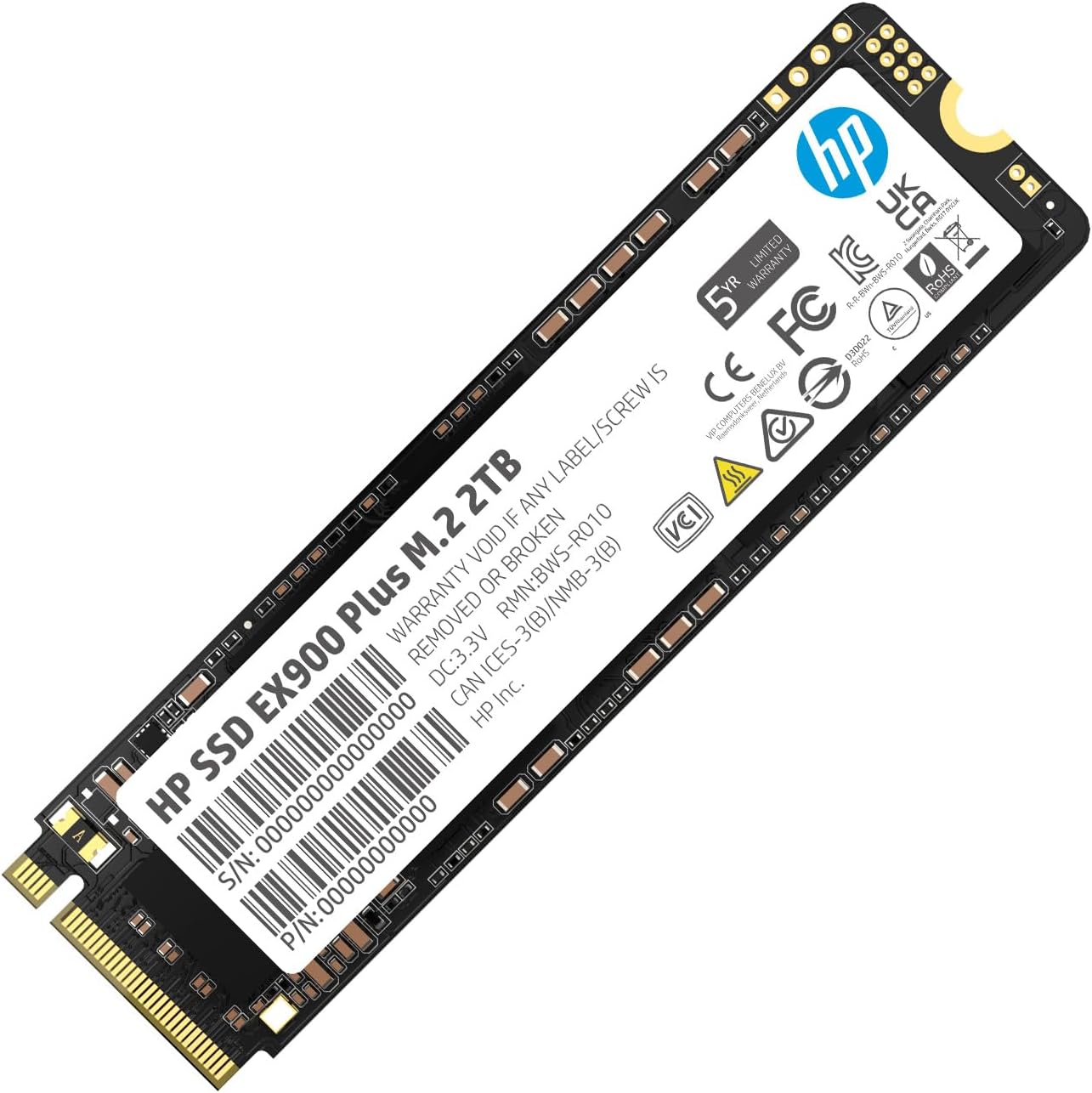
When it comes to boosting your computer's performance, storage upgrades play a vital role. The HP EX900 Plus SSD is a high-speed NVMe SSD offering 2TB of capacity, designed to meet your needs. Packed with features like M.2 Gen3 x4 compatibility and sustainable speeds of up to 3125 MB/s, this affordable SSD is an ideal solution for laptops.
Installing the HP EX900 Plus SSD in your laptop can revolutionize your computing experience. This drive doesn't just add storage; it significantly improves system boot times, data transfer speeds, and overall responsiveness. With read and write speeds up to 3125 MB/s, you'll notice a dramatic difference in how quickly applications launch and files open. Unlike traditional hard drives, SSDs are more durable and energy-efficient, which can extend the life of your laptop and reduce latency in everyday tasks.
At a price of $89.99, the HP EX900 Plus SSD offers excellent value for money. Given its 2TB storage capacity and high-speed performance, this SSD is a budget-friendly upgrade for any laptop. Not having to replace your entire laptop saves you money and reduces electronic waste. Plus, it's brand new in the box, meaning you get the full warranty and support from HP. Customer reviews highlight its affordability and efficiency, making it a popular choice for users looking to upgrade their old machines.
There are many SSDs on the market, but the HP EX900 Plus stands out for several reasons. Firstly, its high-speed performance ensures you're not left waiting during data-intensive tasks. Secondly, its 2TB capacity provides ample space for your files, software, and multimedia. Lastly, its compatibility with older laptop models, as noted by several reviewers, makes it a versatile option. Whether you own a newer laptop or an older model, this SSD is designed to fit and function efficiently.
The HP EX900 Plus SSD is packed with impressive features. Key among them is the M.2 Gen3 x4 interface, which ensures you're tapping into high-speed data transfer capabilities. With a read and write speed of up to 3125 MB/s, tasks that demand high data throughput are managed seamlessly. The drive's 2TB capacity offers a massive boost in storage, accommodating large software programs, high-resolution videos, and extensive file libraries. Furthermore, this SSD's thermal management technology ensures it remains cool and operational under load, prolonging its lifespan.
Installing the HP EX900 Plus SSD is straightforward, even if you're not a tech guru. Begin by ensuring your laptop is compatible with an M.2 Gen3 x4 SSD slot. Power off and unplug your laptop, then remove the back cover. Locate the M.2 slot and insert the SSD carefully, securing it with a screw if necessary. Boot up your laptop, and it should recognize the new drive immediately. You can then format the SSD and migrate your OS and files, either using software solutions or following detailed guides available online.
Compatibility is a primary concern when upgrading SSDs. The HP EX900 Plus SSD is designed to work with a range of laptops. It's particularly suitable for models that feature an M.2 Gen3 x4 interface. According to reviews, even older laptops like the 2017 HP Pavillion and old MacBooks (with an adapter) work seamlessly with this SSD. Always verify your laptop’s specifications and storage requirements before purchasing to ensure compatibility.
The best time to upgrade to the HP EX900 Plus SSD is when you notice sluggish performance, slow boot times, and frequent delays in accessing files. If your laptop's existing storage is nearing capacity or failing, an SSD upgrade is an immediate solution. Additionally, during sales events or promotional periods, often around holidays or back-to-school seasons, you might find even better deals on this already affordable SSD.
The HP EX900 Plus SSD is available for purchase from various online and offline retailers. Major e-commerce sites like Amazon, Best Buy, and Newegg frequently stock this model. Additionally, HP’s official website may offer exclusive deals or bundled offers. Always buy from reputable sources to ensure you're getting a genuine product, and consider checking customer reviews to affirm your choice.
With the HP EX900 Plus SSD, you get a substantial 2TB of storage, sufficient for most users’ needs, ranging from daily tasks to more intensive data storage. The SSD offers high-speed data transfer rates up to 3125 MB/s, drastically cutting down on file loading and data transfer times. At a price of $89.99, the cost per gigabyte is highly competitive, ensuring great value for your investment.
The HP EX900 Plus SSD’s 2TB storage capacity allows you to install and run numerous applications, from basic productivity tools to high-end software. Given its high-speed capabilities, you can efficiently run multiple applications simultaneously without experiencing major slowdowns. The SSD’s efficiency in data management means smoother multitasking, quicker application launches, and overall improved system responsiveness.
What makes the HP EX900 Plus SSD stand out as one of the best choices for laptop upgrades is its combination of speed, capacity, and affordability. Customer reviews consistently highlight its reliable performance and ease of installation. It rejuvenates older laptops by providing the speed and storage required for today's demanding applications, making it a highly recommended option.
In comparing the HP EX900 Plus SSD to other SSDs, it's evident that this model offers a balance of performance and affordability. While some SSDs may offer slightly higher speeds, they often come at a significantly higher price. The EX900 Plus provides competitive data transfer rates and substantial storage capacity at a reasonable cost, making it a well-rounded option for most users. User reviews further emphasize its reliability and effectiveness in both new and old laptops.
- *Is the HP EX900 Plus SSD compatible with all laptops?* As long as your laptop supports an M.2 Gen3 x4 interface, it should be compatible. Always check your laptop's specifications to confirm.
- *Can I install the HP EX900 Plus SSD myself?* Yes, the installation process is straightforward if you follow the proper steps and precautions.
- *Will this SSD improve my laptop’s battery life?* SSDs generally consume less power than traditional HDDs, which can help improve battery life.
- *Do I need to clone my existing drive to the new SSD?* Cloning is recommended if you want to preserve your existing operating system and files. Various software tools are available to facilitate this process.
If you're looking to breathe new life into your laptop, the HP EX900 Plus SSD is a worthwhile investment. With high-speed performance, large storage capacity, and budget-friendly pricing, it offers excellent value. User reviews highlight its reliability and ease of installation, making it a recommended upgrade for both new and old laptops.
Choosing the HP EX900 Plus SSD for your storage needs ensures a significant performance boost, ample storage, and great value for your money. With positive customer feedback and strong specs, it stands out as a reliable and efficient upgrade for most laptops. So, if you're looking to enhance your laptop’s speed and storage, the HP EX900 Plus SSD is an excellent choice.
Only In TestMarket
Average rating
 5
5
13
4
2
3
0
2
0
1
0


 Facebook
 Twitter
 Linkedin
 Reddit
 Pinterest




James Cooper
Aug 25, 2024
This HP EX900 Plus SSD is a reliable upgrade for an older laptop. Installation was simple, and it fit perfectly in my HP Pavilion.
Noticed significant speed improvements for general computing tasks. The SSD came sooner than expected and was well-packaged. At $89.99, it's a fantastic deal for the 2TB storage it offers.
Definitely worth considering for upgrades.
Shipping
Item Quality
Customer Service
Packaging
Charlotte Stewart
Aug 25, 2024
Upgraded my laptop with the HP EX900 Plus 2TB SSD, and it works flawlessly. Installation was straightforward, and the performance improvement was immediate. The product arrived securely packaged and ready to install.
This SSD is not the fastest on the market but does very well for daily tasks. Great value for the price.
Shipping
Item Quality
Customer Service
Packaging
Benjamin Roberts
Aug 29, 2024
The HP EX900 Plus SSD was a perfect fit for my older HP Pavilion laptop. Easy to install and provides a noticeable boost in speed compared to my old HDD.
The product arrived on time, well-packaged, and ready to go. It may not offer the fastest speeds, but it is great for normal use. Given the price and the 2TB capacity, it’s a great upgrade option.
Shipping
Item Quality
Customer Service
Packaging
Sofia Ross
Aug 27, 2024
Recommended
I replaced the existing 256GB SSD in my laptop with the HP EX900 Plus 2TB SSD for extra storage. The installation was smooth and quick.
The speed boost for everyday tasks is noticeable. It came well-packaged, brand new, and ready to install. At $89.99, it's an affordable way to extend the life of an older laptop.
Highly recommended.
Shipping
Item Quality
Customer Service
Packaging
Lucas Stewart
Aug 29, 2024
Upgraded my old laptop with the HP EX900 Plus SSD and noticed a significant improvement in performance immediately. The drive came securely packaged and was easy to install. It fits perfectly and worked right out of the box.
Though it’s not the fastest NVMe SSD available, the speed is adequate for regular tasks. Great value for money.
Shipping
Item Quality
Customer Service
Packaging
Joshua King
Aug 26, 2024
This 2TB HP EX900 Plus SSD fit perfectly into an old HP Pavilion. The installation process was simple, and I encountered no issues. The SSD arrived quickly and in excellent condition.
It has greatly improved my laptop's performance for typical everyday tasks, although it’s not the fastest when compared to newer models. For the price, it’s a great buy.
Shipping
Item Quality
Customer Service
Packaging
Grace Collins
Aug 29, 2024
Recommended
I purchased the HP EX900 Plus SSD to replace the sluggish HDD in my older laptop. The drive arrived earlier than expected, well-packaged and ready to go.
The noticeable improvement in speed and efficiency after installation was fantastic. It’s not the top-tier speed SSD, but it does well for day-to-day operations. Highly recommend for anyone looking to upgrade an existing older system.
Shipping
Item Quality
Customer Service
Packaging
James Cooper
Aug 31, 2024
Got this HP EX900 Plus SSD for an upgrade, and I’m highly impressed. This SSD fits my HP Pavilion perfectly, after ensuring compatibility. The speed increase was immediately noticeable, and it was relatively easy to install.
Very affordable at $89.99 for a 2TB NVMe SSD. It's not the fastest, but definitely worth the investment for general use.
Shipping
Item Quality
Customer Service
Packaging
Scarlett Price
Aug 29, 2024
Recommended
I used the HP EX900 Plus SSD to upgrade an old MacBook using an adapter, and it works flawlessly. The installation was straight forward and the performance improvement is remarkable.
This SSD is perfect for typical day-to-day activities and the 2TB capacity is ample for all my storage needs. The SSD came well-packaged, and looked premium. Highly recommend.
Shipping
Item Quality
Customer Service
Packaging
James Cooper
Aug 31, 2024
This HP EX900 Plus SSD has exceeded my expectations. Installed it on an older laptop and the speed boost was noticeable right away.
The product came in secure packaging and appeared brand new. It’s not the fastest SSD, but for regular daily use, it's more than sufficient. The 2TB storage capacity is also very handy.
Very satisfied with this purchase.
Shipping
Item Quality
Customer Service
Packaging
Mila Campbell
Aug 26, 2024
Bought the HP EX900 Plus SSD for an old HP Pavilion model, and it performed exceptionally well. The SSD arrived in pristine condition and the installation was easy. Transitioning from a traditional HDD to this SSD, the difference in boot time and load speeds is impressive.
For the price of $89.99, it’s a no-brainer for anyone looking to breathe new life into their aging laptop.
Shipping
Item Quality
Customer Service
Packaging
Emily Scott
Aug 25, 2024
Upgraded my laptop with the HP EX900 Plus SSD, and it's been a game-changer. Installation was a breeze, and I saw immediate improvements in speed and performance.
The 2TB capacity is great for storing all my files and software applications. The price is quite affordable, given the quality and performance. Ensure your laptop model supports it before purchasing.
Shipping
Item Quality
Customer Service
Packaging
Ava Green
Aug 25, 2024
Recommended
I bought this HP EX900 Plus SSD to replace a very limited drive in an old laptop. The installation was seamless, and the SSD has dramatically increased the speed and efficiency of my device. It may not have blazing fast speeds, but it handles everyday tasks efficiently.
The packaging was excellent, and the price is very reasonable for the benefits it provides. Definitely recommend getting a couple.
Shipping
Item Quality
Customer Service
Packaging
Henry Ward
Aug 31, 2024
The HP EX900 Plus SSD was worth every penny. It arrived earlier than expected and has greatly improved my laptop's performance.
I had to use an adapter to install it in an older MacBook, but the process was smooth and hassle-free. While it may not be the fastest drive on the market, it is perfect for regular daily tasks. The packaging was secure and the product felt sturdy and high-quality.
Shipping
Item Quality
Customer Service
Packaging
David Jenkins
Aug 25, 2024
I recently bought the HP EX900 Plus SSD for my 2017 HP Pavilion laptop, and it works like a charm. The installation process was straightforward. I appreciate that it's the same brand and well-suited for my older model, as current m2 SSDs wouldn’t fit. Just a heads up to everyone: please ensure you check your computer model number to verify compatibility.
This SSD revitalized my laptop significantly, and I couldn't be happier with the upgrade.
Shipping
Item Quality
Customer Service
Packaging