 Today's Deal
Amazon Deals
Today's Deal
Amazon Deals
 Today's Deal
Amazon Deals
Today's Deal
Amazon Deals
 popular
 8
8
Views Today






Business Name: Nelu LLC

Business Address: 1801 S Decatur Blvd, 14923, LAS VEGAS, NV, 89102, US

Business Size: Micro
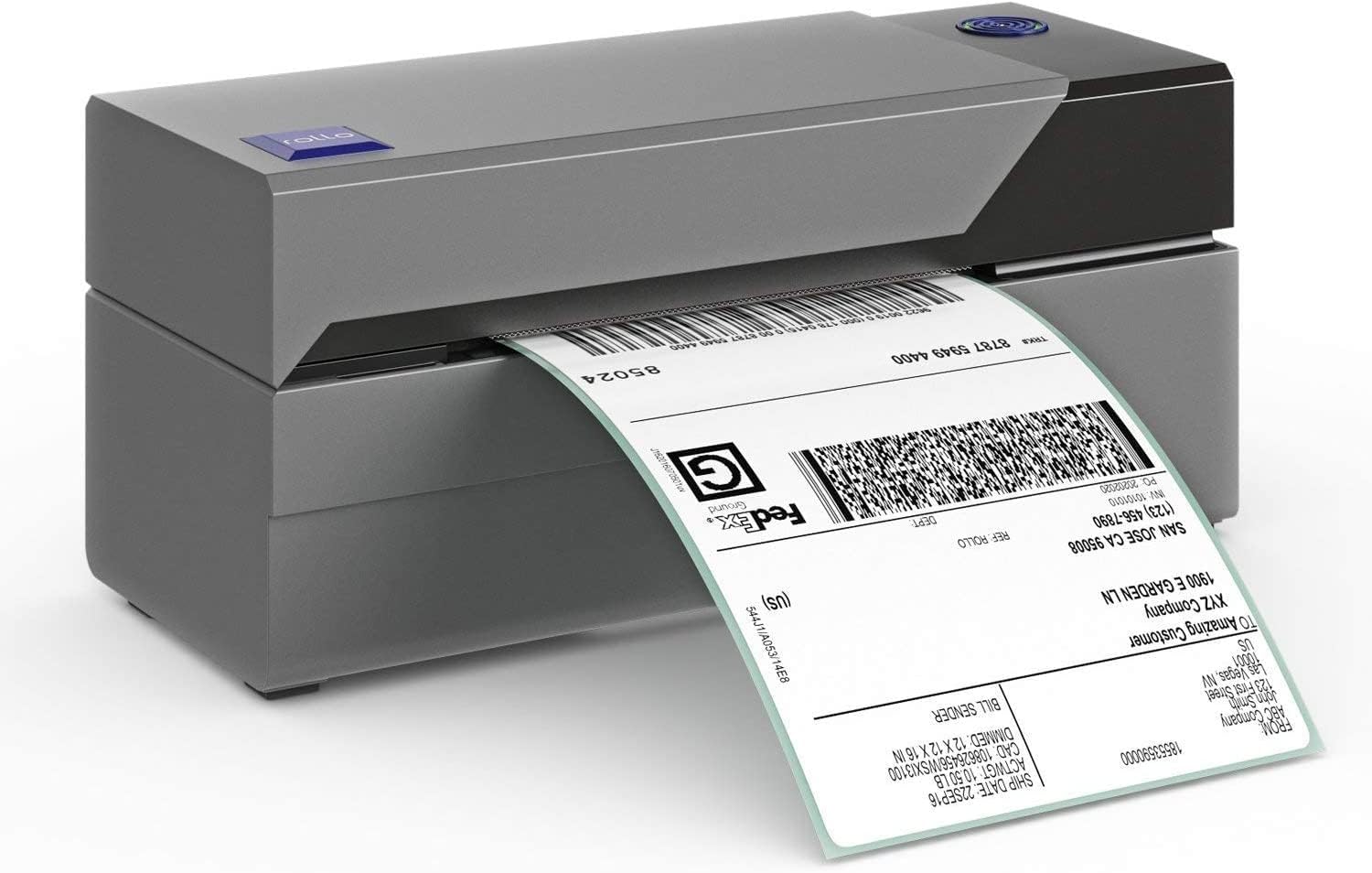
If you’re in the market for a reliable and efficient way to print your shipping labels, the Rollo USB Shipping Label Printer is a game changer. Designed specifically for commercial-grade shipping needs, this thermal printer is both high-speed and budget-friendly. But what makes it stand out from the crowd?
The Rollo USB Shipping Label Printer offers numerous benefits that cater especially to online sellers and businesses. Firstly, it significantly reduces the time and effort required to produce shipping labels. It eliminates the need for ink and toner, thanks to its advanced direct thermal technology. Additionally, it offers compatibility with a wide range of shipping platforms like USPS, UPS, and FedEx. The printer’s durability and reliability make it an essential tool for businesses that need to maintain a high volume of shipments.
When evaluating cost-effectiveness, the Rollo USB Shipping Label Printer offers remarkable value. Priced at $179.99, it might seem like an upfront investment, but consider the long-term savings from not needing ink or toner. Furthermore, its fast printing speed of up to 150mm/s can save considerable time, which translates directly into cost efficiency.
You should consider the Rollo USB Shipping Label Printer if ease of use, reliability, and speed are your primary concerns. Unlike traditional printers, it is specifically designed to handle the rigors of high-volume shipping tasks. It is versatile and compatible with almost any direct thermal label, including free UPS labels, making it an indispensable tool for businesses.
The standout feature of the Rollo USB Shipping Label Printer is its high-speed printing capability. Capable of printing 4x6 shipping labels at speeds up to 150mm/s, it efficiently handles bulk printing tasks. The technology behind it ensures crisp, clear, and durable labels that can withstand the rigors of shipping and handling. Another special attribute is its broad compatibility, seamlessly integrating with popular e-commerce platforms.
Setting up the Rollo USB Shipping Label Printer is straightforward, though a few tips can make it smoother. First, watch a setup video to understand the basics. Connect the printer to your computer using the included USB cable. Download and install the Rollo driver from their official website. When loading labels, ensure you close the printer head before feeding the label into it to avoid any feeding issues. Once the setup is complete, calibrate the printer to accurately read the labels.
Rollo USB Shipping Label Printer is highly versatile, supporting a wide range of e-commerce and shipping platforms. It works well with major carriers like USPS, UPS, DHL, and FedEx. Additionally, it is compatible with popular online storefronts such as Amazon, eBay, Etsy, and Shopify. Whether you use a PC or Mac, the Rollo is designed to operate seamlessly, ensuring that your shipping process remains uninterrupted.
The best time to utilize the Rollo USB Shipping Label Printer is when you’re preparing to ship products in bulk. Given its high-speed capabilities and ease of use, the Rollo is ideal during peak shipping seasons like holidays or sales events. Anytime you find yourself needing to create accurate, professional-quality shipping labels quickly, the Rollo shines.
The Rollo USB Shipping Label Printer is available through various online retailers. You can purchase it directly from Rollo’s official website, Amazon, Walmart, and other major e-commerce platforms. Given its specialized nature, buying from a reputable seller ensures you receive a genuine product and effective customer support.
As previously noted, the Rollo USB Shipping Label Printer is priced at $179.99. This cost covers the printer itself, a USB cable, and a quick start guide. Considering its high-speed capabilities and the absence of ongoing ink or toner expenses, it offers excellent value for the money.
The Rollo USB Shipping Label Printer is capable of handling a high volume of labels, given its commercial-grade build. It can manage thousands of labels without experiencing wear and tear, making it a suitable choice for businesses with substantial shipping needs.
For those searching for an efficient, reliable, and affordable shipping label printer, the Rollo USB Shipping Label Printer emerges as one of the best options. From its high-speed performance to its broad compatibility, it offers numerous advantages over other label printing solutions.
Customer reviews highlight the overall satisfaction with the Rollo USB Shipping Label Printer. Many users appreciate the time-saving features and high-quality prints. Common praises include its straightforward setup process, though some mention initial hiccups that were easily resolved with video tutorials. Users consistently recognize it as a significant upgrade from traditional label printers.
-
- A: Yes, it is compatible with both Mac and PC. -
- A: No, it is compatible with almost any direct thermal label. -
- A: Ensure you close the printer head before feeding the label into it.
Given its numerous benefits, ease of use, and time-saving features, the Rollo USB Shipping Label Printer is definitely worth the investment. It has garnered positive reviews for its efficiency and reliability, making it a valuable asset for any business involved in shipping.
In conclusion, the Rollo USB Shipping Label Printer stands out as a top choice for anyone involved in e-commerce or high-volume shipping. It offers a blend of speed, reliability, and cost-efficiency that’s hard to beat. While it does have a few quirks, these are generally minor and easily manageable. Overall, it is a highly recommended tool for enhancing your shipping operations.
Only In TestMarket
Average rating
 5
5
11
4
4
3
0
2
0
1
0


 Facebook
 Twitter
 Linkedin
 Reddit
 Pinterest




Charlotte Stewart
Aug 31, 2024
Recommended
I've been utilizing the Rollo thermal printer for all my shipping needs, and it’s excellent. No more aligning and cropping labels—just print and go. Highly recommend this if you ship frequently for your e-commerce business.
The labels come out sharp and precise.
Shipping
Item Quality
Customer Service
Packaging
Mason Jenkins
Sep 04, 2024
The Rollo printer is indeed a game-changer for my online business. My favorite part is how fast it prints labels—within seconds! The labels are clear and easy to read, making it perfect for my shipping needs on Etsy. It’s definitely a time-saver.
Shipping
Item Quality
Customer Service
Packaging
Charlotte Kelly
Sep 01, 2024
Setting up the Rollo USB Shipping Label Printer was a bit of a learning curve for me, but once done, it's been a breeze. The labels print with high clarity, and it works well with USPS shipping labels. Just make sure you have the right software configuration.
Shipping
Item Quality
Customer Service
Packaging
William Scott
Sep 05, 2024
I was using a normal desktop printer for shipping labels before switching to the Rollo. This thermal printer is so much better—no more ink smudges, and it’s incredibly quick. It’s especially good for printing multiple labels for my Shopify store in one go.
Shipping
Item Quality
Customer Service
Packaging
Lily Rivera
Sep 01, 2024
The Rollo thermal printer has definitely taken my shipping game up a notch. My packages now have clean, professional-looking labels, and the printer works well with my Windows PC. Setup instructions could be better, but customer support was helpful when I needed it.
Shipping
Item Quality
Customer Service
Packaging
Logan Powell
Sep 03, 2024
Transitioning to the Rollo USB Shipping Label Printer for my business has been one of the best decisions. It’s so efficient and fast. There were a few problems during the setup, mainly with feeding the labels correctly, but after figuring it out, it’s been seamless.
Shipping
Item Quality
Customer Service
Packaging
David Jenkins
Aug 31, 2024
I’m using the Rollo label printer for my online store, and it’s relatively easy to use. Prints are high-speed, and the thermal print technology means I don’t have to buy expensive ink cartridges. Took a bit of tinkering to get it perfect, but it’s highly efficient overall.
Shipping
Item Quality
Customer Service
Packaging
Abigail Kelly
Sep 01, 2024
As a small business owner on eBay and Amazon, this printer has streamlined my workflow. The Rollo USB Shipping Label Printer is quick and reliable. Printing directly through the USB connection is handy, and the labels are scannable without any issues. The only downside is occasional blank label ejections, but it's manageable.
Shipping
Item Quality
Customer Service
Packaging
Michael Rivera
Sep 05, 2024
I got the Rollo thermal printer after much research and comparison. The packaging was secure, and the device looks robust. Setup was initially a tad tricky, but once it was done, it worked flawlessly. My labels are neat, and the print quality is top-notch for both USPS and UPS packages.
Shipping
Item Quality
Customer Service
Packaging
Mia Adams
Aug 30, 2024
At first, I was overwhelmed with the setup of the Rollo label printer. The user manual wasn’t that clear, but thanks to a helpful video I found online, I managed. Now, printing 4x6 shipping labels from my Shopify store is a matter of a few clicks, and it’s worth every penny.
Shipping
Item Quality
Customer Service
Packaging
Maya Howard
Sep 02, 2024
Having a commercial-grade thermal printer at this price point is amazing. The Rollo printer churns out labels much faster than my Ecotank and with no messy ink. It's great for my small business shipping needs on Amazon. A great buy!
Shipping
Item Quality
Customer Service
Packaging
Isabella Brooks
Aug 30, 2024
The Rollo USB Shipping Label Printer is a lifesaver. My labels are now professional-looking and consistent. Using it with my MacBook Pro was a breeze after configuring the settings as per an online guide. It especially helped automate my eBay shipping process.
Shipping
Item Quality
Customer Service
Packaging
Oliver Reed
Aug 30, 2024
I was hesitant to transition from my regular printer to this thermal printer for my Etsy shop. I don't regret it—this Rollo printer is not only faster but also produces really high-quality labels. The only issue I encountered was setting it up, but a quick YouTube search solved it. Definitely worth the investment.
Shipping
Item Quality
Customer Service
Packaging
Ariana Sanders
Sep 02, 2024
If you’re shipping a lot of packages like I am, this Rollo label printer will save you so much hassle. Previously, I was wasting time aligning and cutting labels on my regular printer. The setup was a bit confusing initially, but once I found an online video that showed the right way, it was smooth sailing.
Shipping
Item Quality
Customer Service
Packaging
Sofia Peterson
Sep 02, 2024
When I first switched to the Rollo USB Shipping Label Printer, I was skeptical. Having relied on inkjet printers for years, this thermal printer is a game-changer! It’s surprisingly lightweight and compact but doesn’t compromise on speed or quality. My labels print in seconds, and they’re crisp and clear every time.
Shipping
Item Quality
Customer Service
Packaging