 Today's Deal
Amazon Deals
Today's Deal
Amazon Deals
 Today's Deal
Amazon Deals
Today's Deal
Amazon Deals
 popular
 6
6
Views Today





Business Name: ShenZhen QIKELA Technology Co. LTD

Business Address: 坂田街道坂田社区坂雪岗大道3010号2层201室, 深圳市, 龙岗区, 广东, 518100, CN

Business Size: Micro
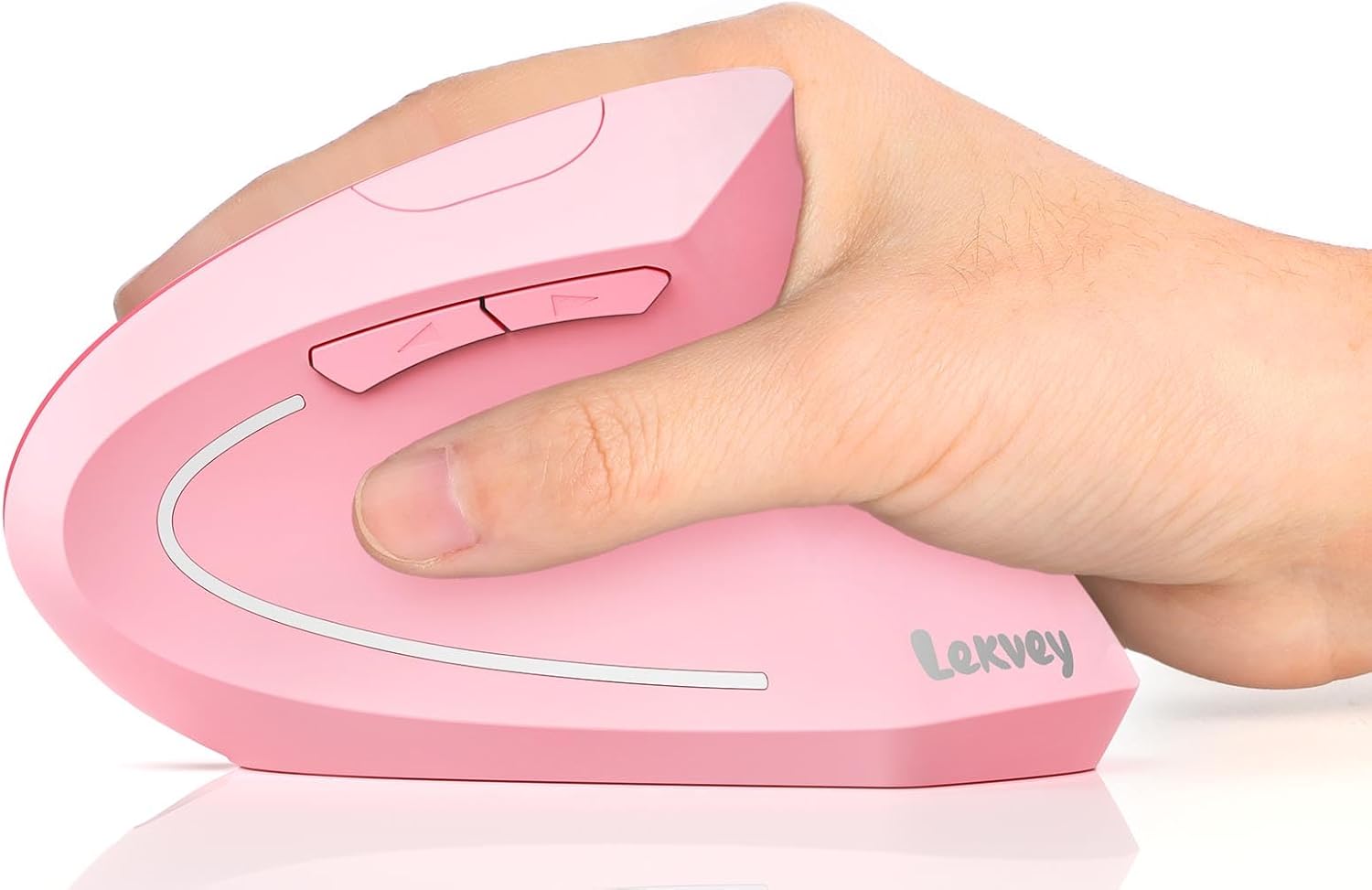
The Lekvey Ergonomic Mouse is a vertical wireless mouse designed to enhance comfort, minimize wrist strain, and offer a customizable user experience for laptop, desktop, and notebook users at an affordable price. With features such as ergonomic design, rechargeable USB, and adjustable DPI settings, it's aimed at providing a high-quality, budget-friendly alternative to traditional mice.
Choosing the Lekvey Ergonomic Mouse brings numerous benefits, especially for those suffering from thumb or wrist pain. As reviewers have noted, the vertical design encourages a natural hand position, reducing stress on the wrist and thumb muscles. Users like how it feels in the hand, noting the comfort and ease of use even after extended periods. Additionally, the mouse offers customizable DPI settings (800/1200/1600), allowing for precise control and smooth tracking on various surfaces, enhancing productivity and usability.
Yes, the Lekvey Ergonomic Mouse is highly affordable, priced at just $19.99. This makes it an excellent choice for gamers, professionals, and everyday users who need a reliable and comfortable mouse without breaking the bank. At this price point, the mouse offers exceptional value with high-quality features like rechargeable batteries, wireless functionality, and a stylish design in pink.
People often wonder why they should switch to the Lekvey Ergonomic Mouse from a traditional one. The primary reason is comfort and health benefits. Users with years of traditional mouse usage experience thumb and wrist pain that the vertical design helps alleviate. The ergonomic shape promotes a more natural grasp, reducing the impact of long hours of computer use.
The uniqueness of the Lekvey Ergonomic Mouse lies in its design and functionality. Unlike standard mice, its vertical alignment aims to reposition your wrist to a less strenuous angle. Besides, it includes six buttons and customizable DPI settings that can be tailored to your specific requirements, making it adaptable for various tasks. The ability to recharge via USB also means you save on battery replacement costs, making it both convenient and environmentally friendly.
Operating the Lekvey Ergonomic Mouse is straight-forward. The vertical design allows your hand to rest in a handshake position, reducing strain. It connects wirelessly to your device via a USB receiver, with plug-and-play functionality requiring no additional software. You can switch DPI settings with just one click, depending on whether you are gaming, working, or browsing, ensuring a smooth and responsive experience.
The Lekvey Ergonomic Mouse is compatible with various systems including laptops, desktops, and notebooks. It works seamlessly with Windows and macOS operating systems, ensuring wide usability. Whether you need a mouse for your work computer, your personal laptop, or even a media navigation system, this mouse fits the bill.
If you find yourself experiencing wrist or thumb pain from prolonged traditional mouse use, it may be time to switch to the Lekvey Ergonomic Mouse. Additionally, if you are in need of a mouse offering better precision and customizable controls for different tasks, this is a worthy consideration. Its plug-and-play functionality means you can make the switch effortlessly.
The mouse is ideal for use in various settings such as home offices, workplaces, schoolwork, and gaming stations. Its reliable wireless connection allows for flexible usage spaces, even up to 20 feet away, making it versatile enough for both professional and personal use.
The Lekvey Ergonomic Mouse is priced at an affordable $19.99, which is quite competitive given its range of features. This budget-friendly price point makes it accessible to a wide range of users looking for ergonomic comfort without spending too much.
The mouse features six buttons, which offer enhanced functionality, including standard left and right clicks, as well as additional customizable side buttons for efficiency in different tasks. The scroll wheel is smooth with a tactile feel, providing easy navigation and a satisfying click.
Among its best features are its ergonomic vertical design, customizable DPI settings, and long battery life. Users particularly appreciate its comfortable grip, precise tracking across various surfaces, and ease of use during prolonged sessions. The wire-free experience, facilitated by a reliable USB connection, and the rechargeable battery further enhance its appeal.
Performance-wise, the Lekvey Ergonomic Mouse exceeds expectations, providing smooth tracking and precise cursor control. Users have praised its responsiveness and reduced wrist strain. Whether for professional tasks or casual browsing, it delivers consistently.
*Does the mouse require any software to install?* - No, it’s a plug-and-play device.
*Is it compatible with Mac computers?* - Yes, it works with both Windows and macOS.
*How long does the battery last on a single charge?* - It can last several weeks on a single full charge.
Given its ergonomic benefits, range of features, and affordable price, the Lekvey Ergonomic Mouse is a worthwhile investment for anyone seeking comfort and efficiency in their daily computing tasks. Its positive reviews and high satisfaction rate among users further solidify its value proposition.
If you’re in the market for an ergonomic, reliable, and cost-effective mouse, the Lekvey Ergonomic Mouse should be at the top of your list. Offering a blend of comfort, functionality, and style, it’s designed to meet the needs of various users while providing exceptional value.
Only In TestMarket
Average rating
 5
5
9
4
6
3
0
2
0
1
0


 Facebook
 Twitter
 Linkedin
 Reddit
 Pinterest




Sofia Ward
Oct 21, 2024
Bought the Lekvey Ergonomic Mouse for my computer, and it has been an excellent purchase. The vertical design is more comfortable than I thought it would be, reducing my wrist pain significantly. The mouse operates smoothly, and the DPI settings are a useful feature for switching between tasks. The USB charging is convenient; I’ve been using it heavily for two weeks without needing to recharge.
It was easy to set up, with a reliable wireless connection. This mouse offers great value for its price point and does not disappoint.
Shipping
Item Quality
Customer Service
Packaging
Elena Reed
Oct 21, 2024
Lekvey Ergonomic Mouse is a decent product for its price. I’ve had it for about a month, and it has been performing well. The vertical design did take some getting used to, but now it's second nature. The battery life is long, and I like that it’s rechargeable via USB.
Tracking is precise, and the DPI settings are easy to change. It’s a well-made mouse that provides comfort and alleviates wrist pain, making computer work more enjoyable. Shipping was quick, and the packaging was solid.
Shipping
Item Quality
Customer Service
Packaging
Charlotte Stewart
Oct 24, 2024
This mouse from Lekvey has been a great addition to my work setup. I noticed an immediate reduction in wrist strain, and the vertical design is surprisingly comfortable. The mouse has a premium feel and fits nicely in my hand.
The battery life is noteworthy, lasting weeks on a single charge. The DPI settings cater to various needs, from high-speed tasks to precise work. Its affordable price makes it an excellent choice for anyone looking to switch to an ergonomic mouse without breaking the bank.
Shipping
Item Quality
Customer Service
Packaging
Henry Ward
Oct 26, 2024
I've had the Lekvey Ergonomic Mouse for a few weeks now, and it's been a positive experience. It took about a week to fully adjust to the vertical design, but my wrist no longer aches after long hours of use. The mouse tracks well on different surfaces, and the DPI settings allow for precise control whether I'm working on detailed tasks or just browsing. The battery life is impressive; I haven’t needed to recharge it yet.
It’s a great ergonomic option at an affordable price.
Shipping
Item Quality
Customer Service
Packaging
Ella Murphy
Oct 24, 2024
This Lekvey Ergonomic Mouse has been a game-changer for my PC use. After suffering from wrist pain for months, I decided to make the switch to an ergonomic mouse, and this one has exceeded my expectations. The vertical design took a little time to get accustomed to, but now it feels much better than a traditional mouse. The USB charging is convenient, and the battery life is exceptional.
The DPI settings are easy to adjust, which is great for different tasks. It’s stylish and budget-friendly—what more could you want?
Shipping
Item Quality
Customer Service
Packaging
Grace Wright
Oct 21, 2024
The Lekvey Ergonomic Mouse is a surprisingly good mouse for its price. I bought it for my home office and have been using it daily for three weeks. The mouse is comfortable to use and fits well in my hand.
The height took some getting used to, but after a few days, it started to feel natural. Track movement is precise, and the DPI adjustments are easy to make. It's rechargeable, which saves the cost and hassle of replacement batteries.
Packaging was secure, and setup was a breeze.
Shipping
Item Quality
Customer Service
Packaging
Joseph Robinson
Oct 19, 2024
Have been using the Lekvey Ergonomic Mouse for around a month now, and my wrist pain has significantly decreased. The transition to an ergonomic, vertical mouse was smoother than I expected. The battery life is impressive, and the wireless connection is stable without any lag.
I also love the pink color—it’s a nice change from the usual black or white peripherals. It fits comfortably in my hand and the customizable DPI settings are excellent for both high-precision work and general use. It's a budget-friendly option that doesn’t compromise on quality.
Shipping
Item Quality
Customer Service
Packaging
Lily Adams
Oct 25, 2024
After much research, I decided to buy the Lekvey Ergonomic Mouse for my laptop. I'm glad I made this choice. This mouse provides a comfortable grip, and the vertical design does reduce wrist strain.
I had to adjust to its height, but now I hardly notice it. It works well on various surfaces, and the rechargeable battery is holding up strong even after continuous use. I also appreciate that it has multiple DPI settings, making it suitable for different applications, from detailed design work to everyday browsing.
Shipping
Item Quality
Customer Service
Packaging
Noah Rivera
Oct 20, 2024
Recommended
Very pleased with my purchase of the Lekvey Ergonomic Mouse. It arrived quickly and was well-packaged. I use it for work on my desktop, and it has noticeably reduced the stress on my wrist and thumb.
The design took a few days to get used to, but now I find it much more comfortable than my previous traditional mouse. The DPI settings are highly customizable, which comes in handy for different types of tasks. Overall, it’s an excellent value for the price, and I would recommend it to anyone experiencing wrist discomfort.
Shipping
Item Quality
Customer Service
Packaging
Grace Collins
Oct 23, 2024
The Lekvey Ergonomic Mouse is a reliable and affordable option for anyone looking to switch to an ergonomic mouse. I've been using it on my notebook for a couple of weeks, and it performs well. The vertical design was a bit weird at first, but now it feels more comfortable than my old mouse.
The battery lasts long, and the recharge via USB is convenient. The customization of DPI settings is great for different tasks, and the mouse works perfectly on all surfaces I've tried so far, including my glass desk.
Shipping
Item Quality
Customer Service
Packaging
Owen Ramirez
Oct 21, 2024
I’ve had the Lekvey Ergonomic Mouse for about three weeks, and it’s been a game changer. As someone who spends hours a day on the computer, my wrist and thumb were starting to feel the strain of my old mouse. This vertical mouse has significantly alleviated that pain.
The battery life is phenomenal; I’ve yet to charge it after the initial full charge. The setup was straightforward, and it connected to my laptop without any issues. I’m still adjusting to the height, but it’s becoming easier as I use it more.
Shipping
Item Quality
Customer Service
Packaging
Eli Jenkins
Oct 23, 2024
Ordered the Lekvey Ergonomic Mouse for my desktop computer, and I have to say it’s pretty good. The mouse feels sturdy and fits well in my hand. Initially, the vertical design took a bit of getting used to, but now it feels more natural. The USB charging feature is a plus and means I don’t have to worry about batteries running out.
The mouse operates smoothly with no lag, making it great for both work and casual use. Shipping was quick, and the product arrived in perfect condition. Definitely worth the price!
Shipping
Item Quality
Customer Service
Packaging
David Jenkins
Oct 26, 2024
If you're in the market for an affordable yet high-quality ergonomic mouse, the Lekvey Ergonomic Mouse is a solid choice. I've been using it on my PC for a week, and the difference in my wrist comfort is noticeable. The mouse tracks precisely, whether I'm working on my desk or on a softer surface like a couch cushion.
I also like the stylish pink color, which adds a nice touch to my workspace. The battery life is long-lasting, and I love that it's rechargeable via USB, saving me from the hassle of buying new batteries.
Shipping
Item Quality
Customer Service
Packaging
David Jenkins
Oct 23, 2024
The packaging of the Lekvey Ergonomic Mouse was neat and secure, and setting it up took no time at all. The mouse immediately connected to my laptop as soon as I plugged in the USB receiver. I appreciate the customizable DPI settings which make it versatile for different tasks, from graphic design to regular browsing. The scroll wheel is smooth, and the tactile feel of the buttons is satisfying.
Although the vertical design was odd for the first few days, I quickly got used to it and now find it much more comfortable than a traditional mouse.
Shipping
Item Quality
Customer Service
Packaging
Logan Powell
Oct 23, 2024
I've been using the Lekvey Ergonomic Mouse for a month now, and I can definitely say it's better than my old traditional mouse. While it takes a bit of time to get used to the vertical design, the benefits for my wrist far outweigh the adjustment period. Initially, my thumb and wrist were a bit sore as they acclimated to the new angle, but this discomfort faded after a week. What really stands out to me about this mouse is its smooth tracking and comfortable grip.
The battery life is impressive; I haven't needed to recharge it yet, and I'm a heavy user.
Shipping
Item Quality
Customer Service
Packaging