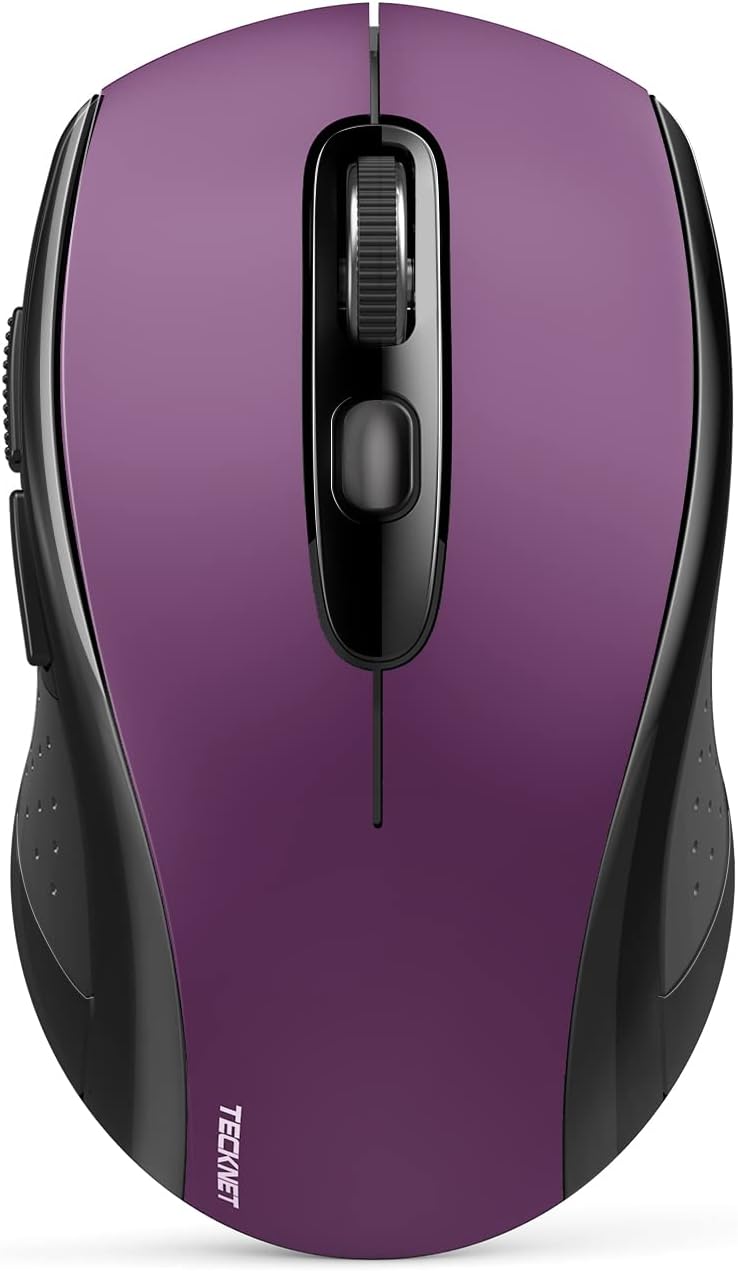
TECKNET Bluetooth Wireless Mouse, 2-in 1 Bluetooth 5.0 & 3.0 Mouse 2.4G Wireless Portable Optical Mouse with USB Nano Receiver, Ergonomic Mouse for Laptop, MacBook, PC, Windows, Android, OS System Purple - Testmarket Special Deals
Deals Trends Proviews Blog
Company
Are you a Seller?
Login Sign up
TECKNET Bluetooth Wireless Mouse, 2-in 1 Bluetooth...

TECKNET Bluetooth Wireless Mouse, 2-in 1 Bluetooth 5.0 & 3.0 Mouse 2.4G Wireless Portable Optical Mouse with USB Nano Receiver, Ergonomic Mouse for Laptop, MacBook, PC, Windows, Android, OS System Purple

$13.59 $25.99 48%
BRICKLAYING DIRECT

BRICKLAYING DIRECT

danger
rating_star_full.svg rating_star_full.svg rating_star_full.svg rating_star_full.svg rating_star_seventy_five.svg
4.73
deal_rating_info
briefcase

Business Name: BRICKLAYING LIMITED

location

Business Address: 5A, 1/F, WANG FU BUILDING, NO. 5-7 CHATHAM COURT, TSIM SHA TSUI, KOWLOON, 999077, HK

buildings

Business Size: Micro

Product Details
  • Enable High-Efficiency Multiple Working Modes: 3 modes bluetooth wireless mouse(BT5.0 & BT3.0 + 2.4GHz), realizes free switches between 2 devices(with Bluetooth mode and 2.4G mode) in a switch button on the wireless mouse. Simple & convenient to work from the desktop to the laptop, or tablet to Macbook, etc.
  • 2 in 1(Bluetooth+2.4Ghz USB) Computer Mouse Wireless: Bluetooth mode works with Windows/ Android/ MAC OS system, choose the Bluetooth version of your device, bluetooth mouse for laptop with BT5.0 and BT3.0 to choose from; 2.4Ghz USB mode works with laptop, desktop, or any device with USB-A port, simply plug in the receiver, use as a usb wireless mouse. Or put away the adapter, use it as a Bluetooth mouse. Also support both connection methods at the same time.(Can not connect though WiFi)
  • Connect 2 Devices Simultaneously: Supports 2 devices simultaneously with just one TECKNET wireless mouse for laptop, desktop, tablet, and so on, you can seamlessly switch between multiple devices with just a click, without the trouble of plugging and pairing. Bluetooth mouse for laptop according to the adaptation method of your device with two connectivity options to choose from: one USB-A and another Bluetooth connect, note: Macbook without a USB port can be connected with Bluetooth
  • 6 Adjustable DPI Levels: To meet the needs of different groups, wireless mouse for laptop with 6 levels of DPI, 800/1200/1600/2400/3200/4000, and comes with a Nano receiver (stored in the back of the wireless mouse). No need for any driver, and you can plug and play the wireless mouse directly, and advanced TeckNet Tru-Wave optical tracking technology ensures precise tracking on most surfaces.
  • Comfortable & Durable Design: Ergonomic design with an elegant profile, this wireless mouse for laptop is perfect to fit your hands, providing a comfortable user experience. Mouse for laptop tested over 10 million times click lifespan ensures long-term stable use. The wireless mouse is medium-sized and is very convenient to carry on trips or outings, note, If your palms are larger and like an oversized mouse, please consider carefully
  • Hassle-free Design: Wireless mouse with smart auto-sleep mode, battery life up to 18 months(NOTE: batteries not included, battery life may vary); Compatible with Windows 11/10/8/7/XP/Vista and Mac OS X/Linux/Android/iOS(13+). Moving quickly forward or back between documents or browsing websites is a breeze with Back/Forward buttons(NOTE: not suitable for Mac System) on the left side of the mouse, which may affect left-handed use, please understand
  • 36 Months Support: If you encounter any problems in using the 2-in-1 wireless bluetooth mouse for laptop, please feel free to contact our professional customer service team, enjoying TECKNET 36 Months Warranty (Registered Only). If the computer mouse wireless cannot connect, try replacing the battery and restart the bluetooth mouse. Check the indicator color: green for 2.4G USB mode, blue for Bluetooth mode, not support WiFi connection.
  • Kind Tips Before Purchase: ⚠️Not rechargeable, requires AA batteries. ⚠️If your device only has USB-C port, USB-A receiver cannot be used. However, you can still connect the wireless mouse via Bluetooth. ⚠️If your device doesn't support USB-A or Bluetooth connections, this mouse won't be compatible. ⚠️On iPad, the Bluetooth mouse cursor appears as a round dot instead of an arrow. ⚠️On Mac systems, the side buttons (forward/backward) are not functional
Promotions
Deals Promotions Deals Promotions Deals Promotions
Promote Your Deals

Coupons, and Products on our website now.

apply now
Deals Promotions Deals Promotions
Explore Products

Coupons, and Products on our website now.

apply now
go top icon

Cookies Policy

We use cookies to improve your browsing experience on our website. By continuing to use this site, you agree to our use of cookies.

Privacy Policy