 Today's Deal
Amazon Deals
Today's Deal
Amazon Deals
 Today's Deal
Amazon Deals
Today's Deal
Amazon Deals
 popular
 2
2
Views Today
 1
1
Favorites Today






Business Name: TECKNET-ONLINE LIMITED

Business Address: 5 Nelson Street, LIVERPOOL, L1 5DW, GB

Business Size: Enterprise
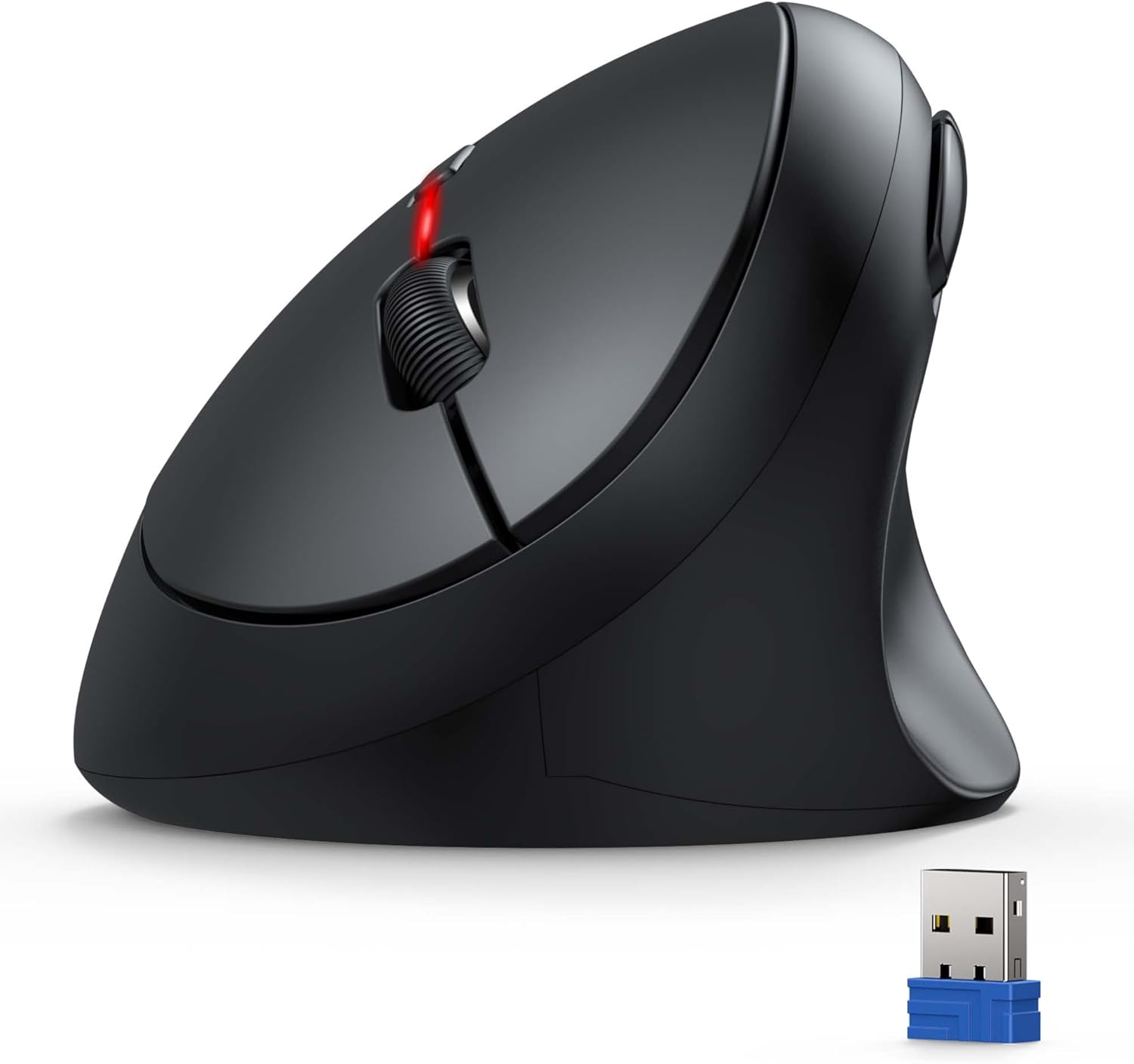
The TECKNET Ergonomic Mouse is a 4800 DPI wireless vertical optical mouse designed for laptops, PCs, Chromebooks, and Macs. Known for its affordability, this six-button silent mouse combines high performance with an ergonomic design to minimize wrist strain and enhance comfort during prolonged use.
Using the TECKNET Ergonomic Mouse can significantly improve your computing experience. Designed to prevent wrist strain, its vertical optical shape encourages a more natural hand position, reducing the risk of repetitive strain injuries. Its silent buttons ensure a noiseless working environment, while the impressive 4800 DPI allows for precise and fast tracking, making it an excellent choice for both everyday tasks and gaming.
With a price tag of just $14.44, the TECKNET Ergonomic Mouse offers remarkable value for its features. Despite being highly affordable, it does not compromise on quality or functionality. The mouse also runs on two AAA batteries, which last a long time, further reducing long-term costs.
Choosing the TECKNET Ergonomic Mouse means investing in comfort, efficiency, and affordability. Its ergonomic design helps reduce wrist pain, and its versatile 4800 DPI setting ensures precise control. The mouse’s silent operation allows for a peaceful working environment, and the durable build quality promises longevity even with extensive daily use.
The TECKNET Ergonomic Mouse stands out for several reasons. Firstly, its vertical design supports wrist health by promoting a more natural arm position. Secondly, the high DPI range and multiple buttons provide a customizable and responsive user experience. Additionally, its wireless functionality reduces desk clutter, and the two AAA batteries offer long-lasting power.
Using the TECKNET Ergonomic Mouse efficiently involves a few simple steps. After inserting two AAA batteries, plug the wireless USB dongle into your computer. The mouse will connect automatically, requiring no additional software. To maximize battery life, consider turning off the mouse when not in use and storing the USB dongle inside the mouse to prevent damage.
The TECKNET Ergonomic Mouse is compatible with a wide range of devices, including laptops, PCs, Chromebooks, and Macs. As long as your device has a free USB port for the wireless dongle, the mouse will work seamlessly. It also supports various operating systems including Windows, macOS, and Linux.
Battery replacement depends on usage, but reviews suggest that the batteries can last several months even with regular use. It is advisable to invest in rechargeable AAA batteries to minimize costs and reduce waste. If the mouse starts to lag or the cursor moves erratically, it might be time to replace the batteries.
The TECKNET Ergonomic Mouse is available on various online marketplaces such as Amazon, eBay, and the official TECKNET website. Physical retailers specializing in computer accessories may also stock this mouse. Always check for deals and discounts to get the best price.
The TECKNET Ergonomic Mouse is priced at an affordable $14.44. Given its range of features, this price point makes it an exceptional value for anyone seeking a budget-friendly ergonomic mouse without sacrificing quality.
The TECKNET Ergonomic Mouse features six buttons, including standard left and right-click buttons, a scroll wheel, DPI switch, and two side buttons for enhanced navigation. These additional buttons can boost your productivity by offering quicker access to shortcuts and frequently used functions.
The TECKNET Ergonomic Mouse is best used in both professional and home settings due to its ergonomic design and versatile features. It provides comfort for extended computer sessions, making it ideal for office work, gaming, and general computer use. Its silent buttons are particularly beneficial in noise-sensitive environments.
Analyzing the performance of the TECKNET Ergonomic Mouse involves assessing its responsiveness, comfort, and battery life. Users have reported smooth and precise tracking, comfortable handling, and enduring battery life. User reviews also highlight its reliability over extended periods, reinforcing its status as an excellent ergonomic mouse.
Yes, the mouse performs well on a variety of surfaces such as beds, couches, and dining tables.
The mouse lacks a traditional power-saving mode but wakes up quickly upon movement, even after being idle.
Depending on your operating system, some customization options might be available through software settings.
Overall, the TECKNET Ergonomic Mouse is a solid investment for those seeking an affordable, comfortable, and efficient mouse. With its ergonomic design, silent operation, and impressive performance, it’s hard to find a better option at this price point.
The TECKNET Ergonomic Mouse stands out as a noteworthy choice in the world of computer peripherals. Its blend of comfort, affordability, and performance makes it a reliable partner for both professional and personal use. Considering the positive feedback and high user satisfaction, this mouse is a highly recommended purchase.
Only In TestMarket
Average rating
 5
5
12
4
3
3
0
2
0
1
0


 Facebook
 Twitter
 Linkedin
 Reddit
 Pinterest




Sophia Collins
Sep 08, 2024
Recommended
Overall, I'm pleased with the TECKNET Ergonomic Mouse. It’s quite affordable, which is what initially caught my eye. Beyond that, its performance has been excellent, covering all my productivity needs. The vertical design reduces wrist strain which is great for long days at the computer.
Highly recommend.
Shipping
Item Quality
Customer Service
Packaging
Avery Rivera
Sep 06, 2024
The TECKNET Ergonomic Mouse has an ergonomically friendly design and is quite efficient at such a low price. It’s responsive, easy to set up, and works great on multiple surfaces without a mouse pad. The battery life has held up well so far.
For anyone seeking a budget-friendly ergonomic mouse, this is a strong contender.
Shipping
Item Quality
Customer Service
Packaging
Amelia Anderson
Sep 05, 2024
I've had the TECKNET Ergonomic Mouse for about a month and I'm pleasantly surprised by its performance. It operates smoothly on different surfaces and the 4800 DPI ensures accurate tracking. The 6 buttons are quiet, making it perfect for use in shared or quiet environments.
Expect a simple unboxing experience, but the product itself is worth it.
Shipping
Item Quality
Customer Service
Packaging
Michael Powell
Sep 08, 2024
The TECKNET Ergonomic Mouse works better than I anticipated. It's lightweight and easy to handle, making it perfect for extended use. The vertical design took a little getting used to but is ultimately more comfortable.
Battery life has been excellent so far, with no need for frequent changes.
Shipping
Item Quality
Customer Service
Packaging
Michael Rivera
Sep 09, 2024
Switching to the TECKNET Ergonomic Mouse has been a game-changer for my home office setup. The vertical design feels natural and alleviates wrist stress. It’s also very responsive and accurate.
The battery-saving feature is another plus. Simple packaging, but the mouse does exactly what I need it to.
Shipping
Item Quality
Customer Service
Packaging
Michael Powell
Sep 07, 2024
Recommended
I've tried several mice over the years, but the TECKNET Ergonomic Mouse stands out. It’s very smooth, comfortable to use for long periods, and works seamlessly with my Mac and PC. The battery life is impressive, and it hasn't had any connectivity issues. Highly recommended if you're tired of traditional designs.
Shipping
Item Quality
Customer Service
Packaging
Sophie Sanchez
Sep 03, 2024
The TECKNET Ergonomic Mouse exceeded my expectations for a budget mouse. It's comfortable, has a sleek design, and is very user-friendly. The 6 buttons are well configured, and the silent clicks are a nice touch.
My only minor gripe is the basic packaging, but who cares when it performs so well?
Shipping
Item Quality
Customer Service
Packaging
Mia Adams
Sep 08, 2024
Great value for the money! The TECKNET Ergonomic Mouse works wonderfully on various surfaces in my home, including my couch and bed. Setting it up was a breeze, taking just a few minutes. The battery life also seems to be excellent; it’s been over a month, and I haven't had to change them yet. The mouse feels a bit heavier than other budget mice, but I like the heft.
Shipping
Item Quality
Customer Service
Packaging
Daniel Cooper
Sep 07, 2024
I've been using the TECKNET Ergonomic Mouse for over a month now and it’s still running on the original set of batteries. The mouse fits well in my hand, and the vertical design eases strain on my wrist during long coding sessions. It’s simple yet functional, fitting my needs perfectly. The click buttons are silent, which is great when working in shared spaces.
Shipping
Item Quality
Customer Service
Packaging
Abigail James
Sep 06, 2024
The TECKNET Ergonomic Mouse is an excellent choice for someone looking for an affordable yet efficient mouse. The vertical design definitely helps with wrist aches. Setup was straightforward, and the mouse is very responsive. I use it for about 8-10 hours daily for work, and the battery has lasted a full month without needing a change.
Shipping
Item Quality
Customer Service
Packaging
Lily Rivera
Sep 04, 2024
I recently switched to the TECKNET Ergonomic Mouse after spending years with a standard mouse, and the difference is immense. My wrist pain has significantly reduced. The DPI settings allow for precise control, and the mice is surprisingly responsive on multiple surfaces.
The design could be more appealing, but functionality-wise, it’s superb.
Shipping
Item Quality
Customer Service
Packaging
Abigail Kelly
Sep 09, 2024
Recommended
Having used the TECKNET Ergonomic Mouse extensively for two weeks, I can say I'm very satisfied. The packaging was minimalist but effective. The mouse itself feels robust and not too cheap despite its low price.
It tracks well on just about every surface I've tried, from my wooden desk to my sofa cushions. Highly recommended for the price.
Shipping
Item Quality
Customer Service
Packaging
Hannah Hill
Sep 07, 2024
I bought this TECKNET Ergonomic Mouse primarily for its vertical design, and it's been quite an improvement for my hand position while working. It's lightweight and glides smoothly on my mouse pad. The mouse has 6 silent buttons which are a plus during late-night work sessions. It took me about a week to fully adapt to the different hand position, but now it feels completely natural.
Shipping
Item Quality
Customer Service
Packaging
Grace Collins
Sep 04, 2024
I've been using the TECKNET Ergonomic Mouse for a few weeks now and it's been a pleasant experience. The setup was simple: just pop in two AAA batteries, plug in the wireless receiver, and you're good to go. The mouse automatically powers down when not in use, which saves battery life.
It's very responsive and works well on a variety of surfaces. The 6 buttons come in handy for various tasks. Given the price, it’s a solid buy.
Shipping
Item Quality
Customer Service
Packaging
Abigail Kelly
Sep 04, 2024
Recommended
This TECKNET Ergonomic Mouse is a great value for the price. It's lightweight and easy to use. I really appreciate the vertical design as it’s much more comfortable for my wrist compared to traditional mice.
The 4800 DPI setting provides accurate tracking, and it pairs effortlessly with my laptop. The two AAA batteries last a surprisingly long time. Highly recommend for anyone looking for an ergonomic, budget-friendly mouse.
Shipping
Item Quality
Customer Service
Packaging