 Today's Deal
Amazon Deals
Today's Deal
Amazon Deals
 Today's Deal
Amazon Deals
Today's Deal
Amazon Deals
 popular
 4
4
Views Today
 1
1
Favorites Today






Business Name: OLCS LTD

Business Address: BROOKS PARADE, 3, GREEN LANE, ILFORD, IG3 9RT, GB

Business Size: Micro
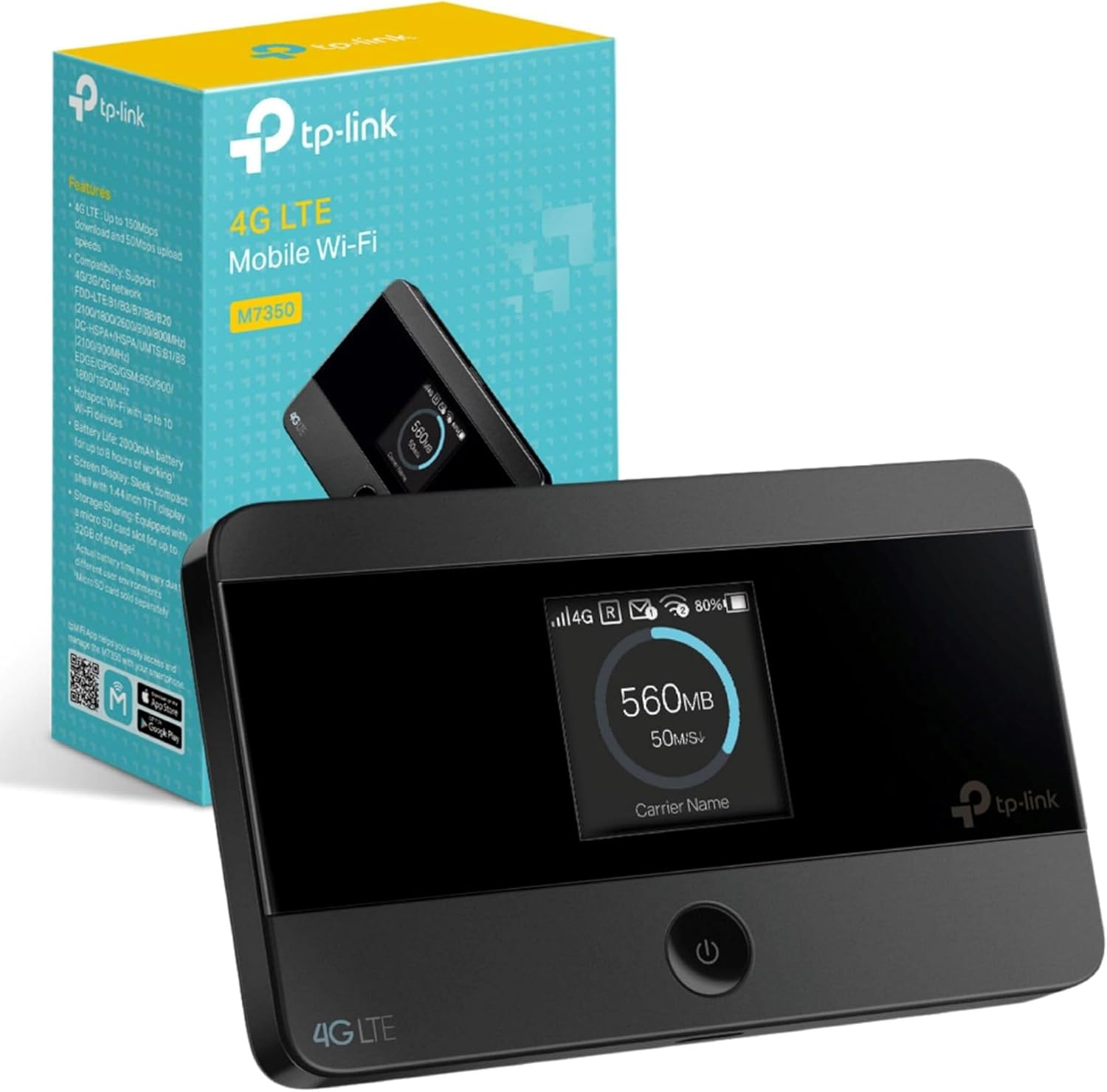
The TP-Link 4G MiFi, also known as a Mobile Hotspot, is an innovative device designed to offer reliable and portable internet connectivity. With its Cat4 LTE capabilities, it delivers speeds up to 150Mbps, making it an ideal solution for high-speed internet on the go. This low-cost internet dongle sports a compact design, making it perfect for travel, and features an 8-hour battery life along with an LED display for real-time status updates. Additionally, it offers easy APP management for user convenience.
#
The TP-Link 4G MiFi is packed with features that significantly improve your internet experience. One of the major benefits is its global compatibility, allowing you to use the device in different countries with ease. This mobile hotspot provides a strong and stable internet connection, whether you're indoors or outdoors, ensuring you stay connected wherever you go. With speeds up to 150Mbps, online activities such as streaming, browsing, and video conferencing happen seamlessly. Moreover, its long battery life, lasting up to 8 hours, ensures that you have internet access throughout your day without frequent recharges.
#
Yes, the TP-Link 4G MiFi is a highly budget-friendly solution for reliable internet connectivity. Priced at just $64.95, it is a cost-effective alternative to traditional ISPs, especially for those who travel frequently or live in areas with unreliable internet service providers. Not only does it eliminate the need for expensive data plans, but it also reduces roaming charges when you're abroad. Additionally, the ability to use pay-as-you-go (PAYG) SIM cards makes it a flexible and economical option.
#
There are many compelling reasons why you should choose the TP-Link 4G MiFi. Firstly, it is incredibly easy to set up and use, making it accessible even for those who are not tech-savvy. The device's global compatibility ensures that you have internet access no matter where your travels take you. Additionally, its portable design means that you're no longer restricted to a single location for internet access. It is also a great option for those who prefer using WiFi-only devices, such as tablets or certain laptops.
#
Several features make the TP-Link 4G MiFi stand out from other mobile hotspots. It offers comprehensive device management through a user-friendly app, which allows you to monitor data usage, manage connected devices, and perform network settings with ease. The LED display provides real-time information about battery life, signal strength, and data usage, ensuring you are always informed. Additionally, its robust performance, even in fringe reception areas, makes it a reliable option that outperforms many traditional ISPs.
#
The operation of the TP-Link 4G MiFi is straightforward. Simply insert a data-only SIM card (from your preferred network provider) into the device, power it on, and the device will automatically connect to the available network. It then broadcasts a WiFi signal that you can connect to via your laptop, smartphone, or tablet. The web interface, accessible through a local IP address, allows for further configuration and security settings. With its pre-configured numeric password and an option to reset to default settings, it ensures both security and usability.
#
The TP-Link 4G MiFi is ideal for a variety of situations. It is perfect for travelers who need reliable internet in different locations, whether that’s a foreign country or a rural area lacking strong traditional ISP services. It’s also a great solution for small businesses or individuals working remotely, who require consistent internet connectivity without relying on public WiFi. Additionally, it’s suitable for families on holiday who want to keep multiple devices connected simultaneously.
#
The TP-Link 4G MiFi is best used anytime you require portable and reliable internet access. Whether you are traveling, working remotely, or simply need a backup internet source in case of a primary network failure, this device serves as a versatile solution. Its 8-hour battery life makes it perfect for all-day events, such as conferences or outdoor activities, where traditional WiFi may not be available.
#
The TP-Link 4G MiFi can be purchased from various online and physical retailers. It's available on popular e-commerce platforms like Amazon, eBay, and Best Buy. Additionally, you can find it in electronic stores and specialty retailers that stock networking equipment. Some telecom providers may also offer this device in conjunction with their mobile data plans.
#
The TP-Link 4G MiFi is priced at $64.95, making it a cost-effective solution for portable internet connectivity. This price includes the device itself and does not cover the cost of a data-only SIM card, which you will need to purchase separately based on your preferred mobile network provider and usage needs.
#
The TP-Link 4G MiFi can support multiple devices simultaneously. Typically, it can handle up to 10 devices connected at the same time. This makes it ideal for small families, groups, or professionals who need to keep several devices online, such as smartphones, tablets, laptops, and even some smart home devices.
#
To maximize the performance of your TP-Link 4G MiFi, consider the following practices:
1. **Optimal Positioning**: Place the device in a location where it receives the strongest signal from your mobile network provider. Avoid obstructed areas and experiment with different spots to find the best signal strength. 2. **Regular Monitoring**: Use the app to regularly check data usage and connected devices to ensure optimal performance. 3. **Battery Management**: For extended usage, consider keeping the device connected to a USB power source. Be cautious of overheating and ensure proper ventilation. 4. **Security Settings**: Change the default username and password, and regularly update your security settings to protect your network from unauthorized access.
#
Analyzing the features, user reviews, and overall functionality, the TP-Link 4G MiFi appears to be a worthwhile investment. It offers portability, reliability, and ease of use at a competitive price point. Reviews highlight its strong performance, particularly in areas where traditional ISPs fall short. While there are minor concerns about battery life and the fragility of its components, the benefits far outweigh these drawbacks. As long as users handle the device with care and are mindful of its power needs, it serves as an excellent solution for modern connectivity needs.
#
A: Yes, as long as the SIM card supports data, you can use it with the TP-Link 4G MiFi.
A: No, the device supports 4G LTE networks, ensuring broad compatibility even in areas without 5G coverage.
A: It generally takes a few hours to fully charge the device, and it offers up to 8 hours of battery life on a single charge.
A: The primary function is to provide wireless internet connectivity; however, some models may support USB tethering.
A: No, it is generally plug-and-play, and configuration can be managed through a web interface or app.
#
In conclusion, the TP-Link 4G MiFi is a solid investment for those in need of reliable, portable internet access. Its ease of use, affordability, and robust performance make it an excellent choice for a variety of users, from travelers and remote workers to families on holiday. With strong user reviews and a feature set designed for convenience and reliability, this mobile hotspot is well worth considering.
#
Finally, the TP-Link 4G MiFi brings a host of advantages, making it a powerful tool for modern-day connectivity needs. While there are minor considerations to keep in mind, such as ensuring the device is handled carefully and managing battery life effectively, the overall value and performance make it a compelling choice for anyone looking to stay connected on the go.
Only In TestMarket
Average rating
 5
5
11
4
4
3
0
2
0
1
0


 Facebook
 Twitter
 Linkedin
 Reddit
 Pinterest




Henry Adams
Oct 10, 2024
The TP-Link 4G MiFi has been a dependable substitute for a wired connection during my travels. I appreciated how easy it was to get started—just attach the battery, insert the SIM, and it was ready to go. The web interface is intuitive, and I was up and running quickly. Battery life is suitable for most daily needs but could use an extra boost for longer hours.
All in all, a great device for on-the-go internet.
Shipping
Item Quality
Customer Service
Packaging
Grace Powell
Oct 10, 2024
Needed a dependable MiFi and the TP-Link 4G caught my attention. Installation and setup were straightforward, a matter of minutes. The connection is stable but limited to a room unless perfectly positioned. Battery life is adequate but not outstanding; measures around 7-8 hours with average usage.
Occasionally, it heats up when on constant power. Useful for those who need good reliability for short stints.
Shipping
Item Quality
Customer Service
Packaging
Charlotte Powell
Oct 05, 2024
This TP-Link MiFi has been a fantastic backup for my unreliable home internet. Setup with a GiffGaff SIM was quick and easy. The web-based interface is helpful for managing settings and security. It stayed connected reliably, although the battery’s lifespan is on the shorter side and the device tends to heat up when used for long periods.
Overall, a handy gadget to have on hand.
Shipping
Item Quality
Customer Service
Packaging
Lucas Stewart
Oct 06, 2024
I grabbed the TP-Link 4G Mobile Hotspot for a month-long European trip, and it exceeded expectations in terms of connectivity and ease of use. Installing the SIM card and navigating the menu was straightforward. The device does run warm during constant power usage, but it’s quick to reset after cooling down.
Battery life is okay, though it requires regular recharges. A reliable companion for travel internet needs.
Shipping
Item Quality
Customer Service
Packaging
Emily James
Oct 09, 2024
The TP-Link MiFi device is useful for providing internet during vacations and short trips. The instructions were clear for setting up, and it connected to 4G quickly. It’s helped maintain steady connections for my devices, but the downfall is the battery that needs frequent charging. Another improvement could be indicating how much data is left on the SIM.
Nevertheless, it’s a practical tool for staying online away from home.
Shipping
Item Quality
Customer Service
Packaging
Henry Adams
Oct 09, 2024
I’ve been using the TP-Link MiFi with a Vodafone SIM since last year, and it’s served my travel and work needs well. The initial setup was effortless, involving a simple insert of the battery and SIM card. It has a useful interface for making network adjustments. Its battery life could be improved and occasional overheating does occur, especially during charging.
Still, for the price and functionality, it has proven to be a valuable acquisition.
Shipping
Item Quality
Customer Service
Packaging
Abigail Kelly
Oct 05, 2024
Recommended
The TP-Link 4G Mobile Hotspot is quite a nifty device. I bought it for a vacation and it enabled stable internet access for my tablets and phones. Setup took just a few minutes, and it was good to go. The one letdown is the battery life, which necessitates frequent recharging if used extensively.
Would definitely recommend it for short-term use and vacations where reliable internet is a must.
Shipping
Item Quality
Customer Service
Packaging
Joshua King
Oct 07, 2024
For occasional trips and working remotely, the TP-Link 4G MiFi has been a good investment. Installing the battery and SIM card was easy, and the device connected to 4G pretty fast. The web interface is intuitive for configuring settings.
Battery life is somewhat average, lasting around eight hours. A bit of overheating was noticed during extensive use, but it hasn’t been much of an inconvenience. A reliable travel companion.
Shipping
Item Quality
Customer Service
Packaging
Logan Flores
Oct 06, 2024
I travel frequently and acquired the TP-Link Hotspot for consistent internet access. Working with an EE data SIM, the setup was quick. The device holds a connection well, even when moving between locations. The battery life generally lasts a full workday if not pushed too hard.
A display feature showing the remaining SIM data would make it even better. Overall, it’s a valuable tool for anyone needing portable internet.
Shipping
Item Quality
Customer Service
Packaging
Mia Adams
Oct 04, 2024
Purchased the TP-Link 4G MiFi for my countryside home with spotty WiFi and immediately noticed a difference. Attaching the battery and SIM was uncomplicated following the instructions. Connection speed was decent for browsing and streaming.
The signal filled my entire living room but didn’t extend much beyond that. Bear in mind, the battery drains quickly with heavy use. Despite this, it’s a reliable device for areas with limited connectivity.
Shipping
Item Quality
Customer Service
Packaging
Michael Powell
Oct 05, 2024
The TP-Link Mobile Hotspot is a robust device for staying connected while traveling. I mainly used it with a data-only SIM from Three, and the installation was hassle-free. Just remember to navigate through the device’s simple menu using two buttons to set it up.
It does get warm and even shuts down if left continuously plugged in. However, the 4G connectivity and web interface features like password management make it a solid purchase.
Shipping
Item Quality
Customer Service
Packaging
David Jenkins
Oct 07, 2024
As someone who works on the road, the TP-Link 4G MiFi was a crucial addition to my gear. The setup was smooth, and I appreciated how easy it was to configure through the provided web interface. The device did tend to overheat occasionally when continuously plugged in and the battery could be short for longer work hours. Besides these minor flaws, it’s been a great aid, providing steady 4G network coverage both indoors and in transit.
Shipping
Item Quality
Customer Service
Packaging
Scarlett Price
Oct 08, 2024
I bought the TP-Link MiFi for a trip to Europe and couldn’t be happier with the performance. It was incredibly easy to setup and got my devices online within minutes. I used it for my phone, tablet, and laptop without any connection issues.
The battery life is on the shorter side, but it holds up for a regular workday before needing a recharge. A feature to show the remaining SIM data would be the cherry on top. Still, it’s quite reliable and user-friendly.
Shipping
Item Quality
Customer Service
Packaging
Charlotte Campbell
Oct 07, 2024
My experience with the TP-Link 4G Mobile Hotspot has been quite positive. Living in a rural area, traditional ISPs were not practical for us. With an O2 PAYG Sim, this device gave us the uninterrupted, high-speed internet we needed. The initial setup was uncomplicated, and the device connected to 4G without any issues.
Just make sure to charge it regularly or to keep it plugged in if you use it continuously as the battery can get overworked. Overall, a valuable buy for anyone needing portable internet.
Shipping
Item Quality
Customer Service
Packaging
David Rivera
Oct 05, 2024
I decided to give the TP-Link 4G MiFi a try for my frequent travels and it was a great decision. Setting up the device was straightforward with a simple insert of the SIM card and battery. The user manual helped me navigate through changing the settings via a web interface on my laptop.
Connectivity was impressive even in less populated areas, sustaining a stable 4G service. My only concern was the battery life, as it lasted around 8 hours while connected—sufficient for most of my days but not all. It’s a useful companion tool for travelers needing consistent internet access.
Shipping
Item Quality
Customer Service
Packaging