 Today's Deal
Amazon Deals
Today's Deal
Amazon Deals
 Today's Deal
Amazon Deals
Today's Deal
Amazon Deals
 popular
 2
2
Views Today
 1
1
Favorites Today






Business Name: Shanghai Norwii Technology Co., Ltd

Business Address: RoomA643-06, Building2, No. 351, Guo Shoujing Road, China (Shanghai) Pilot Free Trade Zone, Shanghai, Pudong New Area, Shanghai, 201207, CN

Business Size: Small
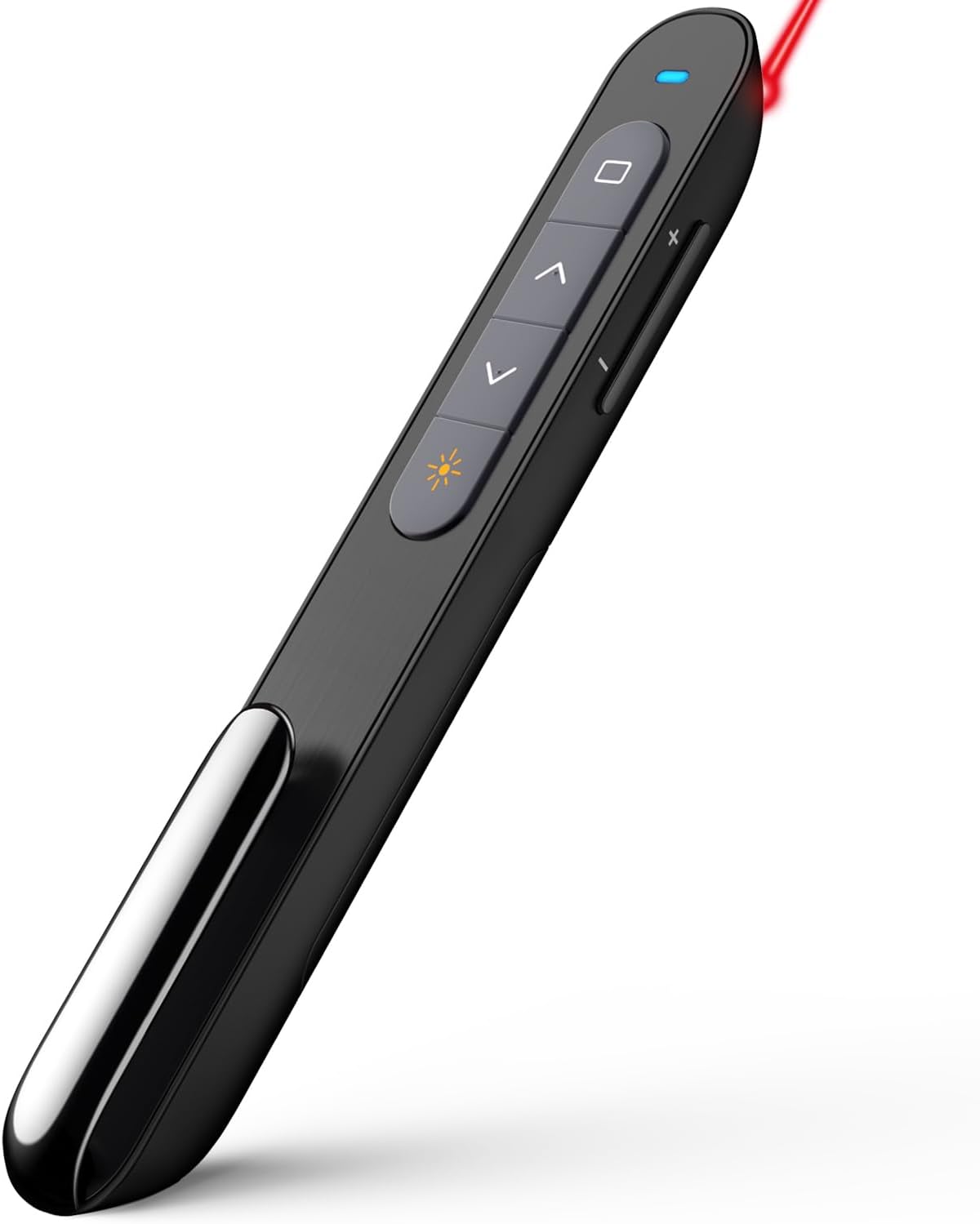
The NORWII N27 Presentation Clicker is a sophisticated, wireless presenter designed to provide a seamless presentation experience. Engineered with 2.4GHz wireless technology, this innovative clicker offers an impressive range of up to 328 feet, making it an ideal tool for educators, professionals, and anyone who frequently hosts presentations. With a price of just $11.99, it's an affordable yet invaluable tool for elevating your presentation skills.
The NORWII N27 Presentation Clicker provides a multitude of benefits that make it a standout choice for professionals and educators alike. Its extensive 328-foot range allows for ultimate mobility, enabling you to walk around the room and engage better with your audience, a feature highly appreciated by teachers. The integrated laser pointer is another excellent addition, giving you the ability to highlight important aspects of your slides without being tethered to your computer. Furthermore, the 2.4GHz wireless technology ensures flawless connectivity, reducing the risks of lag or disconnections. All these features contribute to elevating your presentation skills and make your sessions more interactive and dynamic.
At just $11.99, the NORWII N27 Presentation Clicker is one of the most cost-effective presentation tools available. Despite its budget-friendly price, it doesn’t skimp on essential features like a long-range wireless connection, user-friendly design, and a built-in laser pointer. This combination of affordability and functionality makes it an excellent investment for anyone looking to improve their presentation skills without breaking the bank.
Wondering why you should opt for the NORWII N27 Presentation Clicker over other brands? The answer lies in its unique blend of advanced features, reliability, and affordability. Unlike many other clickers on the market, this device offers a remarkable range of 328 feet, ensuring you won’t be anchored to your podium. Additionally, the intuitive control buttons and easy setup make it user-friendly for people of all technical levels. Reviews highlight its excellent performance, especially in educational settings, making it a trustworthy choice.
The NORWII N27 is packed with features that make it stand out from the crowd. Its 2.4GHz wireless technology guarantees stable and rapid connectivity, even in large rooms. The device’s hyperlink and volume control features add extra functionality that many basic clickers lack. Plus, the included laser pointer helps in capturing the audience’s attention on crucial points. All these features are encapsulated in a sleek black design, making it a professional addition to your presentation toolkit.
Using the NORWII N27 Presentation Clicker is straightforward and requires minimal setup. Simply plug the USB receiver into your computer’s USB port, and the device will connect automatically. The intuitive buttons allow you to navigate through your presentation easily, with additional buttons for hyperlink navigation and volume control. The built-in laser pointer can be activated with a simple press, helping you highlight critical information during your talk. This ease of use ensures that even technologically inexperienced users can operate it without hassle.
The NORWII N27 Presentation Clicker is designed for versatility and is compatible with a range of devices including Windows PCs, MacBooks, laptops, and even some tablets. This cross-platform compatibility ensures you can use it with virtually any device you might bring to your presentation, making it an incredibly flexible tool for various settings.
The NORWII N27 Presentation Clicker is perfect for any scenario where a presentation is needed, whether it’s a corporate meeting, a classroom setting, or even a conference. Its long-range capabilities and robust feature set make it suitable for both small rooms and large auditoriums. Essentially, whenever you have important points to convey through a slideshow, this clicker will enhance your delivery.
The NORWII N27 Presentation Clicker can be easily purchased online from popular e-commerce websites such as Amazon, eBay, or the official Norwii website. With frequent discounts and competitive pricing, these platforms offer convenience and reliability, ensuring you get the best deal on your purchase.
Priced attractively at $11.99, the NORWII N27 Presentation Clicker is affordable without compromising on quality. This competitive pricing empowers you to enhance your presentation skills without making a significant financial investment, making it a fantastic value proposition.
The NORWII N27 Presentation Clicker boasts numerous features tailored to enhance your presentation experience. Key features include a 328-foot wireless range, intuitive control buttons, laser pointer, hyperlink navigation, and volume control. These features collectively ensure a more interactive and engaging presentation session.
Given the high praise it has received from educators, the NORWII N27 is undoubtedly one of the best presentation clickers for teachers. The long range and easy-to-use buttons allow teachers to move freely around the classroom, thereby interacting more directly with students while managing the presentation effortlessly.
Reviews of the NORWII N27 Presentation Clicker are overwhelmingly positive. Users frequently highlight its ease of use, long-range functionality, and value for money. One teacher mentioned how the clicker allowed them to walk around the room and engage better with students, accentuating the practical advantages of this device. Overall, the clicker is praised for its reliability and functionality, making it a top choice among presentation tools.
A1: Yes, the NORWII N27 Presentation Clicker is compatible with MacBooks, as well as Windows PCs and laptops.
A2: The NORWII N27 Presentation Clicker has a remarkable range of up to 328 feet, allowing for significant mobility during your presentations.
A3: Yes, the NORWII N27 comes with an integrated laser pointer to help highlight key points during your presentation.
A4: Setting up the NORWII N27 is simple. Plug the USB receiver into your computer, and it will automatically connect.
A5: Absolutely! The NORWII N27 is designed with intuitive buttons and easy setup, making it user-friendly for everyone.
The NORWII N27 Presentation Clicker is an essential tool for anyone who frequently hosts presentations. Its blend of affordability, extended range, and user-friendly features make it an excellent investment. Whether you’re a teacher, corporate professional, or student, this clicker will help you deliver more engaging and effective presentations.
In conclusion, the NORWII N27 Presentation Clicker offers an exceptional balance of functionality, ease of use, and cost-effectiveness. With positive reviews backing its performance, it stands as a highly recommended tool for enhancing your presentation skills. Whether in an academic, professional, or casual setting, this clicker will undoubtedly add value to your presentations.
Only In TestMarket
Average rating
 5
5
10
4
5
3
0
2
0
1
0


 Facebook
 Twitter
 Linkedin
 Reddit
&media=https://testmarket.io/storage/deal/amazon/2025-03-25/cb13c96f70876c42679e68aa64a0233c.jpg) Pinterest
Pinterest




Lucas Stewart
Sep 04, 2024
I've worked in sales for several years and have gone through multiple presentation clickers. The NORWII N27 stood out because of its range, functionality, and price. The 328FT range ensures I am always connected, no matter where I stand.
The volume control feature is handy during interactive sessions. I didn’t expect such quality for $199, but I'm very pleased with this purchase.
Shipping
Item Quality
Customer Service
Packaging
Henry Adams
Aug 30, 2024
The NORWII N27 has been highly practical for my conferences. It fits comfortably in hand and clicks smoothly through slides. I appreciate the immediate, reliable connection, which is essential during time-sensitive presentations. Additionally, it's versatile and works on various platforms like my laptop and Mac.
Considering the affordable price of $199, it's a fantastic buy.
Shipping
Item Quality
Customer Service
Packaging
Scarlett Harris
Sep 02, 2024
Having used the NORWII N27 Presentation Clicker for a couple of weeks now, I can confidently say it's a solid device. The range is genuinely 328FT, allowing freedom to move around large conference rooms. Easy to set up and user-friendly. The laser pointer and hyperlink navigation add extra functionality often missing in other models at this price point.
Shipping
Item Quality
Customer Service
Packaging
Ethan Lopez
Aug 29, 2024
Recommended
I looked at many different presentation clickers before settling on the NORWII N27. Using it for my PowerPoints was a breeze due to the intuitive controls. The laser pointer is bright and easy to see even in well-lit rooms. The price is just right, and the quality is comparable to those costing twice as much.
Highly recommend it to anyone in need of a reliable clicker.
Shipping
Item Quality
Customer Service
Packaging
David Ross
Aug 31, 2024
The NORWII N27 Presentation Clicker is perfect for my needs. It was delivered quickly and securely packaged. I tested it in a large hall and the 328FT range worked without a hitch. Seamless connectivity with both my Windows laptop and my MacBook.
It offers features typically found in higher-end models but at a budget-friendly $
Shipping
Item Quality
Customer Service
Packaging
Aubrey Adams
Aug 30, 2024
As someone who conducts a lot of workshops and seminars, this clicker has met all my expectations. The laser pointer works well even from the back of the room. The 328FT wireless range means I can move around freely. The price point of $199 makes it a highly affordable yet efficient presentation tool.
Shipping
Item Quality
Customer Service
Packaging
Isabella Bailey
Aug 30, 2024
The NORWII N27 Presentation Clicker is an excellent tool for lectures and business meetings. It has a strong, stable connection with a range that covers large rooms. I found the volume control feature extremely handy. I was also impressed with the overall build quality at just $199.
If you're frequently presenting, this is a must-have gadget.
Shipping
Item Quality
Customer Service
Packaging
Victoria Lewis
Aug 30, 2024
Norwii did an excellent job with this clicker. The setup was incredibly intuitive, and I was up and running in mere minutes. The 328FT range is impressive, allowing me to wander around large venues without worrying about losing the connection. Laser pointer and hyperlink functionality are spot-on.
Given the reasonable price, it's a steal for anyone needing a presentation clicker.
Shipping
Item Quality
Customer Service
Packaging
Mason Jenkins
Sep 01, 2024
Recommended
I bought the NORWII N27 Presentation Clicker primarily for its price, but its performance is exceptional. The device feels sturdy and reliable. The 2.4GHz connection doesn't lag, and the laser pointer is strong and clear.
I use it with a laptop and it hasn't failed me once during a presentation. The surprising part is it costs only $199. A highly recommendable product.
Shipping
Item Quality
Customer Service
Packaging
Michael Rivera
Sep 02, 2024
My experience with the NORWII N27 Presentation Clicker has been quite positive. The installation was a breeze; plug it in, and you're good to go. I appreciate the laser pointer feature as it helps me point out details effortlessly. The 328FT wireless range ensures I stay connected no matter where I am in the room.
For $199, this clicker offers fantastic value for presenters.
Shipping
Item Quality
Customer Service
Packaging
Sophia Jenkins
Sep 03, 2024
I was skeptical about the performance due to its low price, but the NORWII N27 really surprised me. Its 328FT range is more than enough for any presentation setting I encounter. The controls are intuitive, making it straightforward to use even for those less tech-savvy. The volume control and hyperlink navigation are excellent features that have elevated my presentation experience.
Definitely worth the purchase.
Shipping
Item Quality
Customer Service
Packaging
Sofia Ward
Sep 01, 2024
I needed an affordable and reliable presentation clicker for my frequent business presentations, and the NORWII N27 did not disappoint. The device arrived well-packaged, and the compact design makes it easy to store in my laptop bag. The laser pointer is a useful addition, especially when presenting in large rooms. The value offered at $199 is unbeatable, considering the quality and features.
Shipping
Item Quality
Customer Service
Packaging
Elizabeth Moore
Aug 31, 2024
The NORWII N27 Presentation Clicker is very easy to use. Set-up took only a few minutes, and it syncs instantly with my computer. Being able to adjust the volume directly from the clicker is a convenient feature, especially when you're managing a big crowd.
For $199, it's a fantastic tool for anyone who regularly gives presentations. Very happy with my purchase!
Shipping
Item Quality
Customer Service
Packaging
Dylan Ramirez
Sep 03, 2024
As a corporate presenter, I've been using the NORWII N27 for months now. It works seamlessly with both my laptop and Mac. It connects quickly every time, and I’ve never experienced any signal drops within its impressive 328FT range.
The innovative 2.4GHz Hyperlink function is a unique and useful feature; it helps navigate through hyperlinks within my presentations effortlessly. Excellent product and it's surprisingly affordable!
Shipping
Item Quality
Customer Service
Packaging
Lily Rivera
Sep 03, 2024
Recommended
I teach multiple online and in-person classes, and the NORWII N27 Presentation Clicker has been a game-changer. With its extensive 328FT range, I can move freely around the classroom or our large auditorium without worrying about losing connection. The laser pointer is precise, making it easy to highlight important details on my slides.
The affordable price of $199 was also a major plus, as it delivers great value for money. Overall, I’m very satisfied with this purchase and would highly recommend it to educators and presenters alike.
Shipping
Item Quality
Customer Service
Packaging