 Today's Deal
Amazon Deals
Today's Deal
Amazon Deals
 Today's Deal
Amazon Deals
Today's Deal
Amazon Deals
 popular
 8
8
Views Today






Business Name: Hannto Technology Co., Ltd

Business Address: 盛荣路88弄1号704室, 上海, 自由贸易试验区, 上海, 200120, CN

Business Size: Micro
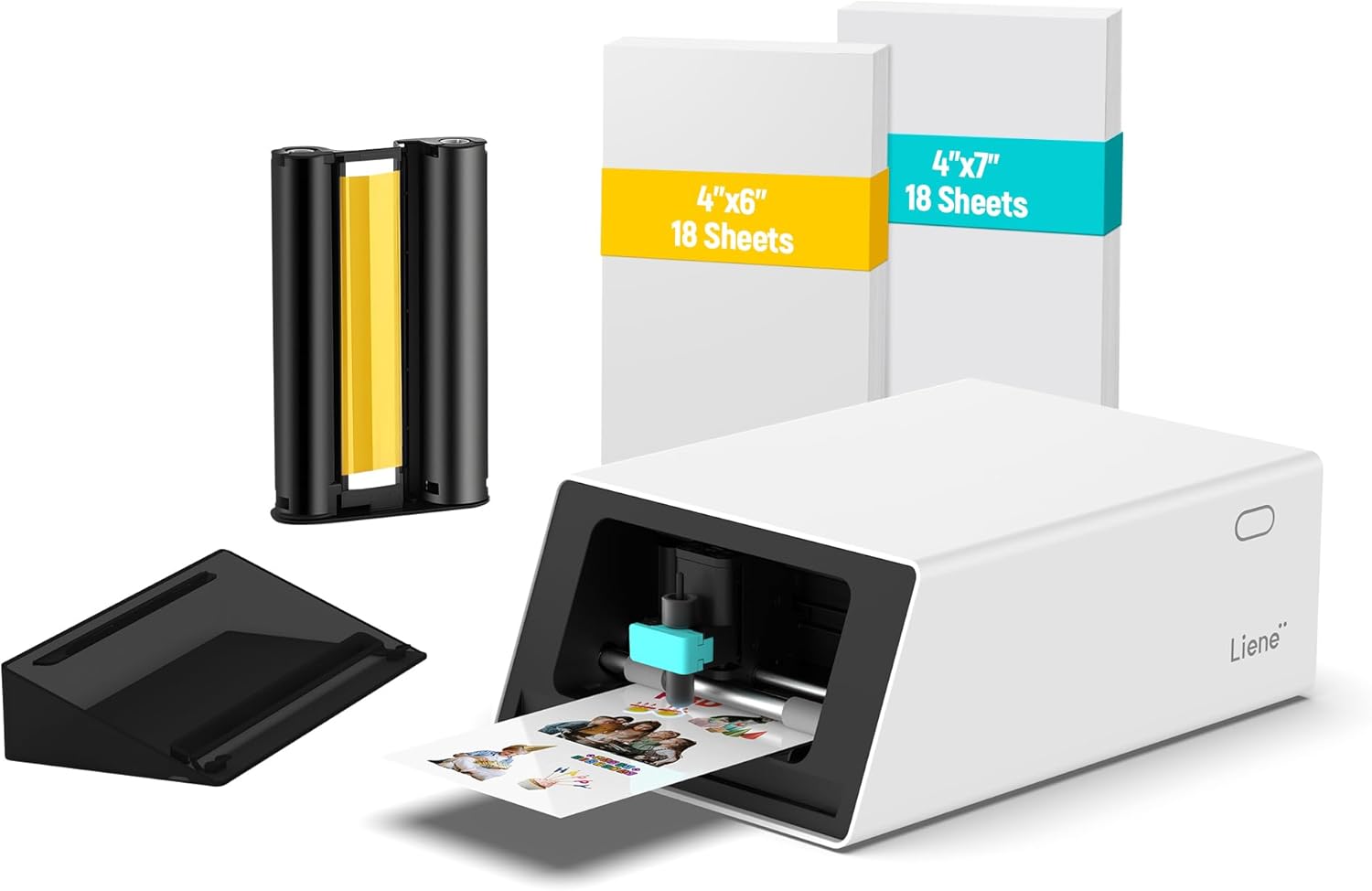
**Introduction to the Liene PixCut S1 Special Color Sticker Printer: What Makes It Stand Out?** The Liene PixCut S1 is a Special Color Sticker Printer that introduces a realm of possibilities for crafting enthusiasts and professionals alike. With its unique capability to print and cut stickers seamlessly, the PixCut S1 eliminates the hassle of using multiple machines and tools, providing an all-in-one solution for your creative projects. This high-efficiency device, priced at $254.99, offers precision and speed, making it a valuable addition to your crafting arsenal.
The Liene PixCut S1 offers numerous benefits that make it a worthy investment for any creative enthusiast. Users appreciate its speed and ease of setup compared to other devices, which often require complex configurations or take up considerable space. This printer’s compact design allows you to maintain a tidy workspace without compromising functionality. Additionally, the PixCut S1’s ability to handle both printing and cutting tasks without mats significantly streamlines the crafting process. Its user-friendly app, although with a slight learning curve, eventually becomes intuitive, making designing and printing stickers and other custom labels a breeze.
Considering its features and capabilities, the Liene PixCut S1 is a budget-friendly option for those serious about their crafting or small business setups. While the initial cost of $254.99 may seem an investment, the convenience and time saved by not having to manage multiple machines quickly justify this expenditure. However, some users mention concerns regarding the high cost of materials like sticker and photo paper which could influence your overall running costs. Despite this, the product's quality output, such as vibrant colors and precision in cutting, may outweigh these expenses for those prioritizing quality in their projects.
The decision to choose the Liene PixCut S1 over alternative sticker printers is driven by its efficiency and precision. Unlike other devices that may require manual operation for cutting after printing, the PixCut S1 seamlessly combines both processes, saving time and effort. Its vibrant color output and precision cutting has been particularly praised by users. Another aspect is its integration with Bluetooth, which makes connectivity straightforward. For individuals who value creativity and flexibility in their projects, the PixCut S1’s prowess in sticker and label creation compels many users to favor it over similar devices.
For those new to crafting or testing the waters with sticker printing, the Liene PixCut S1 offers a relatively straightforward introduction. Although some users initially face a learning curve with the device’s app, the design process ultimately becomes smooth and engaging. New users benefit from its simple setup and ease of use, with many discovering delightful functionalities once comfortable with the app. The ability to print high-quality, vivid color photos and stickers with precision cutting stands as a remarkable feature for beginners venturing into the world of customized printing.
The standout features of the Liene PixCut S1 include its print-and-cut capability without the need for additional mats, an intuitive mobile app for design customization, and its portability despite a slightly larger footprint than expected. Its Bluetooth connectivity ensures easy connection with devices, facilitating a smooth workflow. Additionally, the high-quality print output with vivid colors and precise cutting allows users to unleash their creativity, whether designing custom stickers, photo prints, or unique labels.
The Liene PixCut S1 proves efficient in various environments, from personal crafting studios to professional small businesses. It particularly finds its niche in situations where quick, high-precision sticker printing is required. Its compact design makes it an ideal companion for home use, educational purposes, group gatherings, or even small business setups where space is a constraint. This portability, combined with outstanding functionality, means you can carry your creativity wherever you go.
Priced at $254.99, the Liene PixCut S1 positions itself as a mid-range investment in the personalized printing market. When considering the seamless integration of printing and cutting capabilities, along with the intricate precision and quality of output, the price becomes reasonable. However, the potential additional cost for materials like high-quality photo paper might be a consideration, though many users find the expense justifiable given the quality and creative flexibility the printer offers.
The number of stickers you can produce with the Liene PixCut S1 before needing additional materials largely depends on the complexity and size of your designs. Users are initially provided with materials sufficient to experiment and familiarize themselves with the machine's functionality. Once users master the learning curve, they can maximize material usage. While some initial conservation is recommended until confidence with the machine is achieved, subsequent purchases will ensure you continue making the most of the PixCut S1’s capabilities.
To obtain optimal results from the Liene PixCut S1, start with the setup instructions to ensure accurate calibration. Users are encouraged to explore the app thoroughly to understand its full array of features and design options. Experimenting initially with small projects will build familiarity and confidence, allowing you to efficiently manage materials and achieve desired results. Engaging with online communities or tutorials can also provide tips and techniques to enhance your creations, making the best use of this dynamic sticker printer.
In comparison to competing products, the Liene PixCut S1 stands out with its dual functionality, swiftly bridging the gap between printing and cutting. Unlike others that may require two separate devices or manual intervention for cutting, the PixCut S1 automatically completes both tasks seamlessly. It’s especially praised for its vibrant color print quality and precision, differentiating itself in the market. While slightly larger than some rivals, users appreciate its balanced blend of features and convenience, often maneuvering around material costs due to the overall quality and efficiency it delivers.
Common questions surrounding the Liene PixCut S1 include concerns over material costs, app usability, and connectivity. Addressing these:
- **Material Costs**: While initial costs for photo and sticker paper are acknowledged, users find the high-quality output and durable adhesive worthwhile. - **App Usability**: Though a learning curve exists, the app becomes intuitive with use, providing various customization options for labels and stickers. - **Connectivity**: Bluetooth pairing is generally straightforward, with most connections maintained reliably. Exploring the settings can optimize connectivity preferences.
The Liene PixCut S1 proves to be a highly effective tool for those invested in creative and personalized projects. With its combined printing and cutting functionality, ease of use, and professional-quality output, this device offers a substantial return on investment. It caters to both beginners and seasoned enthusiasts by providing a versatile platform to explore creativity. Despite minor reservations concerning initial material costs, the PixCut S1 remains a compelling option for transforming ideas into tangible artworks effortlessly.
In essence, the Liene PixCut S1 Special Color Sticker Printer transcends the expectations of those desiring a seamless, integrated approach to creating custom stickers and labels. With exceptional print quality, precise cutting, and a user-friendly interface, it facilitates an engaging and creative experience, making it a must-have for enthusiasts and professionals aiming to elevate their crafts. The PixCut S1 invites you into a convenient, vibrant world of sticker creation, ensuring your artistic visions come to life in the easiest, most efficient way possible.
Only In TestMarket
Average rating
 5
5
11
4
4
3
0
2
0
1
0


 Facebook
 Twitter
 Linkedin
 Reddit
 Pinterest




Grace Collins
Sep 25, 2025
Recently added the Liene PixCut S1 to my gadget collection, and it quickly became a favorite. The ease of printing custom stickers without changing devices is such a luxury.
I find the app slightly confusing initially but manageable once I spent some time with it. The printer’s prompt delivery of crisp and vibrant prints is top-notch, and it’s a great value for creative enthusiasts.
Shipping
Item Quality
Customer Service
Packaging
Logan Roberts
Sep 24, 2025
I've been using the Liene PixCut S1 for my scrapbook projects, and it's been wonderful. The printer delivers quality prints with crisp details and vibrant colors. It's slightly bulkier than I imagined, but it’s portable enough for me to share with my crafting group.
I love the precision cutting feature; it's a game-changer for creating perfect keepsakes.
Shipping
Item Quality
Customer Service
Packaging
Mia Adams
Sep 23, 2025
The Liene PixCut S1 has exceeded my expectations with its quality and functionality. The prints are vibrant, and the sticker cuts are precise.
It's easy to transport, so I can take it to craft fairs or family gatherings without hassle. My only issue has been the occasional need for repositioning a print in the app before sending it to the printer, but it’s a small price to pay for such professional results.
Shipping
Item Quality
Customer Service
Packaging
Daniel Harris
Sep 24, 2025
I'm not very tech-savvy, but the Liene PixCut S1 was surprisingly easy to use. The instructions were clear, and I was printing stickers within a short time.
The quality of both the photos and stickers is excellent, which makes it great for preserving memories. The need to manually reconnect the Bluetooth occasionally is a minor inconvenience, but it’s not a deal-breaker.
Shipping
Item Quality
Customer Service
Packaging
Benjamin Price
Sep 20, 2025
As a mother of two creative kids, the Liene PixCut S1 has been fantastic for us. We spend our weekends making stickers and fun prints. The process is quick, and the kids find the app fairly simple to navigate.
I do wish there were more in-app templates for them to work with, but they don't seem to mind. It’s become a cherished part of our family time.
Shipping
Item Quality
Customer Service
Packaging
Michael Parker
Sep 19, 2025
I got the Liene PixCut S1 to make personalized stickers and have been impressed with its performance. The printer is speedy, which is ideal for someone like me who tends to do last-minute projects. The colors are consistently vibrant, and the sticker paper works well, albeit a tad expensive.
Overall, this printer strikes a good balance of quality and convenience.
Shipping
Item Quality
Customer Service
Packaging
Grace Collins
Sep 21, 2025
After reading some positive reviews, I decided to try out the Liene PixCut S1 for my personal art projects. I'm glad I did.
The print quality is excellent, and the device itself is user-friendly. It's a bit larger than I anticipated, which means it takes up a bit more space in my crafting area, but it's manageable. A superb choice for anyone looking to combine printing and cutting in one device.
Shipping
Item Quality
Customer Service
Packaging
Sophia Collins
Sep 21, 2025
The Liene PixCut S1 is a great piece of tech. I use it mostly for creating custom phone cases, and I'm thrilled with the results.
The printer handles vibrant colors superbly, and the cuts are consistently clean. Setting it up was not an issue, though the app's layout feels a bit outdated and can be cumbersome at times. A great buy if you want high-quality prints without too much hassle.
Shipping
Item Quality
Customer Service
Packaging
Thomas Reed
Sep 24, 2025
I was on the fence about purchasing another printer, but the Liene PixCut S1's unique function of printing and cutting in one device swayed me. After using it, I appreciate the machine's ease of use and efficient design.
The prints are beautifully vibrant and detailed. The app could use a more user-friendly update, particularly with image editing features, but it's manageable for simple tasks. Overall, a good investment for home art projects.
Shipping
Item Quality
Customer Service
Packaging
Harper Bennett
Sep 23, 2025
I have been using the Liene PixCut S1 for a couple of weeks now, and it has been an adventure. The printer's cutting precision is remarkable, allowing me to create polished and professional labels for my products. The quality of prints exceeded my expectations, although the ongoing material costs are a bit high.
It's a minor trade-off for the convenience and quality delivered by this little powerhouse.
Shipping
Item Quality
Customer Service
Packaging
Abigail Kelly
Sep 20, 2025
Unboxing the Liene PixCut S1 was a delightful experience. The printer was well-packaged, and it immediately felt like a quality product. Setting it up with my smartphone was straightforward, and the Bluetooth connectivity was stable throughout my testing.
The printer handles both photo and sticker paper adeptly, though switching between them could be more intuitive. Overall, a great purchase for creative minds looking for versatility.
Shipping
Item Quality
Customer Service
Packaging
Oliver Peterson
Sep 20, 2025
The Liene PixCut S1 has been a fantastic addition to my home office. It was somewhat bigger than I initially expected but still fits nicely in my workspace. The prints are of impressive quality, and it handles cutting with great precision.
The Bluetooth setup was straightforward, though I wish the printer remained on longer once idle. This device will definitely see a lot of use in my future projects, especially for photo collages.
Shipping
Item Quality
Customer Service
Packaging
Oliver Powell
Sep 24, 2025
Recommended
As a small business owner, I rely heavily on quality prints for my product labels, and the Liene PixCut S1 has not disappointed. This device has streamlined my process significantly. It's small enough to fit comfortably on my work desk, and the wireless connection feature is a huge perk.
One downside is the cost of the specialized sticker paper, but the efficient operation and precision cut more than make up for it. Highly recommend it for anyone serious about sticker making.
Shipping
Item Quality
Customer Service
Packaging
Chloe Nelson
Sep 24, 2025
I bought the Liene PixCut S1 as a gift for my crafty sister, and she absolutely loves it. She mentioned that the app was a bit challenging initially, but once she got familiar, it functioned seamlessly. The ability to print and cut stickers without switching devices is a massive time-saver for her, and she appreciates the high-quality finish of each print.
If you're into crafting or sticker making, this printer is definitely worth considering!
Shipping
Item Quality
Customer Service
Packaging
Isaac Rivera
Sep 21, 2025
I recently purchased the Liene PixCut S1 and was pleasantly surprised by how simple it was to get started. The initial setup was a breeze, and I was able to start printing within minutes. The print quality is truly impressive, and the colors are vivid and bright. I do wish there was more clarity in the instructions regarding the adjustments for custom sizes, but overall, the results are very satisfying.
Given its convenience and functionality, this printer has quickly become an essential tool for my creative projects.
Shipping
Item Quality
Customer Service
Packaging