 Today's Deal
Amazon Deals
Today's Deal
Amazon Deals
 Today's Deal
Amazon Deals
Today's Deal
Amazon Deals
 popular
 8
8
Views Today





Business Name: Changsha ganshikeji youxianzerengongsi

Business Address: 绿景欣苑2栋1903, 岳麓区洋湖街道和顺路269号, 长沙市, 湖南, 410208, CN

Business Size: Micro
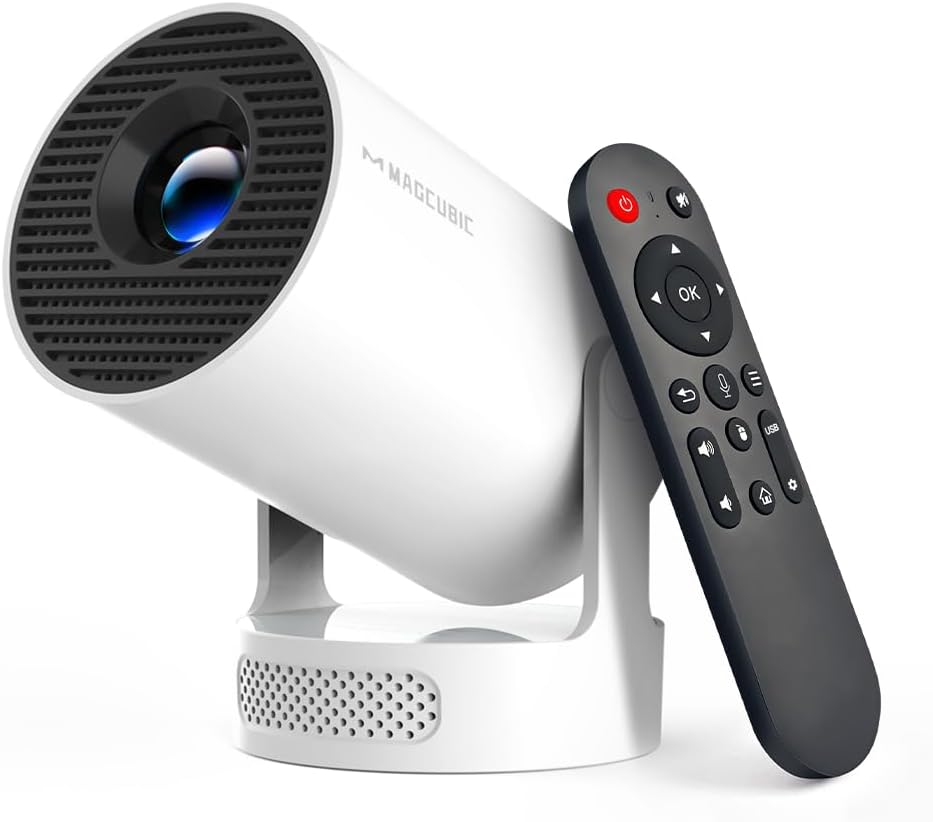
The HY300Pro projector distinguishes itself in the crowded market of visual technology with its advanced features and affordable price point. Equipped with 4K support and the innovative features of WiFi 6 and Bluetooth 5.4, this smart device aims to enhance your viewing experience. It promises convenience and flexibility, whether for home theater enthusiasts or for those who need a portable solution for outdoor gatherings or travel. But what truly makes this projector stand out, and why should it be on your shopping list?
One of the primary benefits of the HY300Pro is its ability to offer high-quality visuals at a price that won't break the bank. The integration of WiFi 6 ensures faster and more reliable streaming, reducing buffering and enhancing your viewing experience. Meanwhile, Bluetooth 5.4 offers seamless connectivity with external speakers, providing a dynamic sound that complements the rich visuals. The 5W soundbase speaker is perfect for intimate settings, creating an immersive environment. Its portability and user-friendly design mean you can take your entertainment anywhere, from your bedroom to your backyard.
Priced at $59.99, the HY300Pro projector is remarkably budget-friendly, especially considering its array of features. In comparison to other projectors with similar specifications, it presents a cost-effective solution for anyone looking to enjoy cinematic experiences without the hefty price tag. Despite some limitations highlighted in user reviews, such as app functionality and resolution, the value for money remains advantageous, making it a sound investment for casual users.
The HY300Pro shines in areas where other projectors might fall short due to its combination of modern connectivity, portability, and affordability. While the technical specifications like the 720p resolution may not be top-tier, the device compensates with connectivity options that present flexibility and versatility—ideal for those who prioritize ease of use and functionality over the highest definition images. Moreover, the projector’s auto vertical keystone assists with aligning the picture perfectly, minimizing set-up hassle.
The HY300Pro projector comes equipped with several cutting-edge features that enhance its usability. Key highlights include WiFi 6 for faster streaming, Bluetooth 5.4 for connecting external audio devices, and a built-in 5W soundbase speaker. Its unique smart capabilities, such as the auto vertical keystone correction, allow for quick image adjustments. Although some users mention the occasional inconvenience with app functionality and 720p resolution quality, the overall feature set promises a balanced viewing experience for casual entertainment.
Setting up the HY300Pro projector is a straightforward process. Start by finding a compatible surface or screen to project on. Connect the device to a power source, and use the manual focus to adjust the clarity of the picture until it's to your liking. To connect it to WiFi, follow the on-screen instructions after accessing the settings menu. Pairing devices via Bluetooth is similarly intuitive: activate Bluetooth on your external speaker or headphones and look up the projector device on your screen.
The HY300Pro projector is versatile enough to fit into multiple environments. It performs best indoors in spaces like bedrooms and small home theaters with controlled lighting. However, its portable nature also makes it suitable for outdoor use, such as in backyards during the evening. Due to its compact design and manual focus, it's ideal for small gatherings and personal viewing, though you might need additional sound systems for a more robust audio experience when outside.
The projector is perfect for a range of activities – whether you're watching a movie on a cozy winter night or hosting an outdoor party during the summer. Although it can function in various lighting conditions, darker settings will yield the best image quality. It is especially favorable for those spontaneous movie nights or gaming sessions where ease of setup and mobility play essential roles.
You can purchase the HY300Pro projector online from various retailers, usually with shipping options that bring it right to your door. For its usage, indoors like living rooms and office spaces are recommended for an optimal experience. Thanks to its portable nature, it can also be utilized in unconventional locations such as balconies or terraces without much hassle.
While the projector itself is priced affordably, you may want to invest in a few accessories to enhance your experience. An additional sound system or Bluetooth speaker could cost between $30-100, depending on quality. You might also consider purchasing a projector screen or a mount, which typically range from $20-50. Such additions can significantly augment the overall multimedia experience of the HY300Pro.
The HY300Pro can handle multiple connections, but it is advisable to ensure a stable network system to manage the devices effectively. Typically, you can connect several devices through WiFi or Bluetooth, enabling versatile usage, yet ensuring that only essential connections are active at any given time will optimize performance.
For its price range, the HY300Pro is a competitive option with its unique blend of features that many budget contenders may lack. While it may not meet professional or high-end specifications, those seeking accessible, versatile entertainment solutions online will find it hard to ignore the value offered by the HY300Pro for casual viewing needs.
Customer feedback for the HY300Pro projector presents a mixed bag. Some users find excellent utility in its integration with personal devices like Amazon Fire Stick and Bluetooth speakers, appreciating its portability and connectivity. However, others express dissatisfaction over certain limitations, such as the pre-installed, outdated apps and occasionally restricted functionality. Despite these drawbacks, many still find it a suitable purchase at its price point.
- *Does the HY300Pro support AirPlay?* While the projector has WiFi capability, some users have reported connectivity issues with AirPlay and certain limitations in streaming content. - *Can I install new apps?* Unfortunately, app installation is restricted due to an outdated app store interface, and it does not allow upgrades for some default applications.
- *What can I do to improve sound quality?* For enhanced sound, connect the projector to an external Bluetooth speaker, which will compensate for its average built-in sound system.
In conclusion, the HY300Pro projector presents a solid entry-level option for those prioritizing affordability and portability over high-end performance. Despite some technical limitations, its blend of connectivity, easy setup, and multi-environment use offers great value for casual users. Ideal for those experimenting with projector use or seeking budget-friendly group entertainment solutions.
Ultimately, expectations should balance the affordable price point with the features provided. The HY300Pro serves as an excellent gateway to exploring the realm of projection technology without significant financial commitments, making it perfect for beginners and occasional users alike who appreciate a fuss-free cinematic experience at home or on the go.
Only In TestMarket
Average rating
 5
5
14
4
1
3
0
2
0
1
0


 Facebook
 Twitter
 Linkedin
 Reddit
 Pinterest




Alexander Adams
Jul 27, 2025
My experience with the HY300Pro projector has been satisfactory when balanced with expectations. While advanced features such as auto vertical keystone and Bluetooth play a vital role, its resolution could be better. Given its price, it remains useful for moveable entertainment options rather than permanent installations. The manual focus ensured clearer images when placed correctly, enhancing its usability.
Shipping
Item Quality
Customer Service
Packaging
Logan Powell
Jul 23, 2025
For what I paid, the HY300Pro is an affordable entry into smart projectors. Setup was a cinch, and while the streaming apps leave room for improvement due to outdated interfaces, using a connected device bolsters its capabilities. The projector excels as a portable option for backyard screenings and impromptu gatherings. The image quality isn’t top-tier, yet perfectly fine for informal viewings.
Shipping
Item Quality
Customer Service
Packaging
Grace Collins
Jul 29, 2025
I've been utilizing the HY300Pro projector for a few movie nights, and it fills the role decently. The keystone adjustment is handy, though I wish it could fix horizontal angles automatically as well. Including a 5W soundbase speaker is thoughtful, but pairing it with an additional sound system definitely enhances the experience. Easy to set up and no-frills; suitable for watching with friends or family.
Shipping
Item Quality
Customer Service
Packaging
Scarlett Price
Jul 26, 2025
Purchasing the HY300Pro projector has been a mixed bag. The WiFi and Bluetooth connectivity are highlights, providing flexibility in usage. However, the default app offerings leave much to be desired, as some key players are outdated and unresponsive.
If you're planning to use this projector with your existing HDMI devices, it fares better. It's a fair starting device for those new to projectors.
Shipping
Item Quality
Customer Service
Packaging
David Rivera
Jul 29, 2025
I was pleasantly surprised by the ease of integrating my Bluetooth headphones with the HY300Pro. This portable projector met my expectations; I use it when traveling for work, and its lightweight design makes it perfect for on-the-go presentations. The auto vertical keystone feature keeps the image aligned, although I tend to manually adjust it myself. Overall, it's more convenient than lugging around a heavier setup.
Shipping
Item Quality
Customer Service
Packaging
Harper Lee
Jul 23, 2025
Recommended
The HY300Pro projector is a practical choice for those seeking something uncomplicated yet functional. I use it mainly for casual movie sessions in my living room. There's decent brightness in a dim setting, but I recommend dark rooms for optimal viewing. The projector's speaker is basic, so I suggest connecting via Bluetooth for better sound quality.
If you're in need of a budget-friendly projector, this one delivers on the basics.
Shipping
Item Quality
Customer Service
Packaging
David Jenkins
Jul 29, 2025
I picked up the HY300Pro for its promised affordability and portability. While it certainly ticks both boxes, there are certain shortcomings, such as the lower resolution and outdated app compatibility. However, the downloadable manual provided good insights, and I was able to use my smartphone apps efficiently for media.
Ideal for occasional use and not bad for the price.
Shipping
Item Quality
Customer Service
Packaging
Sophia Collins
Jul 29, 2025
Being a tech enthusiast, I was drawn to the HY300Pro due to its affordable price and features. Overall, the experience was one of mixed feelings: while the connectivity options are abundant, the resolution leaves room for improvement. I found the projector's manual focus to be a bit finicky, but once adjusted, the viewing experience was sufficient. The sound output could be louder, requiring an external speaker for better audio.
Shipping
Item Quality
Customer Service
Packaging
Oliver Powell
Jul 23, 2025
The projector arrived well-packaged and the printed manual was easy to understand. The HY300Pro is not the smartest projector out there, but it holds its ground with core functionalities. Setting it up in the kids' room was straightforward, and HDMI connectivity was a lifesaver.
The picture quality meets basic expectations, but for a family on a budget, this projector serves its purpose.
Shipping
Item Quality
Customer Service
Packaging
Andrew Nelson
Jul 28, 2025
I primarily bought the HY300Pro because it was affordable and claimed to offer advanced features like WiFi and Bluetooth support. The truth is, it does what it's supposed to for its price tier. I hooked it up with a Bluetooth soundbar for better audio while using it in my home office. It's a convenient tool for presentations, though I'd prefer higher resolution for more detailed images.
Shipping
Item Quality
Customer Service
Packaging
Oliver Powell
Jul 23, 2025
The HY300Pro is a decent low-cost projector for non-essential viewing. I tested it with my gaming console, and the experience was acceptable. The auto vertical keystone is a handy feature, though only vertical adjustments are automatic. I noticed some difficulty in calibrating the manual focus while switching between different screen sizes, yet the projector remained functional enough for casual use.
Shipping
Item Quality
Customer Service
Packaging
Henry Adams
Jul 30, 2025
While this projector won't replace a high-end equivalent, the HY300Pro is a surprisingly useful device at this price point. Its portability is its standout feature, allowing me to carry it to various rooms and even outdoors for fun movie nights. The WiFi and Bluetooth connectivity works well for streaming, although I found the default app selection somewhat restrictive. The image quality isn't 4K, but for my purposes, it’s satisfactory.
Shipping
Item Quality
Customer Service
Packaging
Mia Adams
Jul 28, 2025
I ordered the HY300Pro projector, and it arrived swiftly, well-packaged in a neat box. The initial setup was a breeze, thanks to the easy-to-follow instructions. I primarily use it in my backyard for outdoor movie nights.
The portable design makes it easy to move around, and the connections to my Bluetooth speaker enhance the overall experience. While the built-in speaker is quite basic, the projector’s display and affordable price make up for it.
Shipping
Item Quality
Customer Service
Packaging
Lucas Garcia
Jul 25, 2025
After spending some time with the HY300Pro projector, I've discovered its strengths and limitations. The manual focus option allowed me to get the clarity I needed for my home setup. I was pleased with the auto vertical keystone feature, which simplified the setup on my bedroom ceiling. However, I did notice that some apps were lagging, and the built-in sound wasn't as impressive as I'd hoped.
Still, for $59.99, it's hard to beat this level of convenience and portability.
Shipping
Item Quality
Customer Service
Packaging
Lily Rivera
Jul 23, 2025
I've been using the HY300Pro projector as a portable option for my weekend trips, and it has been decent for the price. The setup process was straightforward, and I managed to get it running without any hiccups. Although the resolution is only 720p, it suffices for casual viewing. The inclusion of WiFi 6 and Bluetooth 5.4 adds versatility, allowing me to connect various devices seamlessly, although I wish the sound output was better.
Overall, a good purchase if you're looking for something portable and affordable.
Shipping
Item Quality
Customer Service
Packaging