


Parent-Child Variations and Amazon SEO
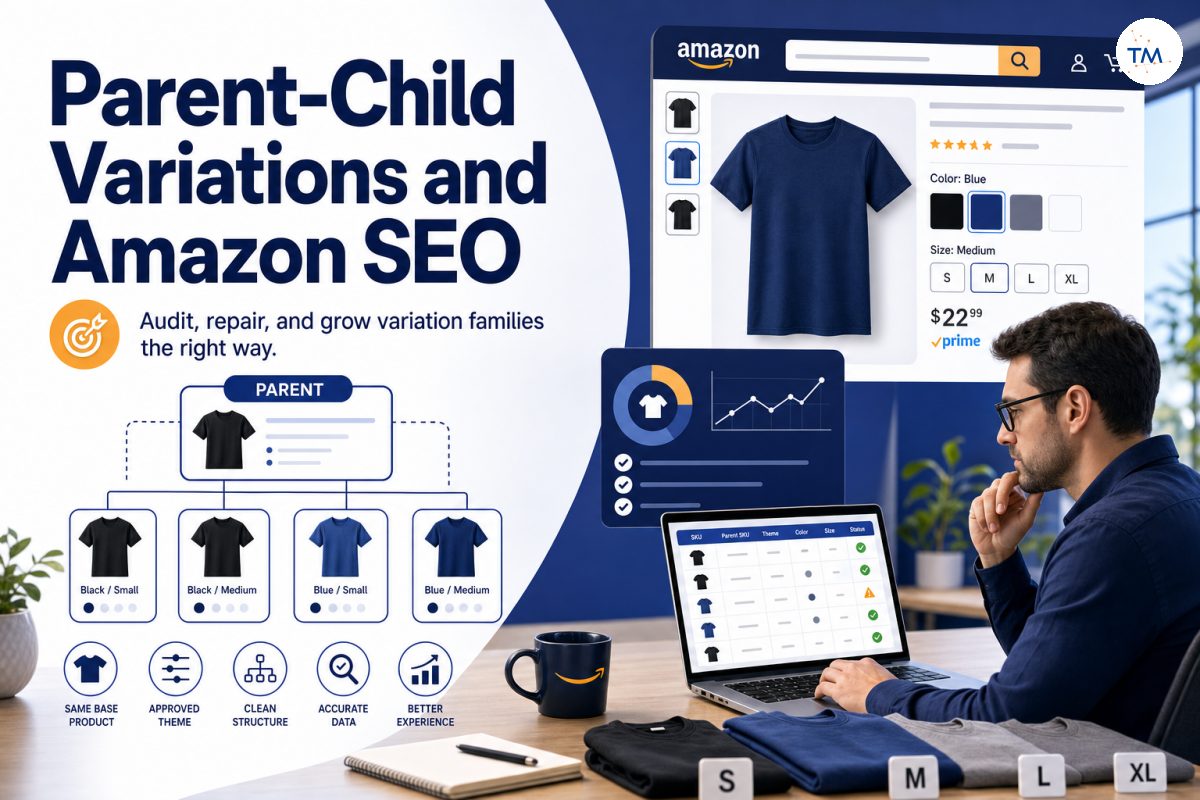
Amazon parent-child variations allow sellers to group genuine versions of the same product under one organized family. Instead of forcing shoppers to open separate listings for every size or color, a valid family can present multiple options through a single product detail page.
However, creating variations is not simply a way to place related products together. Every child must represent the same basic product and differ only through the approved attributes of the selected theme.
This guide explains how product variations work, which items belong together, how to diagnose broken relationships, and how to make controlled changes without damaging a valid family. It is intended for sellers reviewing variation listings in an existing listing, creating a brand new listing, or trying to repair a variation structure inside Seller Central.
What Is an Amazon Parent-Child Variation Relationship?
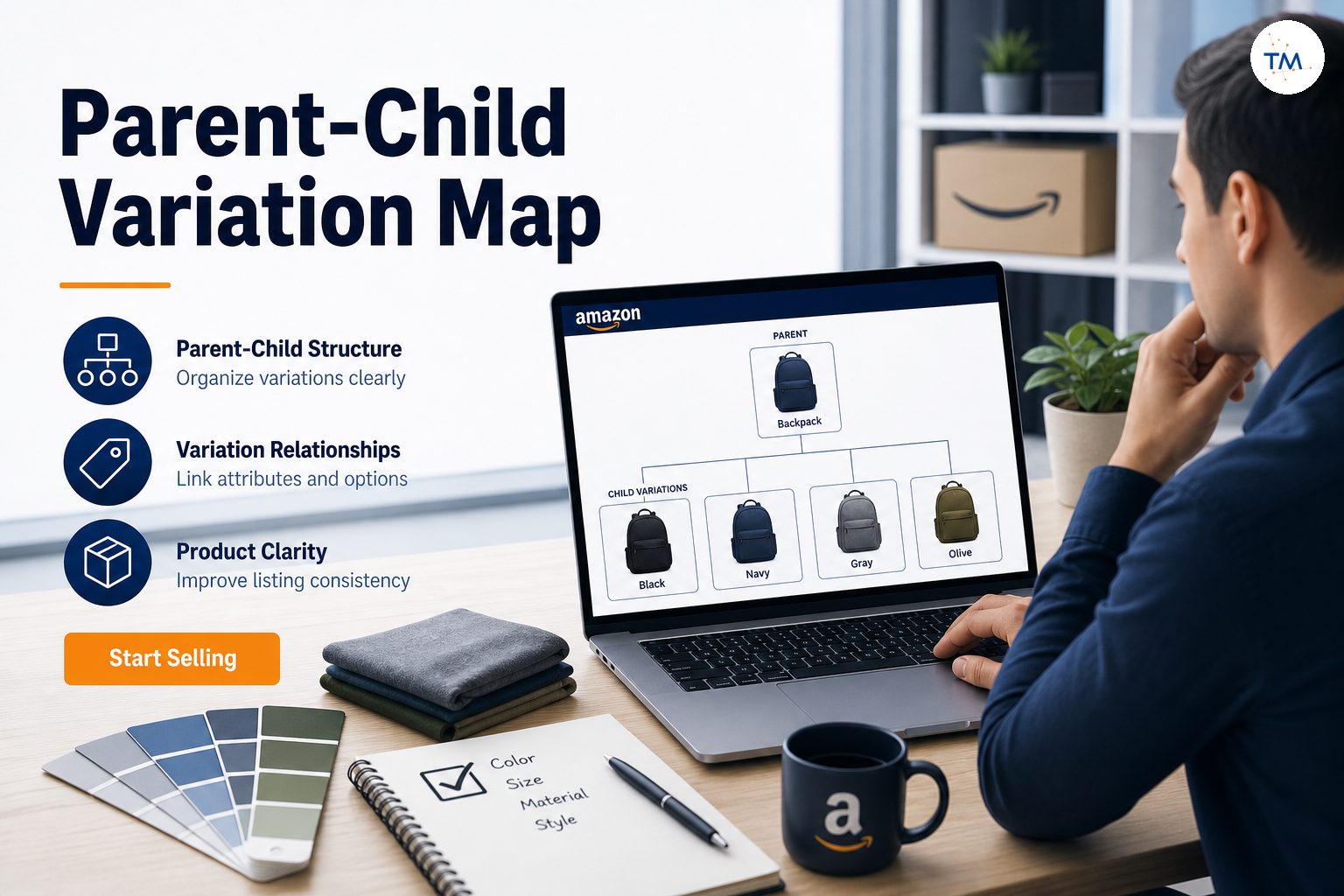
A variation relationship connects several buyable products through a shared parent structure.
Each child represents a real option, while the parent organizes those options into one family. A variation family is a collection of versions of one product, with each unique attribute combination represented by a separate child listing.
The Parent Listing Connects Related Child Products
The parent listing acts as the connection point for all related children.
For example, one parent product may connect a black small shirt, black medium shirt, blue small shirt, and blue medium shirt. Each one is a separate buyable child, but they share a single parent because they are versions of the same base item.
The parent should not be treated as another normal product listing. Its role is structural: it tells Amazon which children belong in the same family.
Core rule
The Parent Is a Structure, Not a Buyable Product
Customers normally purchase a child option, not the parent itself.
Parent listings are non-buyable and only connect related variations. The parent exists to organize the relationship, while the child listings carry the products that shoppers can actually purchase.
The parent should not carry normal offer details such as inventory, fulfilment, or price and quantity in the same way that a buyable child does.
When working through an inventory file, the parent row establishes the family. The child rows contain the sellable products and refer back to the parent through the relationship data.
Treating the parent as a normal item can create confusion inside the family and make later repairs harder.
Child ASINs Represent the Actual Buyable Options
Every child item represents a specific option that customers can select and buy.
- Small and black
- Medium and black
- Small and blue
- Medium and blue
Each child listing normally has its own SKU, inventory, price, availability, and variation value.
Can a shopper select this exact version and complete a purchase?
When the answer is yes, you are dealing with a buyable child rather than the structural parent.
A Variation Family Keeps Related Choices on One Detail Page
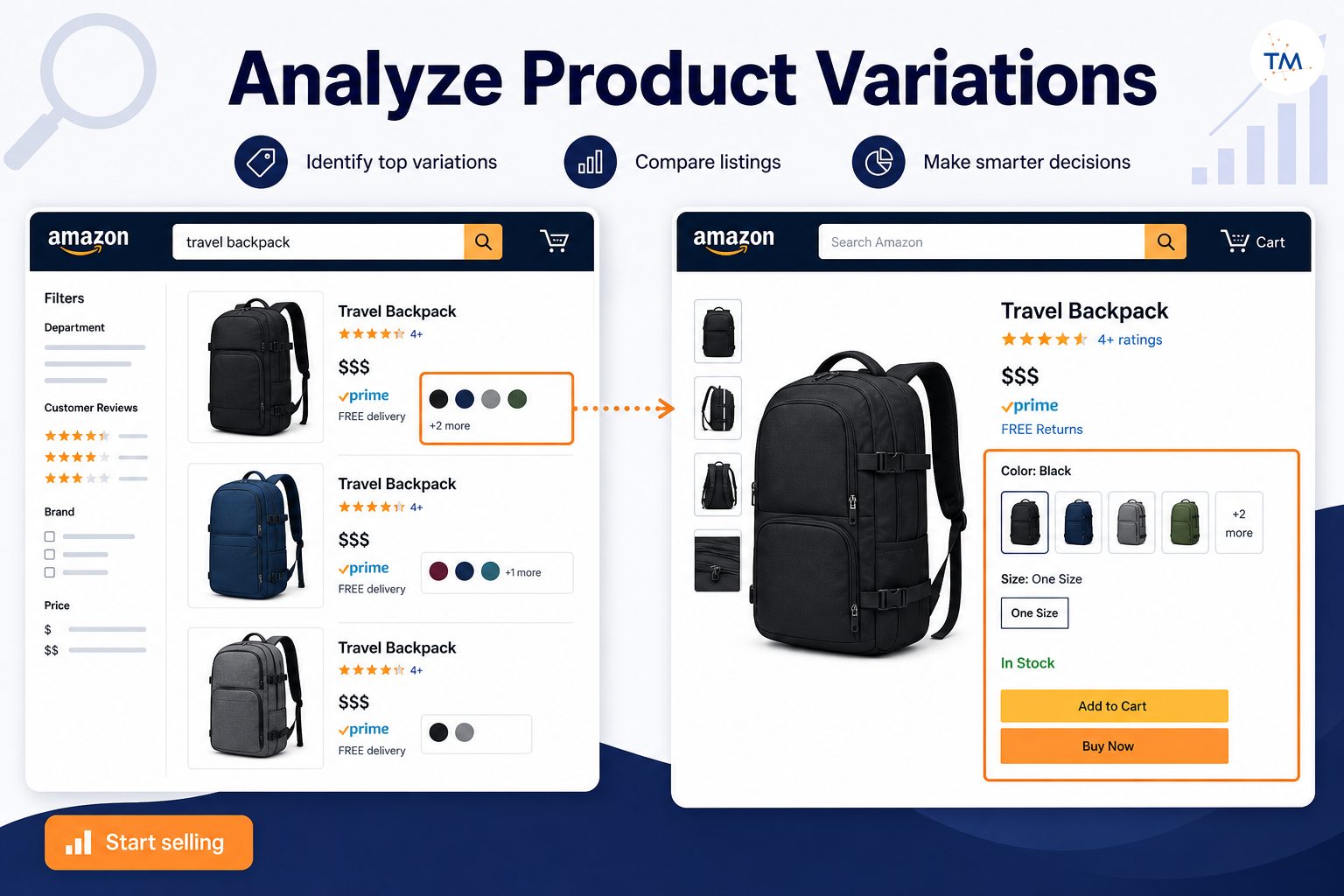
A valid family allows shoppers to compare closely related options through a single listing experience. Rather than returning to the search results every time they want another size or color, shoppers may switch between the options shown on the product page.
This is especially useful when customers expect size, color, flavor, quantity, or another natural choice to be available together. A strong family reduces unnecessary searching. It should not hide major product differences.
The Variation Theme Defines How the Children Differ
The variation theme identifies the changing attribute inside the family.
- Color
- Size
- Style
- Flavor
- Package quantity
- Size and color
The chosen variation theme must describe the real difference between the children. When a color theme is selected, each child should carry an accurate color value. When a size theme is selected, each child should have the correct size.
The available themes and the related fields that become required depend on the product type and marketplace.
Parent, Child, and Variation Theme Are Key Aspects of the Same Structure
Parent, child, and variation theme are three key aspects of one variation structure. Each has a different job, and the family works correctly only when all three support the same product logic.
- Parent: Holds the family together
- Child: Represents a buyable option
- Variation theme: Defines the attribute that changes
All three are required for a clear relationship. When one part is incorrect, the family can break even when the visible pages look normal.
When Should Products Belong to the Same Variation Family?
A variation family should answer a real shopper need. The children must be true options of the same product, not merely products from the same store, collection, or category.
The Children Should Represent the Same Basic Product
Begin by describing the base product without mentioning the changing attribute. For example: a short-sleeve cotton T-shirt for adults.
The red, blue, small, and large versions may all still be the same t shirt. Their basic identity remains unchanged. By contrast, a T-shirt, jacket, and hat do not become valid variations simply because they share a design.
The Main Function Should Remain the Same
Every child should perform the same primary function. If one child is designed for indoor decorative use and another is designed for outdoor industrial use, the function has changed. They may require separate listings even if their names contain similar words.
Do not ask whether the products look related. Ask whether the buyer is still purchasing the same type of item after changing the option.
The Brand and Core Product Identity Should Be Consistent
The children should normally share the same brand and core identity. A family should not combine products from unrelated brands. Enrolment in Brand Registry does not make incompatible products valid variations, and it does not replace Amazon’s variation rules.
Review the brand, manufacturer, model family, and core use before combining children. A difference in spelling can also be important. Family data should not describe one child as a completely different brand or product line.
The Products Should Differ Only Through an Allowed Theme
The difference between children should fit a supported theme.
- One shirt offered in multiple colors
- A shoe offered through size variations
- A case sold in different package quantities
- A product available through a valid size-color variation combination
Do not force products together through an unrelated attribute simply because you want them on the same page.
Similar is not enough
Shoppers Should Reasonably Expect to Compare Them Together
Think from the customer’s perspective. Would a shopper naturally expect to choose between these products from one selector?
- A shopper may expect to compare red versus blue
- A shopper may expect to compare small versus large
- A shopper may expect to compare one pack versus three pack
- A shopper may expect to compare vanilla versus chocolate
- A shopper may not expect to compare a phone case versus a charger
- A shopper may not expect to compare a mug versus a plate
- A shopper may not expect to compare a standard model versus a professional machine
The relationship should make shopping easier.
The Variation Should Make Product Selection Easier
A variation family should reduce confusion. It should clearly show the available options and help a buyer select the correct one without opening many unrelated pages.
Amazon allows up to 2,000 child ASINs per parent ASIN to display on the detail page. However, that technical ceiling should not become your target. A family can become difficult to use long before it reaches the maximum.
When the family becomes so broad that shoppers cannot tell what they are choosing, it is no longer helping. Do not measure a family’s quality by the number of children. Measure it by how clearly those children relate to one another.
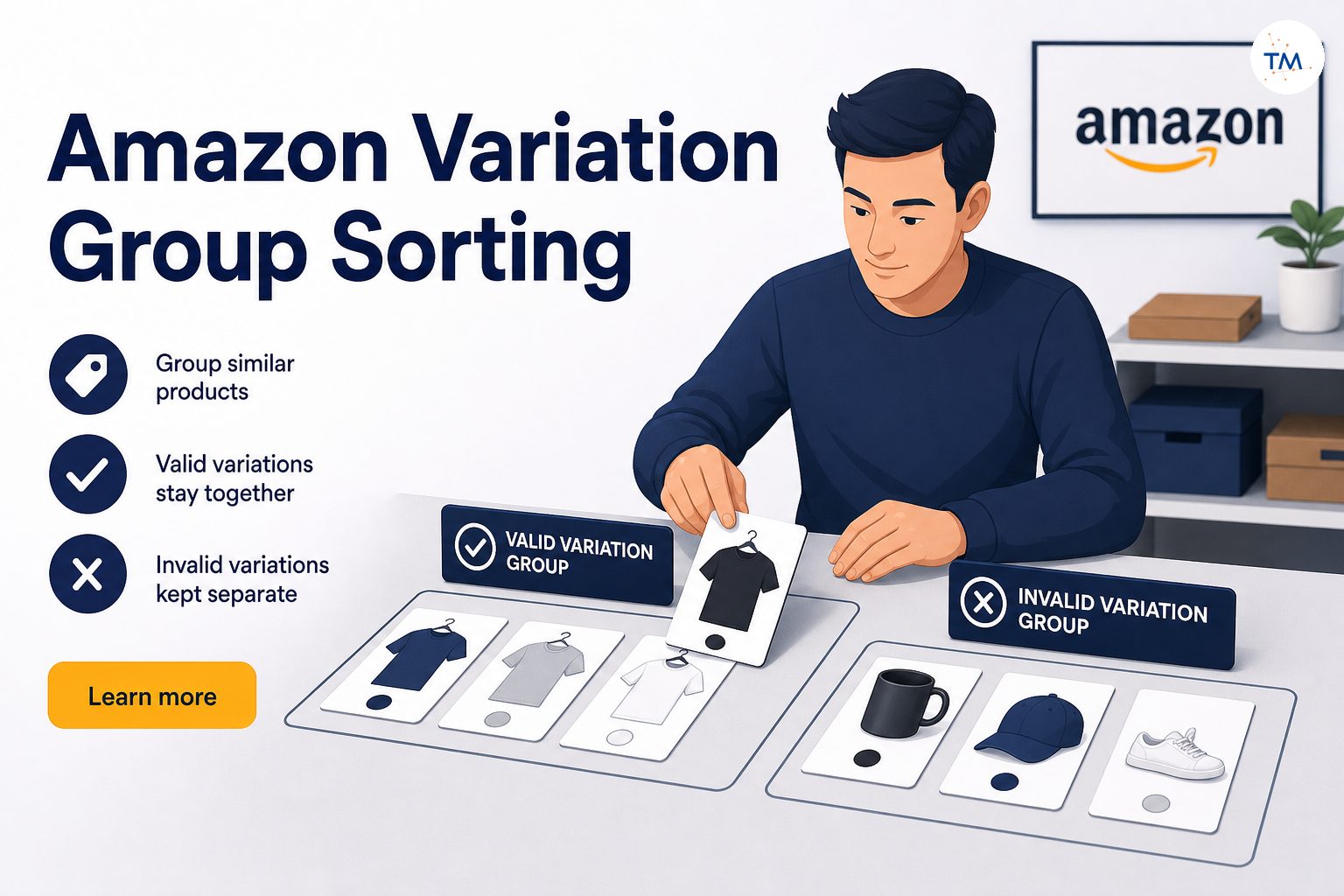
Similar Products Are Not Automatically Valid Variations
Two products can share the same title structure and still require separate pages. Similar titles, photos, branding, or packaging do not prove that the products are genuine variations.
Review the main function, product type, customer expectation, and approved varying attribute before combining them.
What Is a Variation Theme and Why Does It Matter?
A variation theme controls the logic of the family. It tells Amazon which attributes vary and which information should remain consistent.
The Theme Defines the Difference Between Child ASINs
The theme should answer: what exact choice is the shopper making?
For a color family, the shopper chooses a color. For a size family, the shopper chooses a size. For a size-color family, the shopper chooses a combination of both. The varying attributes must remain clear across the whole family.
Do not use the theme as a general description of the products. Use it only to define the valid difference.
Common Themes May Include Size, Color, Style, or Flavor
Depending on the product type and marketplace, supported themes may include size, color, style, scent, flavor, quantity, or combinations.
- Color variations: black, white, blue
- Size variations: small, medium, large
- Style variations: classic, modern
- Quantity variations: one pack, two pack, four pack
The available values are controlled by the relevant product definition. Sellers should not invent themes that the category does not support.
Some Product Types Support Combined Themes
Certain product types may support multiple variations through a combined theme. A clothing product may use both size and color. This creates a variations matrix in which every child represents one specific combination.
- Black / Small / Child 1
- Black / Medium / Child 2
- Blue / Small / Child 3
- Blue / Medium / Child 4
Do not create a child for “Black” alone when the theme requires a complete size-color combination.
Combined themes need complete values
Every Child Must Follow the Same Family Logic
All children under the parent must use the same theme. One child cannot follow color while another follows size and a third follows quantity unless the product type supports one combined theme covering those attributes.
Using different variation themes inside one family can break the relationship or create unclear options. Keep the structure consistent from the parent through every child.
The Theme Must Be Valid for the Product Type
A theme must be allowed for the relevant product category and product type. The system may provide a drop down menu of supported themes during manual creation. In a template, supported values may appear in a valid-values section.
Use a listed valid value. Do not enter a custom phrase because it sounds more accurate to your marketing team.
Available Themes Can Differ Across Marketplaces
A theme available in one marketplace may not be supported in another. Do not copy the U.S. family into another marketplace without checking the local product definition.
- The local product type
- Supported variation themes
- Required fields
- Accepted attribute values
- Category-specific conditions
Marketplace-specific validation should happen before the family is rebuilt.
An Older Theme May No Longer Accept New Children
An older family can sometimes continue using a theme that is no longer suitable for new children. This means an existing amazon listing may remain visible, yet adding more child variations under the old structure may fail.
Before attempting to add variations, check whether the current theme still accepts new relationships. Do not delete a working family simply because a new child failed. First verify whether the theme is still supported.
How Do Parent and Child ASINs Work on the Product Detail Page?
The family displayed to shoppers is built from the parent-child relationship and each child’s individual data.
The parent connects the children through a shared SKU relationship. In file-based creation, the parent has its own SKU, often called the parent sku. Every child refers to that exact identifier. The parent does not need to duplicate every child’s commercial information. Its main purpose is to keep the family connected.
Each child must represent one clear variation value or combination. Under a color-size family, a child might represent Navy / Large. That child should not represent several sizes or several unrelated products.
The shopper selects a child through the option controls on the detail page. The selection may change images, price, availability, delivery date, seller offer, and product identifier. The selected option should always lead to the correct buyable child.
Commercial information belongs to each child. Two children in the same family may have different prices or stock levels. One may be available through Prime while another is temporarily unavailable.
Review price and quantity separately for every child. Do not enter these details only on the parent and expect them to apply automatically to every variation.
One size may sell out while the others remain active. That does not automatically mean the family is broken. The relationship can remain valid even when one child is unavailable.
- Child is attached but out of stock
- Child is detached from the family
- Child is inactive
- Child is suppressed
- Child is unavailable in a particular location
Diagnose availability before rebuilding the relationship.
When the shopper selects red and medium, the active child should actually be red and medium. Mismatch can occur when attribute values are incorrect, children are attached to the wrong parent, duplicate values exist, the image does not match the child, or the theme was changed incorrectly.
Check the displayed selector against the child’s actual data.
When the family relationship breaks, children may appear as individual pages instead of options under one parent. Do not immediately delete and recreate every one listing.
- One child
- Several children
- The parent
- The chosen theme
- Brand or product identity data
A controlled repair is safer than a complete rebuild.
How Can Variations Support Product Discovery Without Replacing SEO?
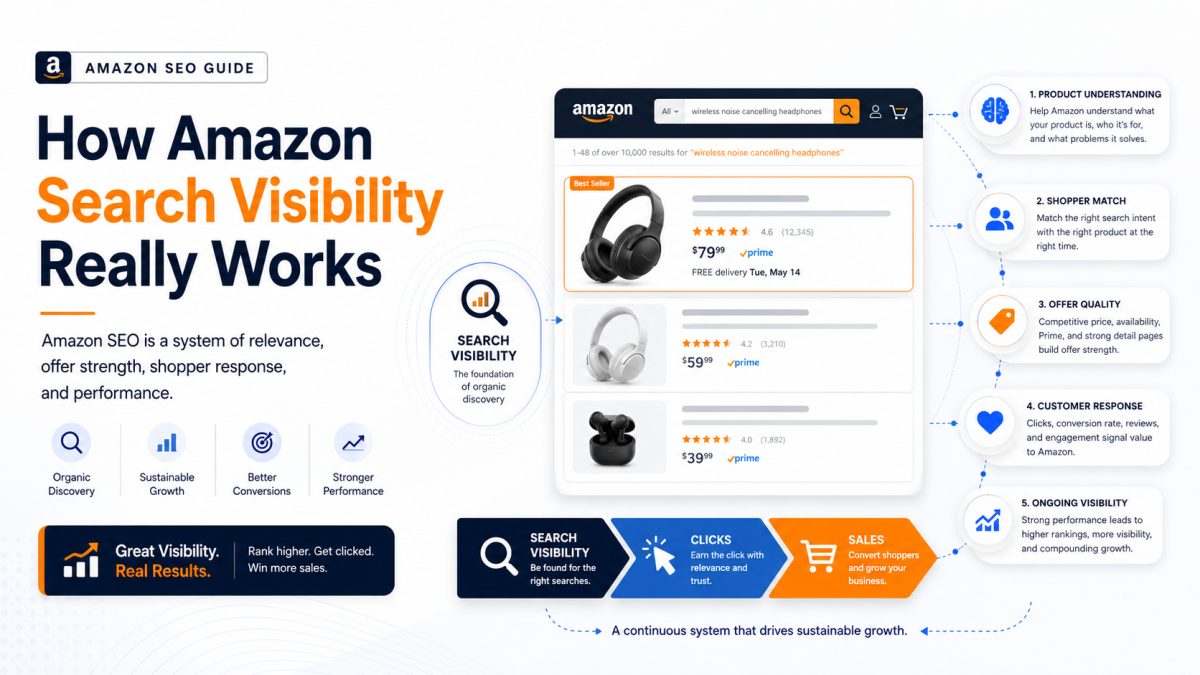
Variations can improve navigation and product comparison, but they do not guarantee visibility.
A strong family keeps relevant choices together. This can help customers understand which colors, sizes, or quantities exist without returning to the search page. The value comes from convenience and clarity—not from trying to manipulate search visibility.
Different children may have different relevance to a particular query. A search for “blue large cotton shirt” may connect more strongly with the blue-large child than with a black-small child from the same family.
Do not assume the parent gives every child identical search performance. Each child still carries its own attributes, availability, and offer context.
Demand may not be evenly distributed across the family. A black medium option may sell far more often than a yellow extra-small option. That difference does not automatically make the weaker child invalid.
Review each child on its own while also reviewing the family as a whole.
Variations are not a ranking shortcut
A well-structured family can keep shoppers from returning to the search results to look for another size, color, or supported option. When shoppers find the base product and see all expected options on one page, they may not need to run a new search.
This can create a smoother shopping experience. However, do not add unrelated products simply to keep a shopper on the page longer.
A parent-child relationship does not automatically move all children to stronger positions. Organic visibility can still depend on query relevance, availability, shopper response, offer strength, and other signals.
A parent-child relationship is not a keyword strategy. Variation creation and keyword selection solve different problems. A valid family groups product options. Keyword work helps describe and position those products accurately.
Mixing these goals often creates oversized families with unclear logic. Each child requires correct data for the selected theme and product type. The family cannot replace accurate child-level information.
How Can You Tell Whether Products Should Really Be Combined?
Before you create parent child relationships, define the logic clearly.
Write one sentence that applies to every proposed child. For example: a reusable stainless-steel bottle with an insulated lid. When one proposed child cannot fit that sentence, it may not belong. Keep the sentence focused on product identity, not color or size.
Create a short shared-attribute list.
- Brand
- Product type
- Main function
- Material
- Model family
- Target customer
- Core design
The more important differences you find, the less likely the products are true variations.
Write down the single attribute or approved combination that varies: color only, size only, flavor only, or size and color. Do not use “model” as a general excuse when the products have different functions.
Check whether the product type supports the required theme. The appropriate variation value must fit the selected theme and be accepted by the marketplace. A logical difference is not enough when Amazon does not support that theme for the product type.
Imagine the shopper has chosen one child. Could the shopper reasonably switch to another child while still buying the same base product? Changing from red to blue usually passes this test. Changing from a bottle to a replacement lid does not.
Variations should not change the core reason for buying the product. A small suitcase and large suitcase may share the same purpose. A suitcase and luggage scale do not.
Related products can be cross-sold or displayed elsewhere without becoming variations. Relationship does not equal variation.
- Accessories
- Replacement parts
- Complementary products
- Different product models
- Different brands
- Different use cases
Do not start the technical process while the team is still debating what belongs.
- Base product
- Shared data
- Changing attribute
- Supported theme
- Child list
- Marketplace
Clear planning prevents repeated corrections later.
Which Products Should Not Be Combined as Variations?
The safest family is often smaller than the seller first imagines.
Different brands should not share one parent simply because the items look similar. Brand consistency is one of the key aspects of a valid family. Keep different brands separated even when they target the same customer.
Products with different purposes should remain separate. A waterproof speaker and waterproof headphones are related electronics, but they are not options of the same product. Focus on what the product does.
Do not group a device with its case, cable, stand, or replacement part. An accessory is not usually a variation of the main item. Combining them may create a misleading selector and incorrect product identity.
A new model may have different features, dimensions, or functionality. Do not use a variation relationship simply to place the new version beside the older one. When the core product changes, create a separate detail page.
A bundle may represent a different purchase than a single unit. Quantity variations can be valid in supported situations, but a custom bundle should not automatically be attached to the individual product. Confirm the theme and category requirements first.
Children that require different product types are strong candidates for separate families or separate listings. A family should not force Amazon to interpret one child as clothing and another as sporting equipment. Product-type consistency matters.
Similar wording is not enough. Two items can share the first part of the title while having different designs or purposes. Do not use naming similarity as the main evidence for a relationship.
Do not combine unrelated products to share reviews, visibility, or traffic. A family should reflect a real product relationship.
What Should You Check When Child ASINs Separate From the Parent?
A detached child is a symptom. Find the cause before rebuilding anything.
Open the seller central dashboard, go to the Manage Inventory page, and locate the relevant family. Confirm whether the parent SKU still appears. If the parent was deleted, the children may remain active but lose their shared relationship.
Review the child’s relationship data. The child should point to the correct parent SKU and use the expected relationship type. A child cannot reliably belong to two different parents at the same time.
Compare the theme on the parent and every child. They should follow the same family logic. One child using a different theme or incomplete combination may detach or display incorrectly.
Review the shared data across the family. Look for differences in brand, product type, product line, core title meaning, manufacturer, department, and model identity. Do not focus only on the variation fields.
The theme may be correct while one child’s value is invalid. For example, one child may use an unsupported size format or an empty color field. Compare each value with the accepted template or schema.
Check what changed before the separation. Possible triggers include product-type update, brand update, theme edit, child deletion, file upload, category change, and parent SKU modification. Record the sequence before making another edit.
One detached child points to a child-level problem. Several detached children may suggest a parent, theme, or family-wide issue. The size of the issue should control the size of the repair.
Deleting and recreating the family may hide the original problem temporarily. If the invalid data remains, the new family can fail again. Find and correct the verified cause first.
What Should You Check When the Wrong Children Appear Together?
A family can remain technically connected while still being logically wrong.
Return to the one-sentence test. When one child requires a different base description, remove it from the proposed family. Do not let the current structure decide what is valid.
A broad theme may hide important differences. For example, using style to combine products with different functions can produce an unclear family. The theme should describe a simple shopper choice, not cover major product changes.
Different models may include different motors, capacities, materials, or technical features. When the model change affects the main product experience, the items may need separate pages. Do not use one family merely because the model names are similar.
Marketing names can make unrelated products appear connected. Read specifications and use cases instead of relying on the title alone. The family must be based on the product itself.
A separate page may be better when the child needs a different product type, has different functions, targets another audience, requires a different set of attributes, or cannot use the same theme.
Review the most recent family changes. An incorrectly added child can affect how the family is displayed. Remove the invalid relationship rather than rebuilding every valid child.
Seller convenience is not enough. A family should help the shopper compare real alternatives. When the family exists only to simplify inventory management, the relationship may not be appropriate.
Do not add more child variations while the current family contains invalid items. Clean the existing structure first. Expansion should come after validation.
What Should You Check When a Variation Option Is Missing?
A missing option can come from relationship, data, or availability issues.
Check whether the child has an active offer. A detached relationship and an inactive offer can look similar from the shopper’s view. Confirm status before editing the parent.
Use the listing-management interface, API relationship data, or your inventory records to verify the parent-child link. A child may exist in inventory but no longer belong to the family.
Confirm that the child has the correct value for the chosen theme. Under a color family, each child needs a valid color. Under a combined theme, each required part of the combination must be present.
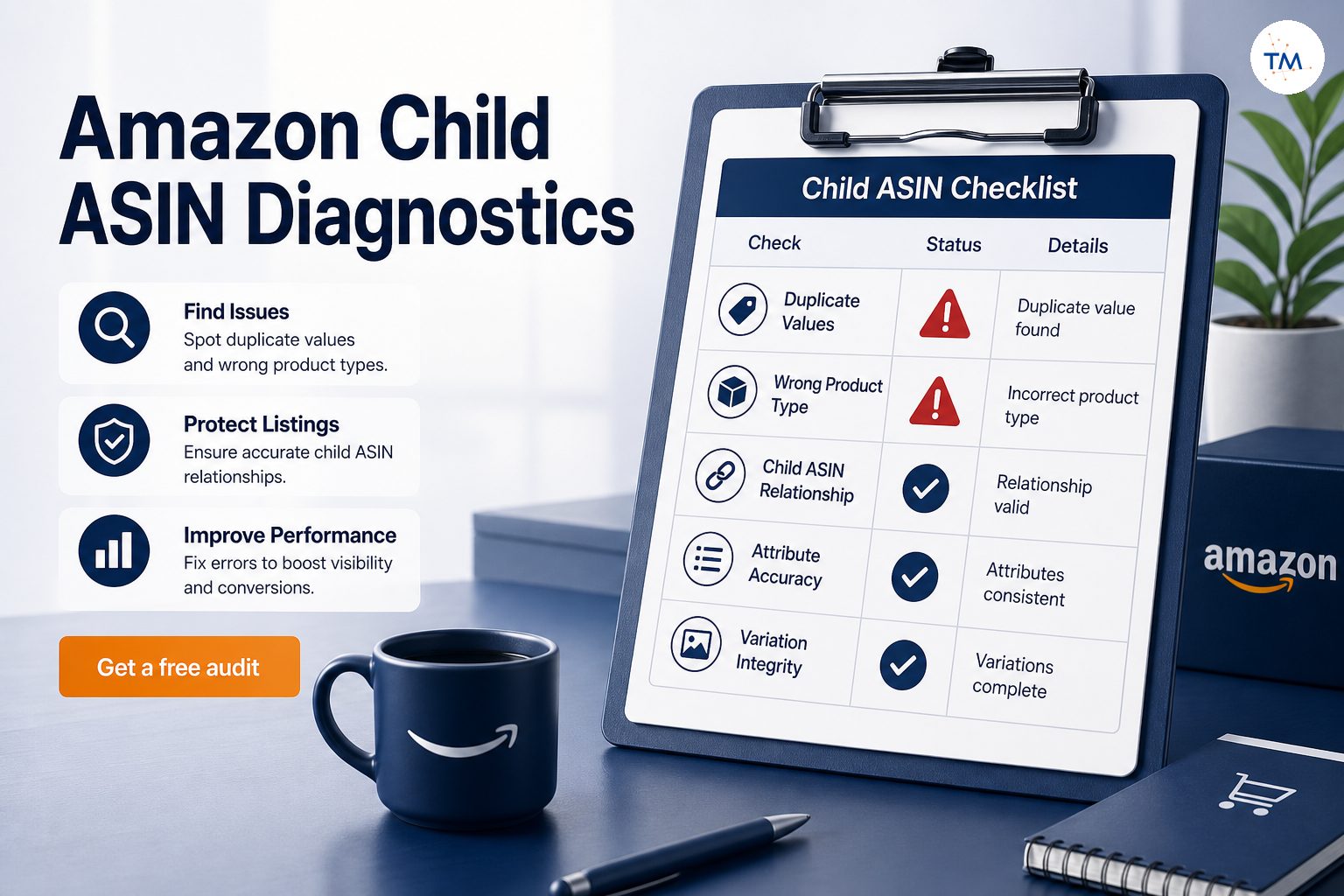
Two children should not use the same value when that would make them indistinguishable. Also check for blank or incomplete fields. A selector cannot display a clear option when the underlying values are duplicates.
The option may be logical but unsupported for the current product type or marketplace. Check the accepted values and theme conditions. Do not type an invented value into the field.
A child using a different product type may have different requirements or themes. Compare it with the parent and the other valid children.
- Child exists but is detached: relationship issue
- Child is attached but unavailable: offer issue
- Child is attached but selector is missing: attribute or display issue
- Child is inactive: listing-status issue
Do not apply the same fix to each case. A duplicate can create more catalog problems. Repair the relationship or data of the existing child when appropriate. Create a new child only when it represents a genuine new product option.
How Should You Review an Existing Variation Family?
A structured audit is better than opening random listings one at a time.
Begin with a family map. Include parent SKU, parent ASIN when available, child SKU, child ASIN, status, variation values, and offer status. You can use view variations functions, relationship reports, or your inventory records to build the list.
Write the actual value beside each child. For a combined theme, record the full combination. This quickly reveals duplicates, blank values, and inconsistencies.
Create two columns: shared and changing. Shared fields may include brand, product type, main function, core material, and product line. Changing fields may include color, size, quantity, flavor, and supported style.
Mark children with duplicate variation values, conflicting product types, different brands, incorrect theme, unrelated function, or missing required values. Do not repair all marked children in one upload.
Review each child individually. One invalid child does not automatically make the full family invalid, but it should be removed or corrected.
Keep relationship health separate from sales availability. One child may belong in the family even when it has no stock. Do not remove a valid child only because its current quantity is zero.
Some issues need deeper review: relationship repeatedly reverts, unsupported value is accepted but not displayed, parent contribution is controlled elsewhere, child data cannot be updated, or a technical error appears after upload.
Use four possible outcomes: keep, repair, split, or remove. Keep means the family is valid. Repair means the structure is valid but data is wrong. Split means children represent more than one base product. Remove means the relationship is invalid. Make the decision before editing.
How Should You Choose the Correct Variation Theme?
Theme selection should reflect how the shopper actually chooses the item.
Observe the purchase decision. Does the customer choose a size, a color, a flavor, a quantity, or a combination? The theme should reflect that decision.
Choose the narrowest accurate theme supported for the product type. Do not use a broad theme merely because it is easier to complete. An accurate theme makes the family easier to validate.
Do not use style to hide different products, functions, or models. The selected theme should not make major product changes appear minor.
Every child must fit the theme. When one child requires a completely different changing attribute, reconsider whether it belongs.
The supported themes come from the product type and marketplace schema. The relevant product-type definition specifies the relationship fields and conditional required attributes for parent and child listings.
A variation theme is not free text. Use a value Amazon supports. An invented theme may be rejected or ignored.
The fact that the current children still display does not prove that the theme accepts another child. Before you add a variation, confirm that the current theme still accepts new children. An older family may continue to function even when that theme should not be used for new listings.
Terms such as “best seller,” “premium,” or “new collection” are not real variation values unless the supported theme and product data genuinely define them. The theme should describe the product—not the campaign.
Why Can Variation Families Differ Across Marketplaces?
Variation rules can be marketplace-specific. The same product may have different accepted themes across marketplaces. Check locally before copying the family.
One marketplace may request fields that another does not. Complete the fields required for the target market rather than translating the old file blindly.
Do not assume a U.S. color-size structure can be transferred exactly to every country. Review the local template or product definition first.
Local taxonomies, product standards, sizing systems, and shopping conventions may affect the family. A clothing size in one country may need a different size-system value elsewhere.
An existing amazon listing from one marketplace may not automatically create the same relationship in another. The listings, SKUs, and catalog contributions can differ.
Copying the same parent and child rows without local validation can produce missing attributes or invalid values. Use the foreign family as a reference, not as guaranteed input.
- Product type
- Supported theme
- Required values
- Parent-child logic
- Child availability
- Display result
Treat each market as a controlled project. The goal is not to recreate the same technical shape everywhere. The goal is to preserve the correct product relationship under the local rules.
How Should You Add a New Child ASIN Safely?
Adding one new child is different from rebuilding the whole family.
The Variation Wizard can help sellers add or update relationships and generate a populated template, while file-based workflows create the parent and connect each child through the parent SKU and shared variation theme.
A new variation should be a genuine option of the same base product, not merely another related item from the catalog. Before creating a new variation, confirm that it represents the same base product. Do not create a child merely because the product is related.
Review the current family and theme. When the theme is no longer suitable, stop before editing the working children.
The new child should share the family’s core identity: brand, product type, base product, manufacturer context, and main function. Do not change shared data simply to fit the child.
Enter the appropriate variation value for the child. For example, a new green medium shirt should use the accepted green and medium values under the supported combined theme. The value should be accurate, unique, and valid.
The child needs its own commercial and listing details. Complete the required information, including offer data such as price, condition, and quantity where applicable.
Do not update all children while adding one option. Limit the change to the parent relationship and the new child unless another verified correction is required.
Note whether you used manual listing editor, Variation Wizard, inventory file, API, feed, or support case. This helps diagnose later issues.
Check the family in inventory and on the public detail page. Variation family creation takes 24-48 hours after successful submission. During that period, Amazon may still be processing the parent-child relationships and updating the public detail page.
Do not assume that an accepted submission always means the display is correct, and avoid sending repeated changes before the first submission has had time to process.
Add and verify one child first. Once the relationship behaves correctly, you can add additional valid children.
How Can Sellers Use Variation Wizard Carefully?
The Variation Wizard is an interactive tool used to create or update parent-child variation relationships and generate an inventory template.
Search for the relevant ASIN or SKU. Confirm that you have found the correct parent and children before making changes. Do not rely only on a similar title.
When you need to update an existing variation, choose the workflow for an existing family. Do not create a new parent every time you add one child. The child should refer to the family’s current parent SKU.
Choose the option to create a new family when the products are valid standalone children but no appropriate parent exists. Do not create a new family to escape a small data error in a working one.
Depending on the current interface and listing method, sellers may access a variations tab or related family-management controls. Use it to confirm existing children, theme, values, missing options, and relationship status.
Interface labels can change, so validate the underlying relationship rather than relying only on one menu name.
Use the add function to add variations that genuinely belong. When using an existing family, verify that the child is not already attached under another SKU or parent.
The wizard may generate a pre filled inventory file template for the selected family. Do not upload it immediately. First review every row and confirm that existing values have not been changed unintentionally.
How Should You Remove or Separate a Child Safely?
Removing a relationship is not the same as deleting a product.
Write the reason: different base product, incorrect brand, wrong model, unsupported theme, duplicate child, or incorrect attachment. Do not remove a child based only on weak sales.
Save the parent SKU, child SKUs, ASINs, theme, variation values, and current offer status. This gives you a recovery reference.
Avoid deleting the entire listing when only the parent-child link is wrong. Use the correct relationship-removal process.
The child may need to remain as a standalone listing. Confirm whether the action removes the relationship or deletes the SKU contribution.
After separation, the child may remain buyable through its own page. Confirm that its data is complete enough to operate independently.
Once the child is removed, check that the remaining children still form a logical family. The theme and selector should remain clear.
Relationship changes may not appear everywhere immediately. Do not submit repeated edits before the first change has processed.
Check that the parent remains, valid children remain attached, variation values are correct, and the public page displays normally.
When the invalid child repeatedly returns, another catalog contribution may be controlling the relationship. Stop repeating the same edit and collect evidence for a technical review.
What Should You Review Before Rebuilding a Variation Family?
Rebuilding should be a controlled last step, not the first reaction.
Possible causes include invalid theme, wrong product type, duplicate variation values, deleted parent, conflicting brand data, unsupported children, and incorrect file relationships. Fix the root cause before rebuilding.
Do not automatically include every previous child. Revalidate the family from the base-product level.
An old theme may no longer support new family creation. Confirm the current valid theme for the marketplace.
Clean up detached or duplicate children before submitting the replacement family. Do not carry old errors into the new structure.
Review the shared identity across every child. Do not rebuild around conflicting product data.
Export or record the child data, including SKU, ASIN, variation value, price, quantity, status, and current parent. This supports recovery.
Use one clear parent and one theme. Do not create several competing parents for the same children.
When several families are affected, test one. Do not upload hundreds of changes before validating the process.
A relationship rebuild already changes important catalog data. Do not simultaneously rewrite titles, bullets, images, and categories unless absolutely required.
How Do Inventory Files Represent a Variation Family?
An inventory file can be used to build or repair parent-child relationships in bulk.
Use a product spreadsheet for multiple variations at scale, especially when manual editing is inefficient. The spreadsheet is a bulk-management method, not permission to place 4,000 child ASINs under one parent. Keep each displayed variation family within Amazon’s 2,000-child limit.
The parent row contains the parent SKU and identifies the item as a parent. The parent sku column on the parent row is normally left blank because the parent does not report to another parent.
Each child row contains the parent SKU value in its relationship field. All children under the same family should point to the same parent identifier.
The parent and children should use the same selected theme. Do not mix color, size, and quantity themes between rows.
The parent establishes the family but does not represent a particular color or size. Each child contains the applicable variation value.
A variation requires both relationship data and the required attributes for the selected product type. Do not assume that the parent-child columns alone are enough.
- Parent and child identifiers
- Parent SKU references
- Theme
- Variation values
- Product type
- Required fields
- Update type
- Price and quantity
- Duplicate rows
A file can update more data than intended, so review it carefully.
When Is the Variation Structure Not the Real Problem?
Not every child-level issue comes from the family.
An unavailable child may disappear from normal selection or purchasing. Review inventory before changing the relationship.
Low visibility does not prove that the child is detached. Check whether the product still appears under the family and whether the issue is query-specific.
A classification issue can affect required attributes and display. Move this problem to the category and product-type workflow rather than rebuilding the family blindly.
A child can remain attached while carrying a separate technical problem. Review errors and suppression independently.
Price, delivery, availability, and seller conditions can affect shopper selection. A weaker offer is not automatically a variation issue.
Some colors or sizes naturally sell more. Do not break the family simply because demand is uneven.
One child may have missing or inaccurate data. Repair the affected child instead of restructuring every sibling.
The family is not one universal performance unit. Each child can have different demand, offer data, and search visibility. Review children individually.
When Should You Escalate a Variation Problem?
Stop manual changes when the system repeatedly rejects or reverses a valid relationship.
Collect examples, dates, SKUs, ASINs, and error messages when Amazon keeps detaching valid children. Do not keep rebuilding the same family without evidence.
An accepted submission does not always guarantee the expected public display. Confirm that the child data, theme, and parent reference are correct before escalation.
Another contribution may control the catalog value. Document the current value and the value you attempted to submit.
When another seller, brand owner, or catalog source contributes data, your update may not remain. A specialist review may be needed.
Capture the product type, marketplace, supported-theme source, and exact error when a valid theme cannot be applied. Do not substitute an unrelated theme to bypass the error.
When a legacy family continues to operate but refuses new children, verify the available current theme. The correct solution may require a planned rebuild rather than repeated additions.
If the family receives a variation policy warning, stop expanding the family. Review whether all children are genuine variations before taking further action.
Several families breaking at the same time may point to a bulk upload error, template change, product-type update, account process issue, or catalog-level change. Investigate the shared event.
Escalation is appropriate when the relationship cannot be corrected through valid data and normal listing tools. Prepare a clean case with exact identifiers and evidence.
Which Parent-Child Variation Mistakes Waste the Most Time?
Most time is lost when sellers change the entire family before identifying the actual issue.
- Combining products that are only loosely related
- Choosing a theme before defining the base product
- Adding children with different brands or functions
- Using duplicate variation values
- Treating the parent as a buyable product
- Adding offer data to the parent instead of the children
- Using an unsupported or deprecated theme
- Rebuilding the entire family after one child breaks
- Changing variation structure and listing content together
- Assuming every child shares the same search performance
- Building families only to combine reviews or visibility
Related items are not automatically variations. Start from the same-base-product rule. Define the product family before selecting technical values. Keep different brands or main functions separate. Every child needs a clear and unique variation identity.
The parent organizes the family. The children carry the actual offers. Price, stock, and quantity should be managed at the child level. Validate current theme support before family creation. One broken child does not always require a full rebuild. Separate structural changes from copy, image, and keyword work.
What Does a Healthy Amazon Variation Family Look Like?
A healthy family is simple enough to explain.
One parent represents one clear base product. Every child fits that identity. Each child has a specific value, SKU, offer, and product combination. There are no placeholder or duplicate children.
The family uses one supported theme or approved combined theme. Every child follows it consistently. Brand, product type, and main function do not conflict across children. Only legitimate variation fields differ.
A shopper can understand each option. There are no duplicates, blanks, or vague labels. The selector helps shoppers choose among real alternatives. The family does not mix accessories, models, or unrelated products.
Products that do not fit remain independent. A smaller valid family is better than a larger confusing one. Each marketplace uses its own validated theme and values. The family is not copied blindly.
For every child, the team can state the shared base product, changing attribute, valid theme, customer reason, and technical relationship. When this cannot be explained, the child needs review.
The team records date, method, fields changed, SKUs affected, expected outcome, and final result. This makes repairs safer.
Amazon Parent-Child Variation Checklist
Use this checklist before variation family creation, adding a child, or repairing an existing family.
- Describe the base product in one sentence and remove children that cannot fit it.
- Confirm that the parent is structural rather than buyable.
- Review status, inventory, and offer details separately.
- Make sure the theme reflects what the shopper chooses.
- Check the current valid values for the product type and marketplace.
- Look for duplicates, blanks, or inconsistent formatting.
- Review brand, product type, model family, and core function.
- Remove accessories, unrelated models, or separate product types.
- Review the change timeline before rebuilding.
- Avoid unnecessary updates across the whole family.
- Save the parent, children, theme, values, and offer status.
- Check both inventory and shopper-facing display.
Frequently Asked Questions About Amazon Parent-Child Variations
An Amazon parent represents the structure connecting related child products. It organizes the family but is not normally the option that a shopper purchases.
A child ASIN is a buyable version of the base product. It represents one specific variation value or combination, such as blue-medium or three-pack.
The variation theme defines the attribute that differs between children. Examples include color, size, style, flavor, or an approved combination.
Products can be combined when they represent the same base product, share consistent core data, and differ only through a supported theme.
Not immediately. First determine whether the problem affects one child, the parent, or the whole theme.
Testmarket can review the parent SKU, child ASINs, variation theme, product identity, relationship data, duplicate values, offer status, and recent changes. The goal is to determine whether the family should be kept, repaired, split, or rebuilt.
Need help fixing an Amazon variation family?
Testmarket can review your parent SKU, child ASINs, variation theme, duplicate values, offer status, and recent changes so you can repair the right issue instead of making random edits.
Grow your sales with Testmarket
Launch products, collect authentic reviews and run deals that convert — start free.